Dahua Bullet Wi-Fi Camera Quick Start Guide
2
Note
For reset, long press for 8 seconds and then the light off; For WPS (Wi-Fi Protected Setup), one
quick press.
2 Operation by Easy4ip App
Step 1 Power on your camera with power adapter.
Step 2 Connect your smartphone to your Wi-Fi network, scan “Easy4ip” QR on the packing box,
download and install “Easy4ip” APP.
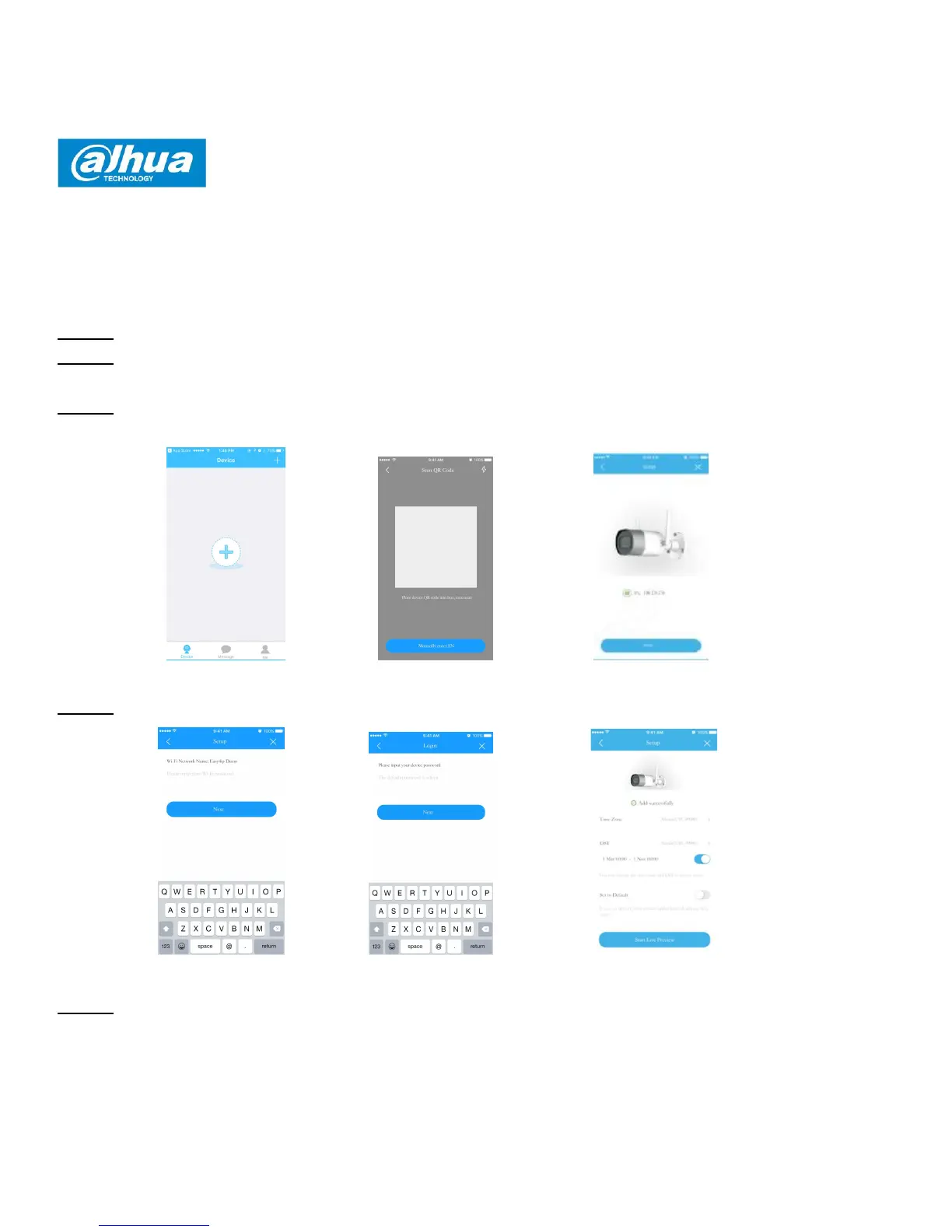
Step 3 Open Easy4ip APP (take iOS version as an example). Please register an account for first
use.
Figure2-1 Figure2-2 Figure2-3
Step 4 Please tap “+” to add new devices after you login your account.
Figure2-4 Figure2-5 Figure2-6
Step 5 Scan the QR code on the back of the camera to get the SN, you can also tap "Manually
enter the SN" and manually input the SN number on the next page. Then tap "Next".





 To Next Page