
 Need help?
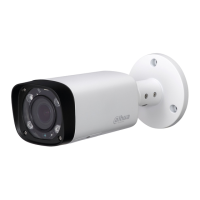
Do you have a question about the Dahua IPC-HFW2221R-ZS/VFS-IRE6 and is the answer not in the manual?
 General
| Camera Type | Bullet |
|---|---|
| Scanning System | Progressive |
| S/N Ratio | ≥ 50dB |
| Lens Mount | M12 |
| Focus Control | Auto/Manual |
| Bit Rate Control | CBR/VBR |
| White Balance | Auto / Natural / Street Lamp / Outdoor / Manual |
| Gain Control | Auto / Manual |
| Noise Reduction | 3D DNR |
| Motion Detection | Yes |
| Region of Interest | Yes |
| Smart IR | Yes |
| Defog | Yes |
| Digital Zoom | 16x |
| Flip | Yes |
| Mirror | Yes |
| Privacy Masking | Yes |
| Streaming Method | Unicast / Multicast |
| Web Viewer | IE, Chrome, Firefox, Safari |
| Smart Phone | iOS, Android |
| Ingress Protection | IP67 |
| Vandal Resistance | IK10 |
| Casing | Metal |
| IR Distance | 30m |
| IR On/Off Control | Auto / Manual |
| IR LEDs | 2 |
| Effective Pixels | 1920 x 1080 |
| Pan/Tilt/Rotation Range | Pan: 0°~360°, Tilt: 0°~90°, Rotation: 0°~360° |
| Video Compression | H.265/H.264 |
| Smart Codec | Support H.265+/H.265/H.264+/H.264 |
| Resolution | 1080P |
| Frame Rate | 30fps |
| Bit Rate | H.265/H.264: 32Kbps~8192Kbps |
| Day/Night | IR cut filter |
| BLC Mode | BLC/HLC |
| Electronic Image Stabilization (EIS) | No |
| Ethernet | 10/100M |
| Protocol | TCP/IP, HTTP, DHCP, DNS, PPPoE, FTP, RTSP, ONVIF |
| Interoperability | ONVIF, PSIA |
| Max. User Access | 20 users |
| Edge Storage | Micro SD card, up to 128GB |
| Management Software | Smart PSS, DSS |
| Certifications | CE, FCC |
| Power Supply | DC12V, PoE (802.3af) |
| Operating Conditions | -30°C ~ +60°C (-22°F ~ +140°F), Humidity ≤95% (non-condensing) |
| Image Sensor | 1/2.7” 2MP CMOS |
Guidelines for safe electrical installation and operation, including power source requirements and cord protection.
Recommendations for operating the device in suitable environments, avoiding extreme conditions and liquids.
Instructions on safe operation, avoiding hot components, and proper maintenance procedures.
Instructions for proper device handling, cleaning, and care of optical components and casing.
Crucial warnings regarding password security, accessory usage, laser safety, and power supply configurations.
Disclaimers on manual accuracy, software updates, and company liability for product usage.
Details on FCC rules, device compliance, and user guidance for mitigating radio interference.
Details on the external cable connections, including LAN and power input ports.
Physical dimensions and structural overview of the camera unit.
Instructions for enabling and using the bidirectional audio communication feature.
Configuration steps for alarm input and output functionality.
Steps for installing a Micro SD card into the device, including cover removal and reset button function.
Procedure for mounting the camera on a wall or ceiling using provided accessories.
Steps for adjusting the camera's monitoring direction using its mounting bracket.
Instructions for adjusting the lens focus lever for precise camera focusing.
Guide for installing the waterproof connector for the network port, especially for outdoor use.
Steps to change the camera's IP address using the quick configuration tool or WEB interface.
Procedure for accessing and logging into the camera's web interface using its IP address.





 To Next Page