The provided manual describes the Airzone Easyzone system, a solution for zoned air conditioning control. This system allows for the management of different zones within a building, each with its own temperature and operational settings, through various thermostat interfaces.
Function Description
The Airzone Easyzone system is designed to provide intelligent control over ducted air conditioning units, enabling precise temperature and airflow management in multiple zones. It integrates with existing HVAC systems, allowing users to adjust modes, efficiency levels (Eco-Adapt), and fan speeds for each zone. The system utilizes a central control board that communicates with motorized dampers (plenums) and various thermostat interfaces.
Key functionalities include:
- Zoned Temperature Control: Each zone can have its own thermostat to set desired temperatures independently.
- Mode Management: Master thermostats allow users to change the overall operating mode (e.g., heating, cooling, dry, ventilation, stop) of the HVAC system.
- Efficiency Control (Eco-Adapt): Users can define the efficiency level to optimize energy consumption.
- Fan Speed Selection: For Fancoil installations, fan speeds can be selected from the master thermostat.
- Scheduling: With a Blueface zero master thermostat, users can set hourly schedules for different zones.
- Peripheral Integration: The system supports connection with other peripherals like the AZCE6OUTPUT8 module (for radiant elements), AZX6CCP (production control board), and AZX6WEBSCLOUD (web server).
- Bypass Damper Control: The system can manage a bypass damper to regulate static pressure in the duct network.
Important Technical Specifications
The manual provides several technical specifications and recommendations for installation and operation:
- Communication Cable: For system communication, a shielded twisted pair cable with 4 wires (2x0.22 mm² + 2x0.5 mm²) is recommended. The connection between control modules should be in Bus mode.
- Thermostat Connection: Thermostats can be wired (Bus or star connection) or wireless. For wired thermostats, use the specified Airzone cable and secure connections to the central board. Wireless thermostats require a CR2450 button battery.
- Thermostat Placement: Thermostats should not be located more than 40 meters from the main control board. They should also be kept away from power lines, fluorescent lights, LED lamps, and motors to avoid communication interference.
- Power Supply: The central control board and external control elements require a 110/230 Vac power supply. A 3x1.5 mm² cable is recommended for the central board's power input. An independent circuit for the Airzone system's power supply, separate from the controlled HVAC unit, is mandatory. A main switch or disconnection means with constant pole separation must be incorporated into the external power wiring.
- Duct Static Pressure: After configuration, it is crucial to verify that the static pressure in the duct system aligns with the air distribution network conditions.
- Motorized Damper Insulation: All metal parts of the Easyzone exposed to outdoor conditions should be insulated (glass wool or polyethylene foam, 25 mm thick) to prevent condensation. Insulation band widths are 97 mm for Standard and Medium motorized plenums and 37 mm for Slim motorized plenums.
- Thermostat Types: The system supports Blueface zero, Think (C/R), and Lite (C/R) thermostats. A Blueface zero thermostat is recommended as the master interface for full functionality.
- System Reset: The central control board has an SW1 button for system reset. Holding it until LED D19 stops blinking will return the system to factory settings.
- LED Indicators: The central board features LEDs (D3, D11, D19) to indicate activity, power, and association channel status. Motorized outputs also have LEDs to show damper open/close status.
- Temperature Range: Configurable maximum heating temperature (19-30°C, default 30°C) and minimum cooling temperature (18-26°C, default 18°C) in 1°C steps.
- Hysteresis Configuration: Defines the temperature differential for the RadianT algorithm, preventing overheating in underfloor heating systems. For radiators, 0°C is recommended.
- Return Temperature: For systems with AZX6SONDPROTEC, cut-off temperatures for air protection in heating (32°C, 34°C, 36°C) and cooling (6°C, 8°C, 10°C) modes are configurable (defaults: 34°C heating, 8°C cooling).
- LWT Temperatures (Aerothermal Units): For AZX6GAW[XXX] gateway installations, configurable Leaving Water Temperatures (LWT) for heating (default 50°C air, 35°C radiant) and cooling (default 10°C air, 18°C radiant) modes.
- DHW Function: For AZX6GAW[XXX] gateway installations, Domestic Hot Water (DHW) function can be activated/deactivated (default activated).
- Cooling Mixing Valve: For aerothermal gateway installations, the system can be configured for manual (18°C setpoint) or auto control of a cooling mixing valve.
Usage Features
The Airzone Easyzone system offers a user-friendly experience through its various thermostat interfaces:
- Master/Zone Configuration: Thermostats can be configured as either a "Master" (controlling all system parameters, including mode and fan speed) or a "Zone" (controlling only zone-specific parameters). Only one master thermostat is allowed per system.
- Initial Configuration Wizard: A step-by-step process guides users through language/country selection, zone addressing, output association, thermostat configuration (master/zone), and control stages (Air, Radiant, Combined).
- Advanced Settings Menu: Accessible from master thermostats (Blueface zero and Think), this menu allows modification of system and zone parameters, including system address, temperature ranges, hysteresis, damper opening type, standby mode, relay settings, return temperature, and Q-Adapt algorithms.
- Flow Regulation (REG and A-M):
- REG (Maximum Flow Adjustment): Allows users to set the maximum desired opening of dampers using a lever (I/II/III/IV) after generating demand in all zones and then turning off the specific zone/damper to adjust.
- A-M (Minimum Air Setting): Allows users to set the minimum desired opening of dampers using a lever (a/b/c/d) after generating demand in all zones and then turning off the specific zone/damper to adjust.
- Thermostat Reset: Individual zone thermostats (Lite) can be reset to factory values by lowering all microswitches and reinserting them into their base.
- Error Messages: The system displays error messages, and users can consult the installation manual or the self-diagnosis section on the Myzone website for troubleshooting.
Maintenance Features
The manual highlights minimal maintenance requirements for the Airzone Easyzone system:
- No Regular Maintenance: The system generally does not require maintenance.
- Battery Replacement: For wireless thermostats, the CR2450 button battery needs to be replaced when depleted. It is recommended to use high-quality, top-brand batteries. Used batteries should be disposed of at appropriate recycling points.
- System Reset for Troubleshooting: In case of issues, a system reset (holding SW1 on the central board) can return the system to factory settings, which might resolve some problems.
- Damper Annulment: Instructions are provided for annulling dampers in motorized adapters, pack combo units, and motorized plenums. This involves ensuring the damper is closed, disconnecting the motor, and inserting a sealing lid. For 7-damper plenums, damper #8 is typically annulled.
- Documentation Access: Comprehensive technical documentation, self-diagnosis tools, FAQs, installation videos, and conformity declarations are available on the Myzone website: myzone.airzone.es/productos/.

 Need help?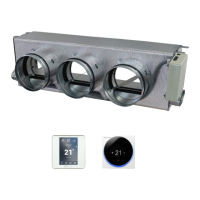

 To Next Page
 General