Need help?
Do you have a question about the Daikin BRCSZC and is the answer not in the manual?
Explains warning and caution symbols to prevent death, injury, or equipment damage.
Details critical safety measures for electrical work and controller placement.
Details optional accessories like extension cables and sub-controllers.
Explains how to activate and select temperature sensors for the system.
Details how to restrict the number of active zones.
Adjusting settings for fan static pressure for airflow requirements.
Instructions for installing the controller mounting bracket.
Guidelines and precautions for safe and correct electrical wiring.
Lists accessories required for the Sub Controller installation.
Step-by-step guide for wiring and connecting the Sub Controller.
This document serves as an installation manual for the Daikin Zone Controller, specifically covering models BRC230Z4, BRC230Z8, BRC24Z4, BRC24Z8, and BRCSZC. It provides comprehensive instructions for the safe and correct installation, wiring, and setup of these zone controllers, along with guidance on their operation and maintenance.
The primary function of the Daikin Zone Controller is to manage and control air conditioning systems across multiple zones within a building. It acts as an interface between the indoor unit and individual zone motors, allowing for independent temperature control and airflow management in different areas. This enhances comfort and energy efficiency by conditioning only occupied or desired zones. The manual details two main types of zone controllers: 4-zone and 8-zone models, available in both 230-240V and 24VAC configurations, catering to various installation requirements. An optional sub-controller (BRCSZC) is also available for more complex multi-zone setups, extending the system's capabilities.
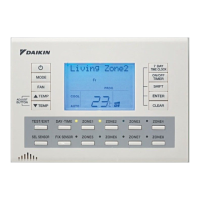
The zone controller offers several usage features designed to provide flexible and efficient control over the air conditioning system. The main interface is a keypad, which allows users to interact with the system. The manual outlines a "Field Setting" procedure, which is crucial for the initial setup and customization of the system. This procedure involves navigating through different modes (Local Set, Mode, Switch, Position) using "Shift," "Temperature up/down," and "Enter" buttons on the keypad. This allows installers to configure parameters such as the number of active zones, fan static pressure, and temperature sensor activation.
One key feature is the "Auto fan function with air sampling mode." This function optimizes fan operation by activating when the set point temperature is achieved (thermo off) and deactivating when the room temperature falls outside the set point range (thermo on). During this mode, the indoor fan periodically stops for 6 minutes and then restarts for 30 seconds or more to sample the room temperature, ensuring accurate readings and efficient operation. This function is only active when the "Indoor Sens" (indoor unit air temperature sensor) is selected. The manual provides a table detailing standard and auto fan functions during thermo off for both heating and cooling, allowing installers to select the most appropriate fan function based on client requirements.
The controller also supports various temperature sensor options, including the indoor unit's sensor, master remote controller sensor, sub-controller sensor (if BRCSZC is installed), and optional remote sensors (KRCSO1-1). This flexibility allows for precise temperature monitoring in different locations. The "Zone restriction" feature enables installers to limit the number of active zones, which is useful in scenarios where fewer zones are required, further enhancing energy efficiency by preventing unused zones from being conditioned.
The manual includes sections that indirectly contribute to maintenance by providing tools for troubleshooting and system diagnostics. The "Fault Mode" is a critical feature for maintenance, as it displays a two-digit code on the LCD screen when a fault occurs. A "Fault Code Sheet" is provided, offering brief descriptions of these codes, which helps in quickly identifying and addressing system issues. This allows technicians to diagnose problems efficiently, reducing downtime and repair costs.
The "Inspection Mode" is another valuable diagnostic tool. Accessible by pressing the "TEST/EXIT" button, this mode displays the last fault code stored in the system. It also allows technicians to clear fault codes by holding the "clear" button for 4 seconds. This feature is useful for post-repair verification and for understanding historical fault data. Some fault codes can even be cleared by simply cycling the power to the unit, which can be a quick fix for minor issues.
For comprehensive system checks, the "Test Mode" can be activated by pressing the "TEST/EXIT" button twice. In this mode, the system is forced to operate according to the set mode, and the compressor is forced to run for 30 minutes. This allows technicians to verify the system's functionality under controlled conditions, ensuring all components are working correctly after installation or maintenance.
The manual also emphasizes safety considerations, which are paramount for both installation and long-term maintenance. It advises that all electrical work be carried out by qualified personnel according to local laws and regulations, and that proper earthing and earth leakage breakers are installed. These precautions are essential for preventing electric shock, fire, and damage to the equipment, thereby contributing to the overall safety and longevity of the system. The instructions for securing wiring with cable ties and ensuring proper cover fitment also prevent potential issues that could lead to faults or require maintenance. The clear guidelines on connecting extension cables and remote sensors further simplify installation and future servicing.
 General
| Brand | Daikin |
|---|---|
| Model | BRCSZC |
| Category | Control Unit |
| Language | English |


 To Next Page