4 Before operation
Operation manual
5
FTXTP-M_FTXTP-N
Daikin room air conditioners
3P717028-2B – 2023.03
NOTICE
▪ Do NOT drop the wireless remote control.
▪ Do NOT let the wireless remote control get wet.
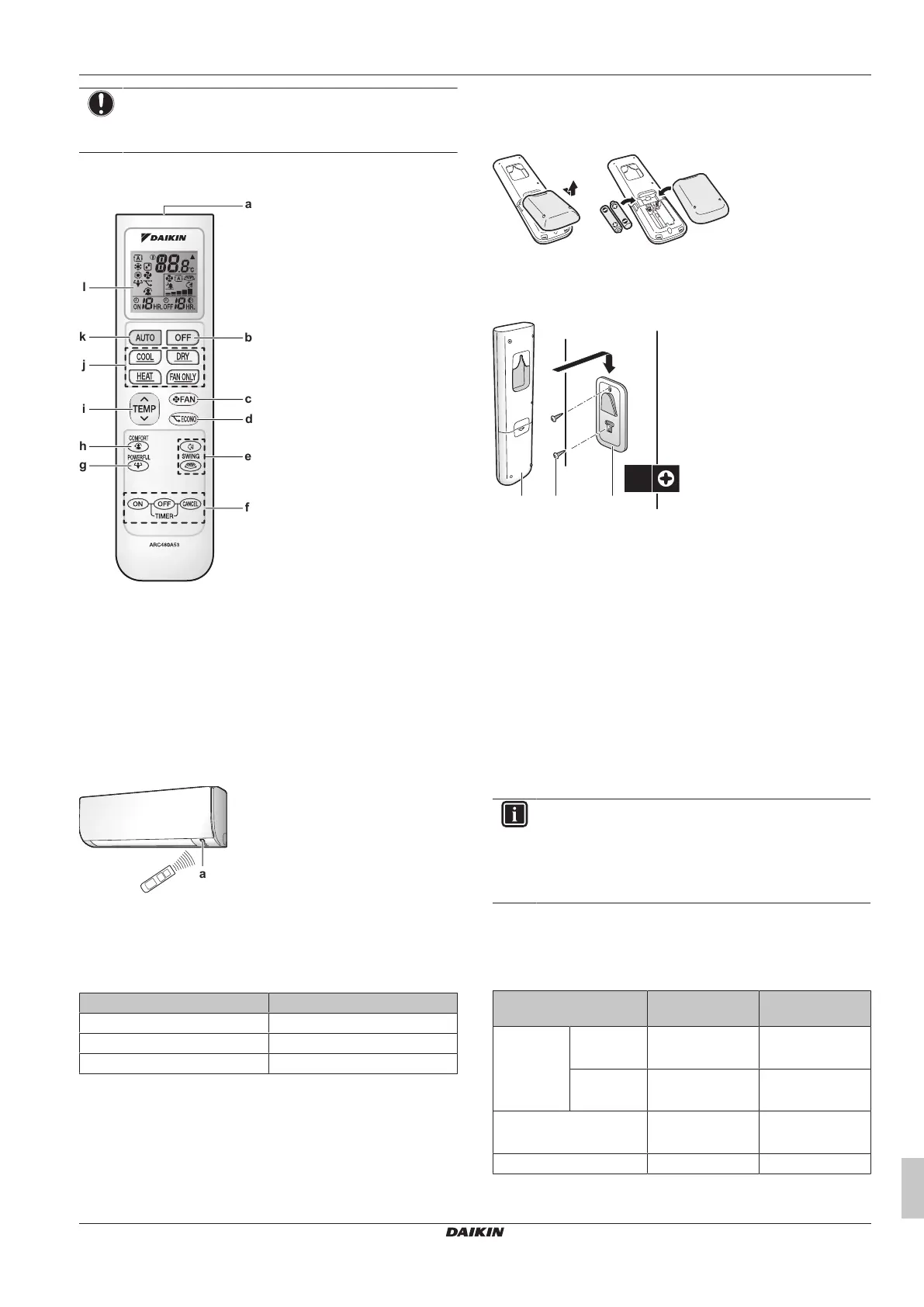
3.2.1 Components: Wireless remote control
a Signal receiver
b OFF button
c Fan setting button
d Econo operation button
e Swing buttons
f Timer setting buttons (ON, OFF, cancel)
g Powerful operation button
h Comfort operation button
i Temperature adjustment button
j Operation mode buttons
k Automatic operation mode button
l LCD display
3.2.2 To operate the wireless remote control
a Infrared signal receiver
1 Aim the signal transmitter at the infrared signal receiver on the
indoor unit (maximum distance for communication is 7m).
Result: When the indoor unit receives a signal from the wireless
remote control, you will hear a sound:
Sound Description
Beep-beep Operation starts.
Beep Setting changes.
Long beep Operation stops.
4 Before operation
4.1 To insert the batteries
The batteries will last for about 1 year.
1 Remove the back cover.
2 Insert both batteries at once.
3 Put the cover back.
4.2 To mount the wireless remote
control holder
a Wireless remote control
b Screws (field supply)
c Wireless remote control holder
1 Choose a place where the signals reach the unit.
2 Attach the holder with screws to the wall or a similar location.
3 Hang the wireless remote control on the holder.
4.3 To turn on the power supply
1 Turn the circuit breaker on.
Result: The flap of the indoor unit will open and close to set the
reference position.
5 Operation
INFORMATION
The indoor unit is delivered with the wireless remote
control as the user interface. This manual describes only
operation with this user interface. If another user interface
is connected, refer to the operation manual of the
connected user interface.
5.1 Operation range
Use the system in the following temperature and humidity ranges for
safe and effective operation.
Cooling and
drying
(a)(b)
Heating
(a)
Outdoor
temperature
RXTP-A -10~46°CDB -30~24°CDB
-31~18°CWB
RXTP-R -10~46°CDB -25~24°CDB
-26~18°CWB
Indoor temperature 18~32°CDB
14~23°CWB
10~30°CDB
Indoor humidity ≤80%
(b)
—
(a)
A safety device might stop the operation of the system if the unit
runs outside its operation range.



 To Next Page