3 | Components
Service manual
226
EBLA09~16DA + EDLA09~16DA
Daikin Altherma 3 M
ESIE20-06A – 2021.03
Is the problem solved? Action
No Return to the troubleshooting of the
specific error and continue with the
next procedure.
Repair procedures
To remove the propeller fan blade assembly
Prerequisite: Stop the unit operation via the user interface.
Prerequisite: Turn OFF the respective circuit breaker.
1 Remove the required plate work, see "3.17Plate work"[4230].
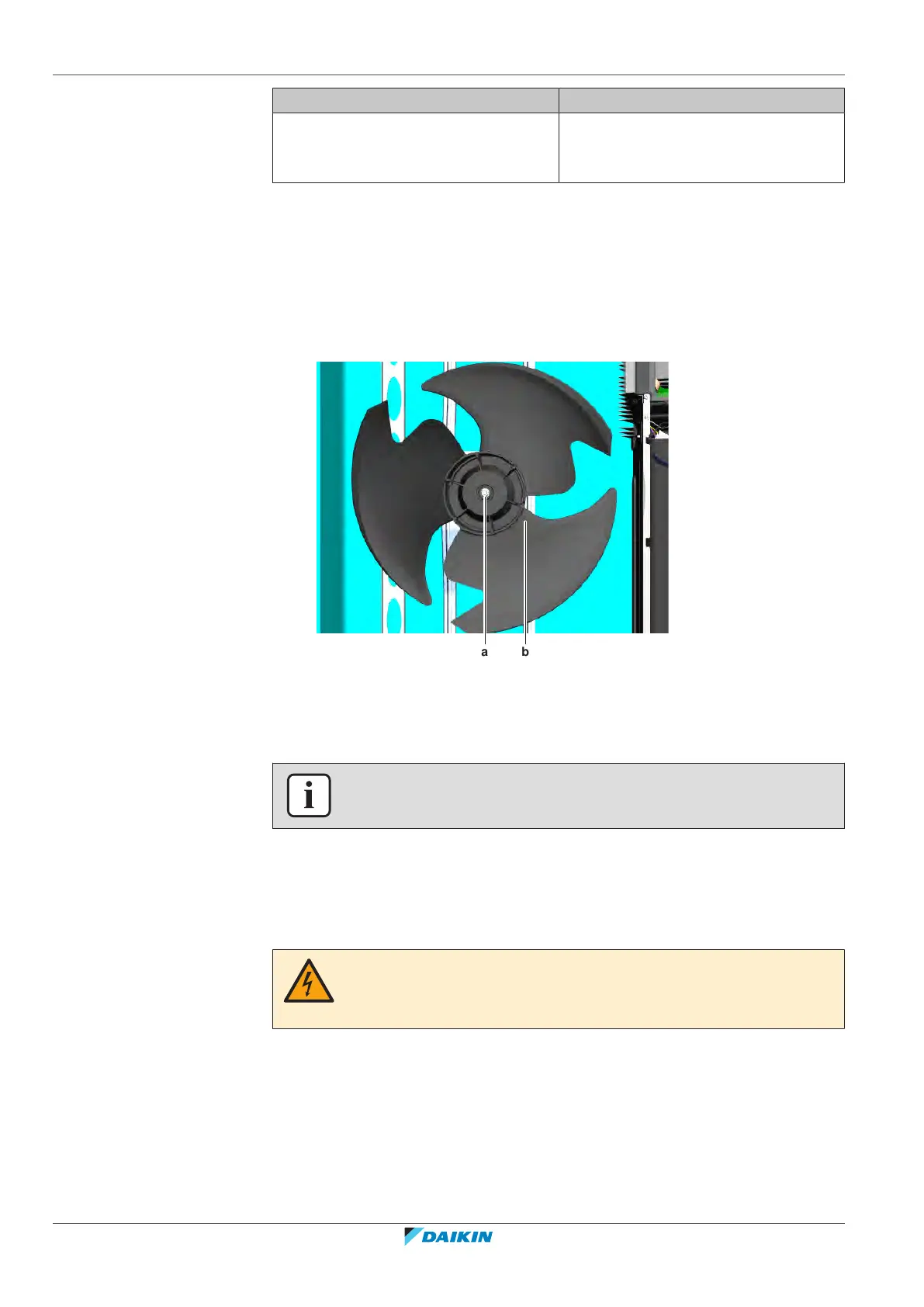
2 Remove the nut that fixes the propeller fan blade assembly.
a Nut
b Propeller fan blade assembly
3 Pull and remove the propeller fan blade assembly from the DC fan motor
assembly.
INFORMATION
Use a pulley remover if the propeller cannot be removed manually.
4 To install the propeller fan blade assembly, see "Repair procedures"[4226].
To remove the DC fan motor assembly
1 Remove the propeller fan blade assembly from the DC fan motor assembly,
see "Repair procedures"[4226].
DANGER: RISK OF ELECTROCUTION
Confirm the rectifier voltage is below 10 V DC before proceeding, see "To prevent
electrical hazards"[4285].
2 Disconnect the DC fan motor connector X108A from the main PCB.



 To Next Page