3 | Components
Service manual
222
EBLA09~16DA + EDLA09~16DA
Daikin Altherma 3 M
ESIE20-06A – 2021.03
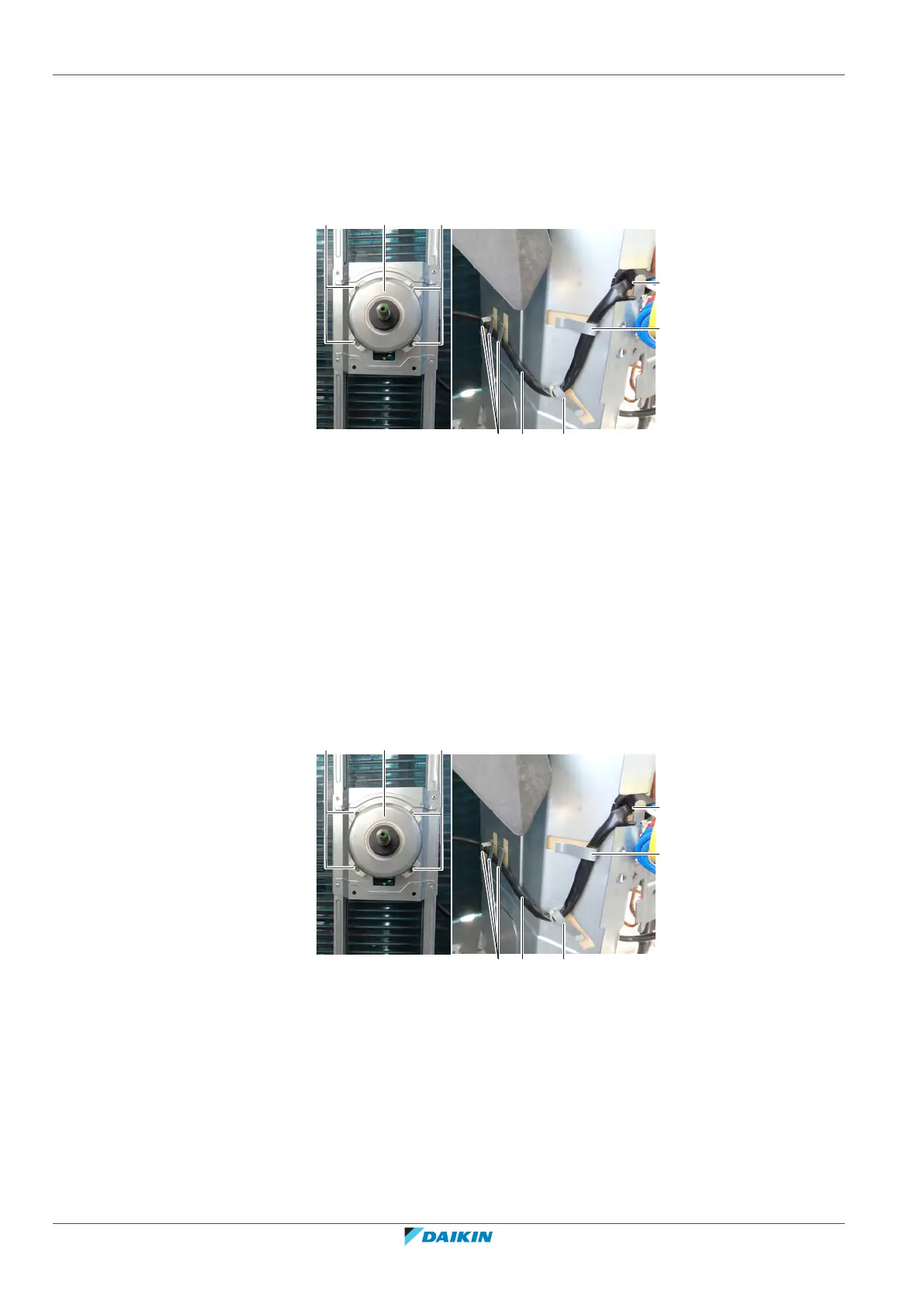
3 Remove the DC fan motor harness from the wire clamp on the right side of
the main PCB.
4 If applicable; cut the tie strap(s) that tie up the excessive DC fan motor
harness.
5 Slightly bend the harness retainers to detach the DC fan motor harness.
a DC fan motor harness
b Harness retainer
c Opening in partition plate
d Screw
e DC fan motor assy
6 Guide the DC fan motor harness though the opening in the partition plate.
7 Remove the 4 screws that fix the DC fan motor assembly.
8 Remove the DC fan motor assembly from the unit.
9 To install the DC fan motor assembly, see "Repair procedures"[4220].
To install the DC fan motor assembly
1 Install the DC fan motor assembly in the correct location.
2 Fix the DC fan motor assembly to the unit by tightening the screws.
a DC fan motor harness
b Harness retainer
c Opening in partition plate
d Screw
e DC fan motor assy
3 Route the DC fan motor harness through the opening in the partition plate.
4 Route the DC fan motor harness through the harness retainers and bend the
harness retainers to attach the DC fan motor harness.



 To Next Page