4 Operation
User reference guide
12
EHBH/X04~16CB + EHVH/X04~16S18+26CB
Daikin Altherma – Low temperature split
4P384964-1 – 2015.01
In scheduled + reheat mode, you can do the following:
You can… Location
Do the same things as in scheduled mode. —
Adjust the preset value (Reheat). Menu structure
See also:
▪ "4.5.3Scheduled mode"on page11
▪ "4.7Preset values and schedules"on page16
4.5.5 Using the DHWtank temperature home
page
Typical DHWtank temperature home pages
Depending on the user profile, the user interface gives you either a
basic or a detailed home page. The examples in the illustrations
below are in DHWtank mode = Scheduled.
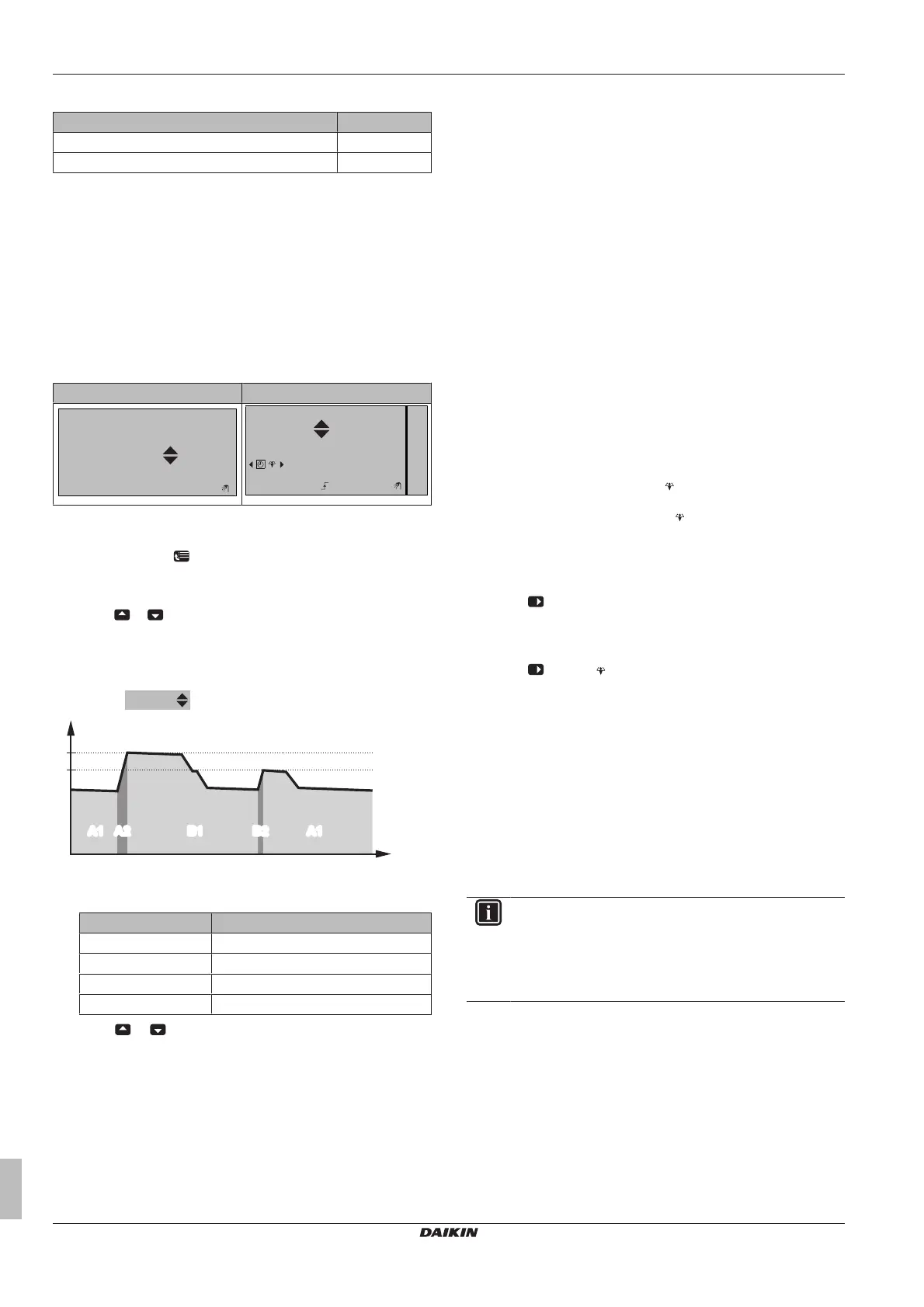
User profile = Basic User profile = Detailed
15:20
60°C
Storage comfort
Tank
Mon
15:20
60°C
00:00
Mon
Tue
Tank
Storage comfort
To read out and adjust the desired reheat temperature (in
scheduled and reheat mode)
1 Go to [7.4.3.3]:
> User settings > Preset values > Tank
temperature > Reheat.
Result: You can read out the desired reheat temperature.
2 Press
or to adjust.
To read out and overrule the active or next scheduled desired
temperature (in scheduled mode or scheduled + reheat mode)
1 Go to the DHWtank temperature home page (Tank).
Result:
is displayed.
t
a
b
T
t
A1
A2 B1 B2 A1A1 A2 B1 B2 A1
T
t
T
t
DHWtank temperature
t Time
During period… You can read out…
A1 The next scheduled action (a)
A2 The active action (a)
B1 The next scheduled action (b)
B2 The active action (b)
2 Press
or to overrule. Note: If the desired temperature is
weather dependent, you cannot change it on the home page.
Usage example: You need more hot water than scheduled
If you are in the following situation:
▪ Current time = 10:30
▪ Next scheduled action of the DHW tank = Heat up to the preset
value (Eco; example: 55°C and sufficient for 2 persons) at 14:00
▪ This evening you need hot water for 3persons
Then you can do the following:
1 Go to the DHWtank temperature home page (Tank).
2 Overrule the next scheduled action by changing from 55°C to
60°C.
Advantages:
▪ You will have sufficient hot water (=comfortable).
▪ You do NOT have to change the schedule (=easy).
▪ You do NOT have to activate the DHW tank booster mode
(=energy saving).
4.5.6 Using the DHWtank booster mode
About the DHWtank booster mode
You can use the DHW tank booster mode to immediately start
heating up the water to the preset value (Storage comfort). However,
this consumes extra energy.
To check if the DHWtank booster mode is active
1 Go to the DHWtank temperature home page (Tank).
2 Check the following:
▪ In user profile = Basic: If
is displayed, the DHW tank
booster mode is active.
▪ In user profile = Detailed: If
is selected, the DHW tank
booster mode is active.
To activate the DHWtank booster mode (user profile = Basic)
1 Go to the DHWtank temperature home page (Tank).
2 Press
for more than 5seconds.
To activate the DHWtank booster mode (user profile = Detailed)
1 Go to the DHWtank temperature home page (Tank).
2 Press
to select .
Usage example: You immediately need more hot water
If you are in the following situation:
▪ You already consumed most of your hot water.
▪ You cannot wait for the next scheduled action to heat up the
DHWtank.
Then you can activate the DHWtank booster mode.
Advantage: The DHWtank immediately starts heating up the water
to the preset value (Storage comfort).
INFORMATION
When the DHW tank booster mode is active, the risk of
space heating/cooling and capacity shortage comfort
problems is significant. In case of frequent domestic hot
water operation, frequent and long space heating/cooling
interruptions will happen.


 To Next Page