TableofContents
Installationandoperationmanual
2
EKRUCBS
DaikinAlthermasimplifieduserinterface
4P3822511–2014.06
TableofContents
Fortheuser 2
1 Buttons 2
2 Statusicons 2
Fortheinstaller 3
3 Overview:Installationandconfiguration 3
4 Toconnectthesimplifieduserinterface 3
5 ToupdatethesoftwarewithUpdater 3
6 Toupdatethesoftwaremanually 4
Fortheuser
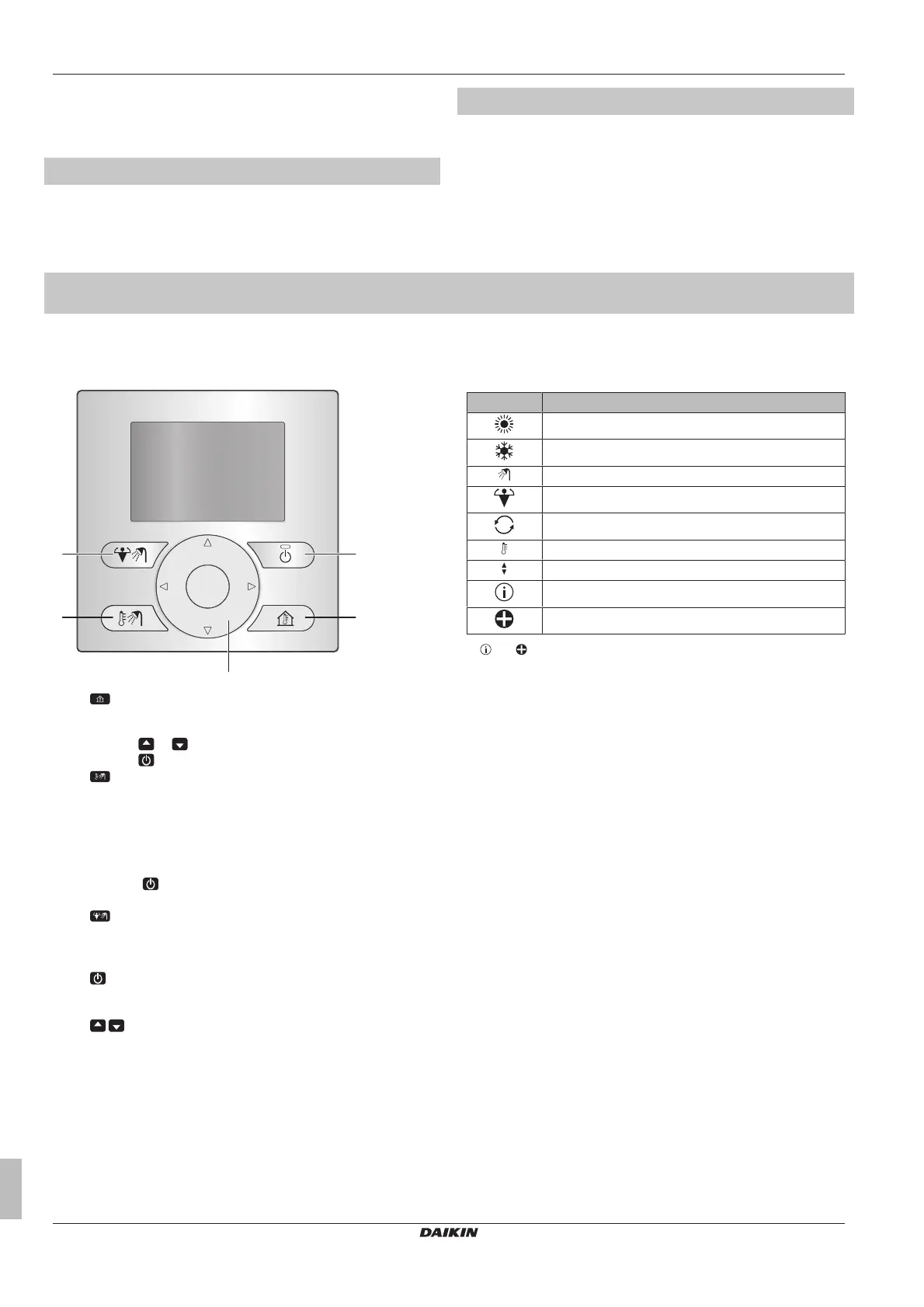
1 Buttons
a
SPACEHEATING/COOLINGCONTROL
Gototheroomtemperaturehomepage,whereyoucan:
▪ Readouttheactualroomtemperature.
▪ Press or toadjustthedesiredroomtemperature.
▪ Press toturnONorOFFtheroomtemperaturecontrol.
b
DOMESTICHOTWATERCONTROL
Gotothedomestichotwaterhomepage,whereyoucan:
▪ Read out the actual domestic hot water tank temperature
(onlyifthesystemcontainsadomestichotwatertank).
▪ Read out the desired instant domestic hot water
temperature (only in case of instant domestic hot water
productionbyaboiler).
▪ Press to turn ON or OFF the domestic hot water
control.
c
DHWTANKBOOSTERMODE
Activate the DHW tank booster mode (only if the system
contains a domestic hot water tank, and provided that the
domestichotwatercontrolisturnedON).
d
ON/OFF
TurnONorOFF thespace heating/coolingor domestichot
watercontrol(ontherespectivehomepages).
e
NAVIGATIONBUTTONS
Adjust the desired room temperature (on the room
temperaturehomepage).
2 Statusicons
Icon Description
Spaceoperationmode=Heating.
Spaceoperationmode=Cooling.
Domestichotwateroperation.
TheDHWtankboostermodeisactive.
Unitisoperating.
Actualtemperature.
Desiredtemperature.
Amalfunctionoccurred.
Emergencyoperationisactive.
If or is displayed, check the main user interface for more
informationor,ifnecessary,contactyourinstaller.


 To Next Page