6Toupdatethesoftwaremanually
Installationandoperationmanual
4
EKRUCBS
DaikinAlthermasimplifieduserinterface
4P3822511–2014.06
6 Toupdatethesoftware
manually
Amanualsoftwareupdateconsistsof:
1 Copying the software of the most uptodate user interface to
theleastuptodateuserinterface.
2 Converting the updated user interface back to its intended
state.
Tocopythesoftware
1 PowerONtheindoorunit.
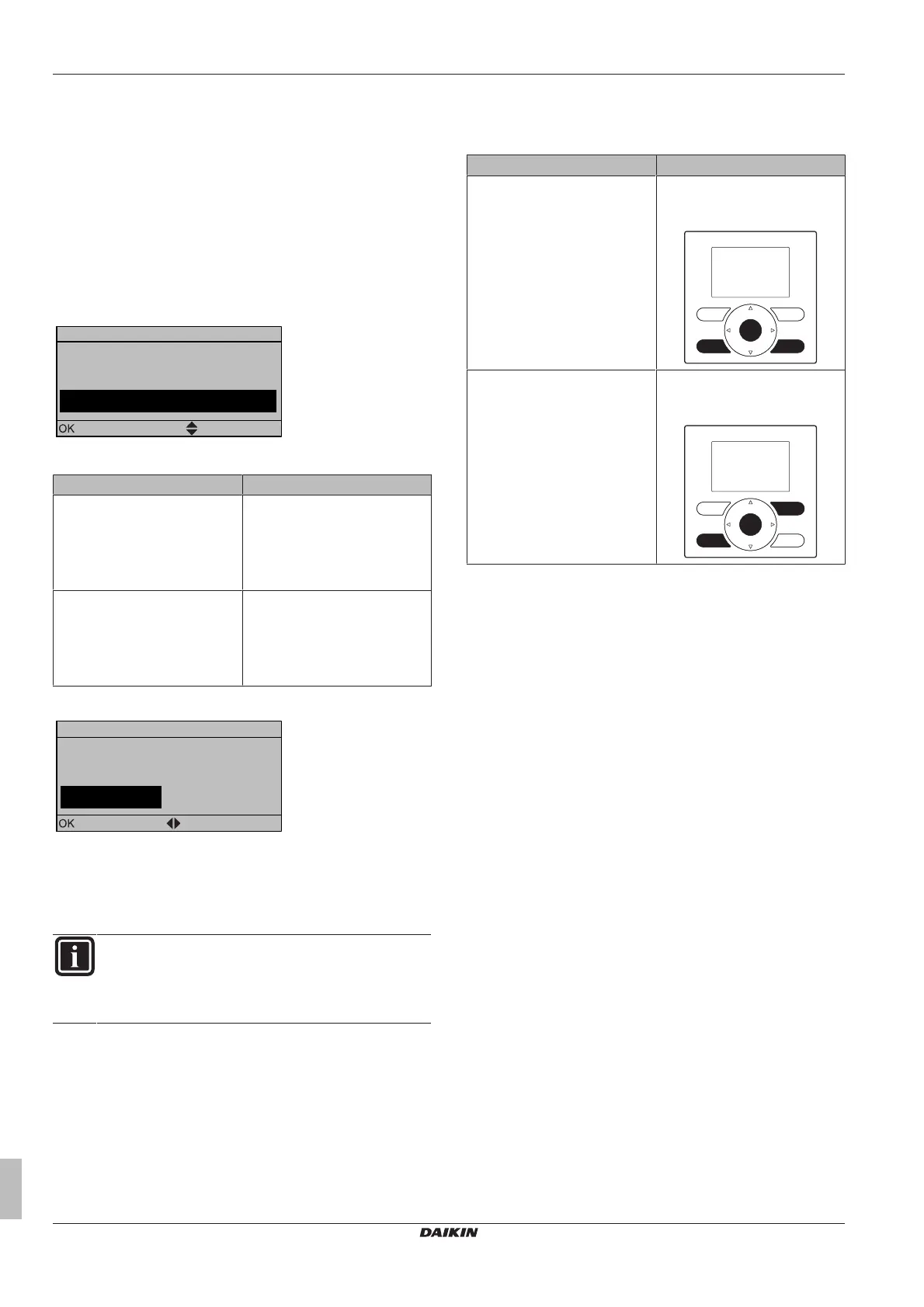
Result:Bothinterfacesdisplaythefollowingscreen:
Synchronization
Data difference detected.
Please select action:
Send data
Confirm
Adjust
2 Selecttherequiredaction:
If Then
Themainuserinterfaceisthe
mostuptodate
Select:
▪ Send data on the main user
interface,OR
▪ Receivedataon thesimplified
userinterface.
Thesimplifieduserinterfaceis
themostuptodate
Select:
▪ Send data on the simplified
userinterface,OR
▪ Receivedataonthemainuser
interface.
3 Confirmyouraction.
Start copy
Are you sure you want to
start the copy operation?
Cancel
OK
Confirm Adjust
Result:Aprogressbarappears.
4 Waitfortheprogressbartofinishandstartflashing.
Result:Bothinterfaceshaveidenticalsoftware.
5 PowerOFFtheindoorunit.
INFORMATION
Copyingthe softwarefromoneuserinterfacetotheother
transforms the receiver into the sender. Depending on
which interfacereceivedtheupdate, you now have either
twomainuserinterfacesortwosimplifieduserinterfaces.
Toconverttheupdatedinterface
6 MakesuretheindoorunitispoweredOFF.
7 Dooneofthefollowing:
If Then
Themainuserinterfacereceived
thesoftwareofthesimplified
userinterface
Pressthefollowingbuttonsto
convertitbackintoamainuser
interface:
Thesimplifieduserinterface
receivedthesoftwareofthemain
userinterface
Pressthefollowingbuttonsto
convertitbackintoasimplified
userinterface:
8 Withthebuttonspressed,powerONtheindoorunit.
9 Wait until text appears on the display and then release the
buttons.
Result:Theinterfaceisconvertedtoitsintendedstate.


 To Next Page