3Fortheinstaller
Installationandoperationmanual
3
EKRUCBS
DaikinAlthermasimplifieduserinterface
4P3822511–2014.06
Fortheinstaller
3 Overview:Installationand
configuration
Installation
▪ Thesimplifieduserinterfacecanonlybeusedincombinationwith
themainuserinterface.
▪ The main user interface acts as control centre and needs to be
installedneartheunit.
▪ Thesimplifieduserinterfaceacts asroom thermostatandneeds
tobeinstalledintheroomthatyouwantittocontrol.
Configuration
Itisrequiredthatthesimplifieduserinterfacehasthesamesoftware
versionasthemainuserinterface.Ifnecessary,updatetheleastup
todate interface. You can find the software version on the box of
eachinterface.
Therearetwowaystoupdatethesoftware:
▪ ByusingtheUpdatersoftware.
▪ Bymanuallyupdatingthesoftware.
INFORMATION
Toupdatethesoftware,itisrecommendedtouseUpdater.
Updatingthesoftwaremanuallycantakeupto2.5hours.
4 Toconnectthesimplified
userinterface
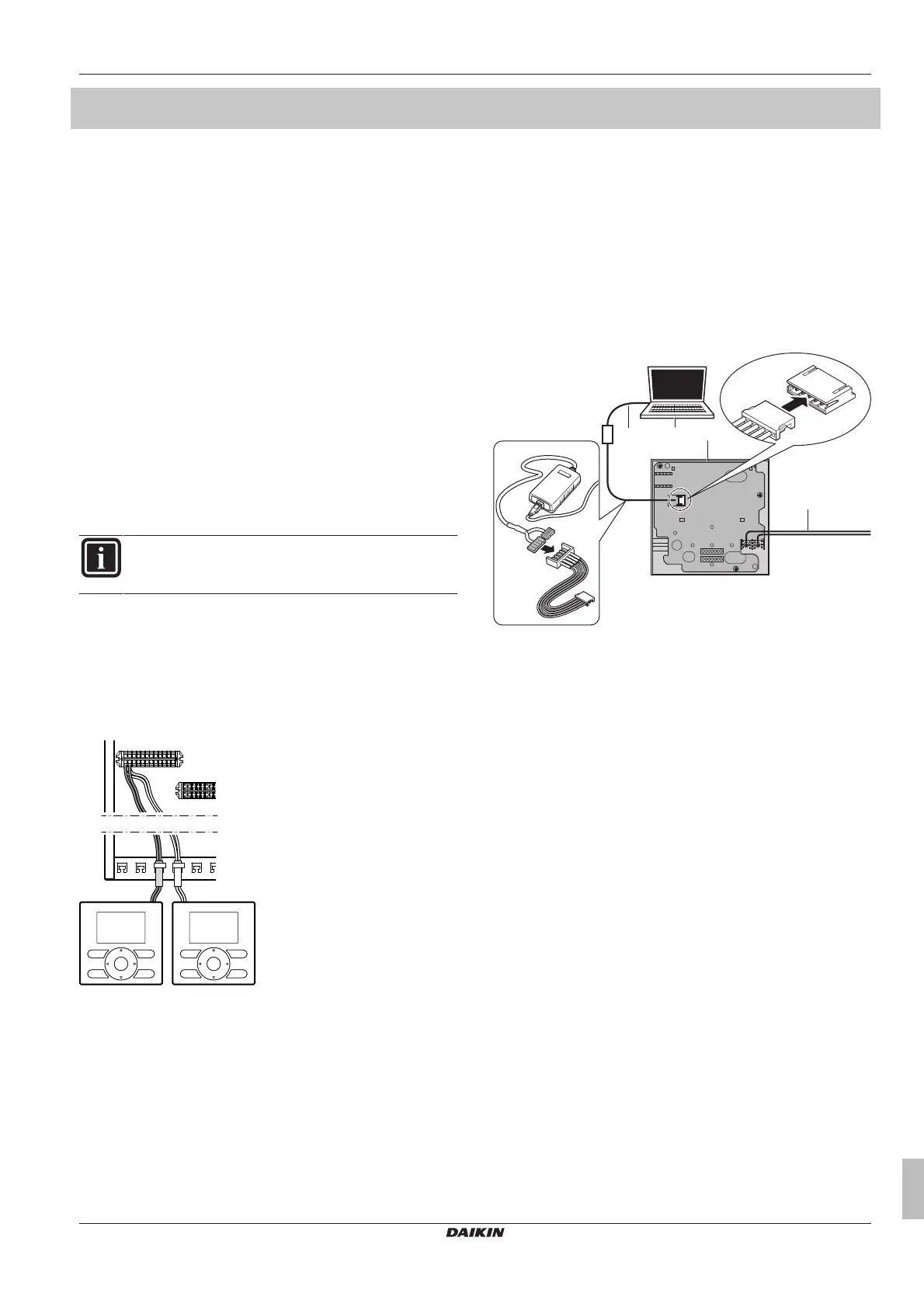
1 Connectthecableofthesimplifieduserinterfacetotheindoor
unit.
a Mainuserinterface
b Simplifieduserinterface
2 Fixthecablewithcabletiestothecabletiemountings.
5 Toupdatethesoftwarewith
Updater
Prerequisite: PC with Updater (contact your dealer for the correct
versionofthesoftware)
Prerequisite:PCUSBcableEKPCCAB3orhigher(includesaUSB
cableandadditionalconnectioncables)
1 MakesurethattheindoorunitispoweredOFF.
2 ConnecttheuserinterfacetothePC.
a PCwithUpdater
b USBcable
c UserinterfacePCB
d Toindoorunit
3 PowerONtheindoorunit.
4 OpenUpdater.
5 InUpdater,goto"Updateprocedure".
6 Type in the name of the interface (EKRUCBL* or EKRUCBS,
dependingonwhichyouareupdating).
7 Selectthedesiredlanguagepack(onlyforEKRUCBL*).
8 Followtheonscreeninstructions.


 To Next Page