Air Filters / Front Panel Si041417EA
2 Removal Procedure
1. Air Filters / Front Panel
Warning
Be sure to wait for 10 minutes or more after turning off all power supplies before
disassembling work.
Step Procedure Points
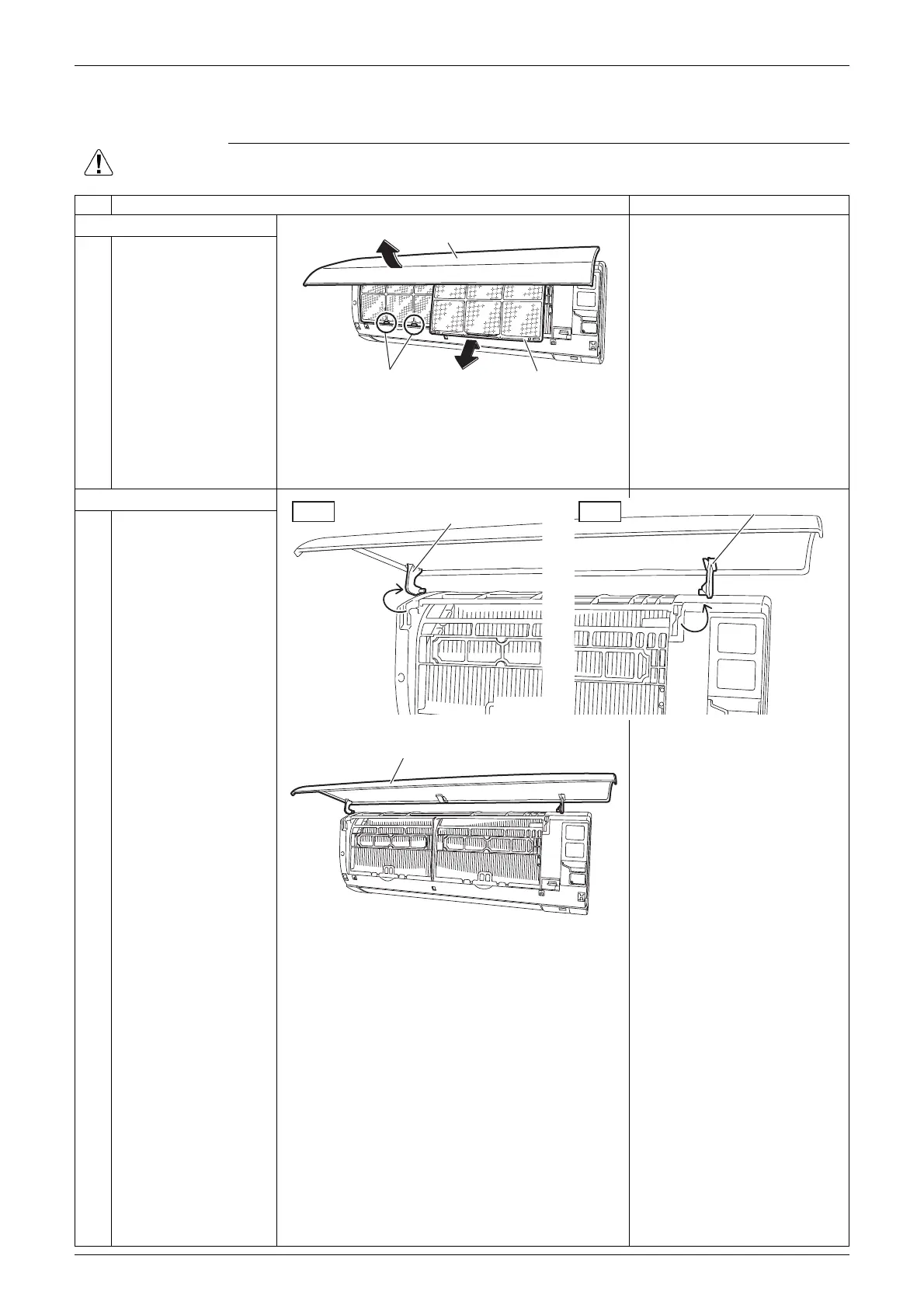
1. Remove the air filters.
The air filter is not marked
for difference between the
right and left sides.
The air filter can be set
easily by inserting it along
the guides.
Insert the air filter with the
“FRONT” mark faced up.
Be sure to insert the 2 lower
hooks when installing the air
filter.
1
2
Open the front panel.
Unfasten the 2 hooks
and pull out the air filter
downward to remove it.
2. Remove the front panel.
1 Release the left and
right shafts.
2 Remove the front panel.
When reassembling the front
panel, fit the right and left
rotary shafts one by one into
the grooves and fully push
them in position.
Front panel
Hook Air filter
(R21000)
Left
Shaft
(R24251)
Right
Shaft
(R24252)
Front panel
(R21003)


 To Next Page