23
TIMER Operation
WEEKLY TIMER Operation
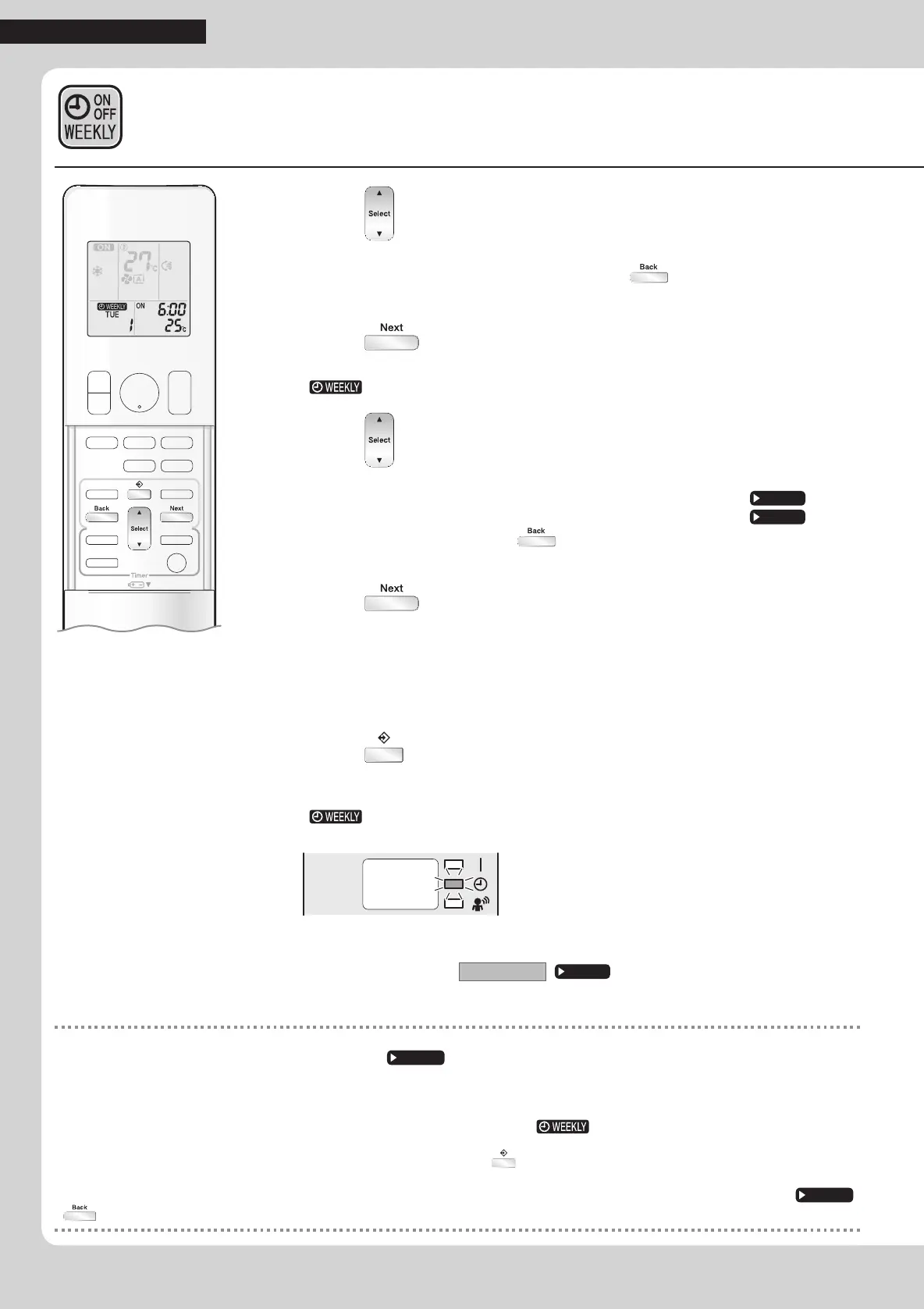
6. Press to select the desired time.
•Thetimecanbesetbetween0:00and23:50in10-minuteintervals.
•ToreturntotheON/OFFTIMERmodesetting,press
.
•ProceedtoSTEP
9whensettingtheOFFTIMER.
7. Press .
•Thetimewillbeset.
•“
”andthetemperatureblink.
8. Press to select the desired temperature.
•Thetemperaturecanbesetbetween10°Cand32°C.
COOLorAUTO:Theunitoperatesat18°Cevenifitissetto10to17°C.
Page 12
HEATorAUTO:Theunitoperatesat30°Cevenifitissetto31to32°C.
Page 12
•Toreturntothetimesetting,press .
•Thesettemperatureisonlydisplayedwhenthemodesettingison.
9. Press .
•Thetemperaturewillbesetandgotothenextreservationsetting.
•ThetemperatureissetwhileinONTIMERoperation,andthetimeissetwhileinOFF
TIMERoperation.
•Thenextreservationscreenwillappear.
•Tocontinuefurthersettings,repeattheprocedurefromSTEP
4.
10.
Press to complete the setting.
•Besuretodirecttheremotecontrollertowardtheindoorunitandcheckforareceiving
toneandblinkingoftheOPERATIONlamp.
•“
”isdisplayedontheLCDandWEEKLYTIMERoperationisactivated.
•TheTIMERlamplightsorange.
Display
•Areservationmadeoncecanbeeasilycopiedandthesamesettingsusedforanother
dayoftheweek.Referto
Copy mode
.
Page 24
NOTE
Notes on WEEKLY TIMER operation
•Donotforgettosettheclockontheremotecontrollerrst.
Page 10
•Thedayoftheweek,ON/OFFTIMERmode,timeandsettemperature(onlyforONTIMERmode)canbesetwiththeWEEKLYTIMER.
OthersettingsfortheONTIMERarebasedonthesettingsjustbeforetheoperation.
•WEEKLYTIMERandON/OFFTIMERoperationcannotbeusedatthesametime.TheON/OFFTIMERoperationhaspriorityifitissetwhile
WEEKLYTIMERisstillactive.TheWEEKLYTIMERwillenterthestandbystate,and“ ”willdisappearfromtheLCD.WhentheON/
OFFTIMERisup,theWEEKLYTIMERwillautomaticallybecomeactive.
•OnlythetimeandsettemperaturewiththeWEEKLYTIMERaresentwiththe .SettheWEEKLYTIMERonlyaftersettingtheoperation
mode,theairowrateandtheairowdirectionaheadoftime.
•
Turningoffthecircuitbreaker,powerfailure,andothersimilareventswillrenderoperationoftheindoorunit’sinternalclockinaccurate.Resettheclock.
Page 10
• canbeusedonlyforthetimeandtemperaturesettings.Itcannotbeusedtogobacktothereservationnumber.
01_EN_3P384084-2.indd 23 11/4/2014 2:09:55 PM



 To Next Page