4 Operation
Operation manual
5
FTXP50~71M2V1B
Daikin room air conditioner
3P511999-4E – 2018.09
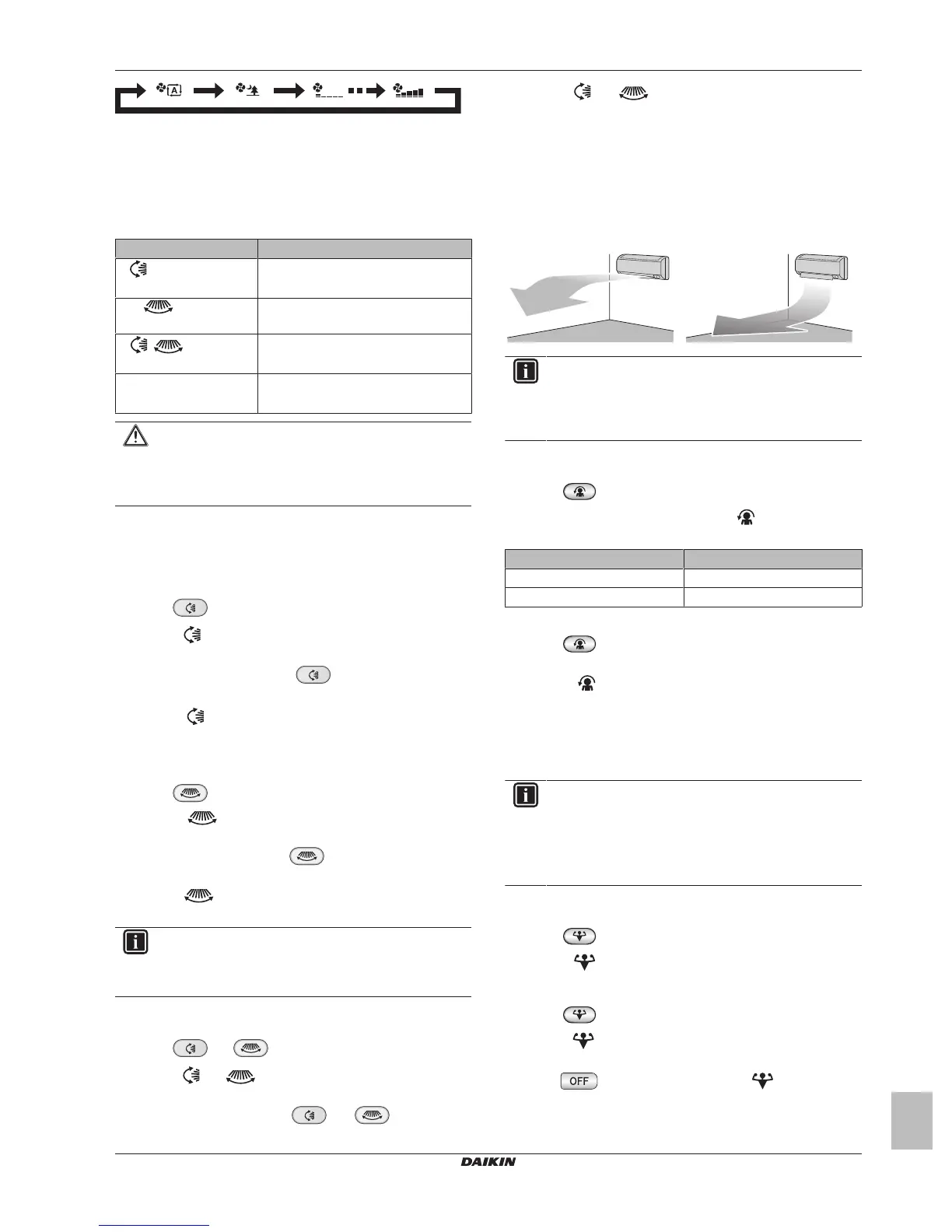
4.4 Airflow direction
When. Adjust the airflow direction as desired.
What. The system directs the airflow differently, depending on the
user selection (swinging or fixed position). It does so by moving
horizontal blades (flaps) or vertical blades (louvers).
Setting Airflow direction
Vertical automatic
swing
Moves up and down.
Horizontal
automatic swing
Moves from side to side.
+ 3-D airflow
direction
Moves simultaneously up and down and
from side to side
[—] Stays in a fixed position.
CAUTION
▪ ALWAYS use a user interface to adjust the position of
the flaps and louvers. When the flaps and louvers are
swinging and you move them forcibly by hand, the
mechanism will break.
The movable range of the flap varies according to the operation
mode. The flap will stop at the upper position when the airflow rate is
changed to low during the up and down swing setting.
4.4.1 To adjust vertical airflow direction
1 Press .
Result: appears on the LCD. The flaps (horizontal blades)
will begin to swing.
2 To use fixed position, press when the flaps reach the
desired position.
Result: disappears from the LCD. The flaps will stop
moving.
4.4.2 To adjust horizontal airflow direction
1 Press .
Result: appears on the LCD. The louvers (vertical
blades) will begin to swing.
2 To use fixed position, press when the louvers reach the
desired position.
Result: disappears from the LCD. The louvers will stop
moving.
INFORMATION
When the unit is installed in a corner of a room, the
direction of the louvers should be facing away from the
wall. Efficiency will drop if a wall blocks the air.
4.4.3 To use 3-D airflow direction
1 Press and .
Result: and appear on the LCD. The flaps (horizontal
blades) and louvers (vertical blades) will begin to swing.
2 To use fixed position, press and when the flaps
and louvers reach the desired position.
Result: and disappear from the LCD. The flaps and
the louvers will stop moving.
4.5 Comfort airflow operation
This operation can be used in heating or cooling operation mode. It
will provide a comfortable wind that will NOT come in direct contact
with people. The system automatically sets the fixed airflow position
upward in Cooling and downward in Heating operation mode.
Cooling operation mode Heating operation mode
INFORMATION
Powerful and Comfort airflow operation CANNOT be used
at the same time. The last selected function takes priority.
If the vertical automatic swing is selected, Comfort airflow
operation will be cancelled.
4.5.1 To start/stop Comfort airflow operation
1 Press to start.
Result: The flap position will change, is displayed on the
LCD, and the airflow rate is set to automatic.
Mode Position of flap…
Cooling/Drying Up
Heating Down
Note: Comfort airflow operation is NOT available in Fan only mode.
2 Press to stop.
Result: The flap will return to the position from before the Comfort
airflow mode; disappears from the LCD.
4.6 Powerful operation
This operation quickly maximizes the cooling/heating effect in any
operation mode. You can get the maximum capacity.
INFORMATION
Powerful operation CANNOT be used together with Econo
and Comfort airflow operation. The last selected function
takes priority.
Powerful operation will NOT increase the capacity of the
unit if it already operates at maximum capacity.
4.6.1 To start/stop Powerful operation
1 Press to start.
Result: is displayed on the LCD. Powerful operation runs
for 20minutes; after that, operation returns to the previously set
mode.
2 Press to stop.
Result: disappears from the LCD.
Note: Powerful operation can be set only when the unit is running. If
you press , operation will be cancelled; disappears from
the LCD.



 To Next Page