English
10
Preparation before Operation
■
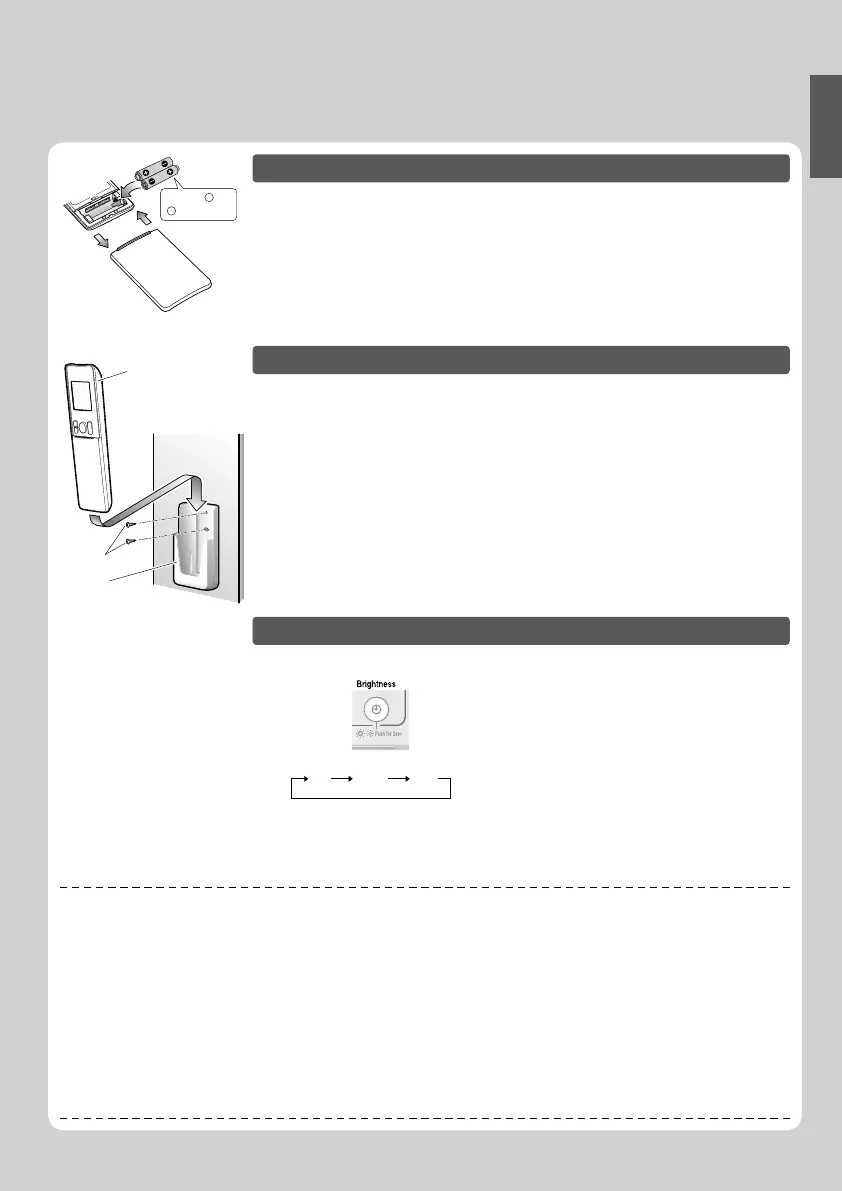
To set the batteries
Position + and
– correctly!
2
3
1
1. Slide the front cover to take it off.
2. Set two dry batteries AAA.LR03 (alkaline).
3. Set the front cover as before.
■
To fi x the remote controller holder on the wall
Remote
controller holder
Remote controller
Screws
1. Choose a place from where the signals
reach the unit.
2. Fix the holder to a wall, or similar location
with the screws procured locally.
3. Place the remote controller in the remote
controller holder.
■
To set the luminance of the display
• The luminance of the indoor unit display can be set.
Press for 2 sec.
Hi Low Off
NOTE
■
Notes on batteries
• When replacing the batteries, use batteries of the same type, and replace both old batteries together.
• When the system is not used for a long time, take the batteries out.
• The batteries will last for approx. 1 year. Low energy of battery is indicated by fl ashing of LCD display. Replace both batteries with new, size
AAA.LR03 (alkaline).
• The attached batteries are provided for the initial use of the system.
The usable period of the batteries may be short depending on the manufactured date of the unit.
■
Notes on remote controller
• Never expose the remote controller to direct sunlight.
• Dust on the signal transmitter or receiver will reduce the sensitivity. Wipe off dust with soft cloth.
• Signal communication may be disabled if an electronic-starter-type fl uorescent lamp (such as inverter-type lamps) is in the room. Consult
the shop if that is the case.
• If the remote controller signals happen to operate another appliance, move that appliance to somewhere else, or consult the service shop.















 To Next Page