17
■
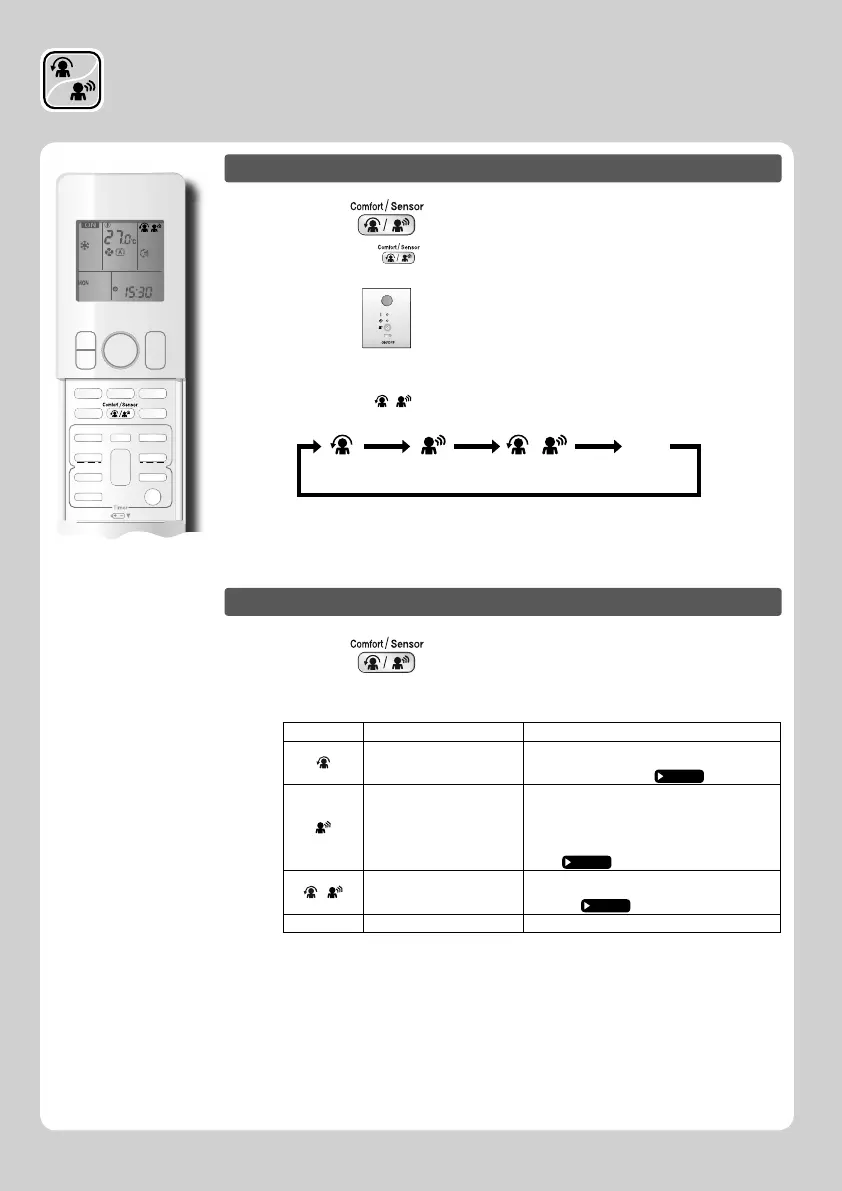
To start operation
Press and select the desired mode.
• Each time the is pressed a different setting option is displayed on the LCD.
• The INTELLIGENT EYE lamp lights green.
Display
• By selecting “ ” from the following icons, the unit will be in COMFORT
AIRFLOW operation combined with INTELLIGENT EYE operation.
blank
No SettingCOMFORT
AIRFLOW
INTELLIGENT
EYE
Combination
• When the fl aps (horizontal blades) are swinging, the operating as above will stop
movement of them.
• The lamp will be lit while human movements are detected.
■
To cancel operation
Press and select “blank” on the LCD.
• The INTELLIGENT EYE lamp goes off.
Display Operation mode
Explanation
COMFORT AIRFLOW
The fl aps will adjust the airfl ow direction upward
while cooling, and adjust the airfl ow direction
downward while heating.
Page 16
INTELLIGENT EYE
The sensors will detect the movement of people
in the sensing areas and the louvers will adjust
the airfl ow direction to an area where people are
not present. When there are no people in the
sensing areas, the unit will go into energy-saving
mode.
Page 16
•
COMFORT AIRFLOW and
INTELLIGENT EYE
The unit will be in COMFORT AIRFLOW
operation combined with INTELLIGENT EYE
operation.
Page 16
Blank
No function −
COMFORT AIRFLOW /
INTELLIGENT EYE Operation















 To Next Page