English
28
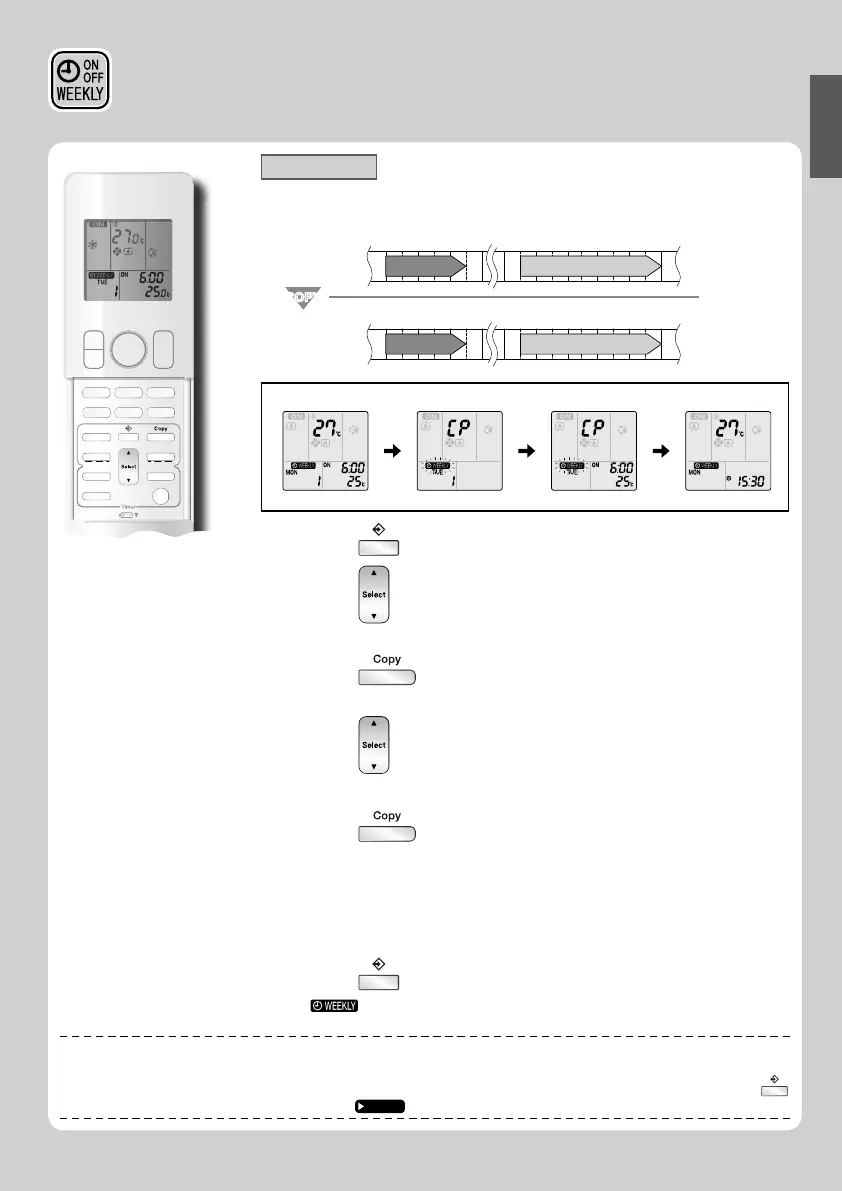
Copy mode
• A reservation made once can be copied to another day of the week. The whole reservation
of the selected day of the week will be copied.
6:00 8:30 17:30 22:00
25°C 27°C
6:00 8:30 17:30 22:00
25°C 27°C
COPYCOPY
Program 1 Program 2 Program 3 Program 4
ON OFF ON OFF
[Monday]
Program 1 Program 2 Program 3 Program 4
ON OFF ON OFF
[Tuesday]
to
[Friday]
Setting Displays
Confi rmation Copy Paste Normal
1. Press .
2. Press to confi rm the day of the week to be
copied.
3. Press .
• The whole reservation of the selected day of the week will be copied.
4. Press to select the destination day of the
week.
5. Press .
• Be sure to direct the remote controller toward the indoor unit and check for a receiving
tone and fl ashing the OPERATION lamp.
• The reservation will be copied to the selected day of the week. The whole reservation
of the selected day of the week will be copied.
• To continue copying the settings to other days of the week, repeat step
4 and step 5.
• The TIMER lamp lights yellow.
6. Press to complete the setting.
• “ ” is displayed on the LCD and WEEKLY TIMER operation is activated.
NOTE
■
Note on copy mode
• The entire reservation of the source day of the week is copied in the copy mode.
In the case of making a reservation change for any day of the week individually after copying the content of weekly reservations, press
and change the settings in the steps of setting mode.
Page 26
WEEKLY TIMER Operation















 To Next Page