7
Names of Parts
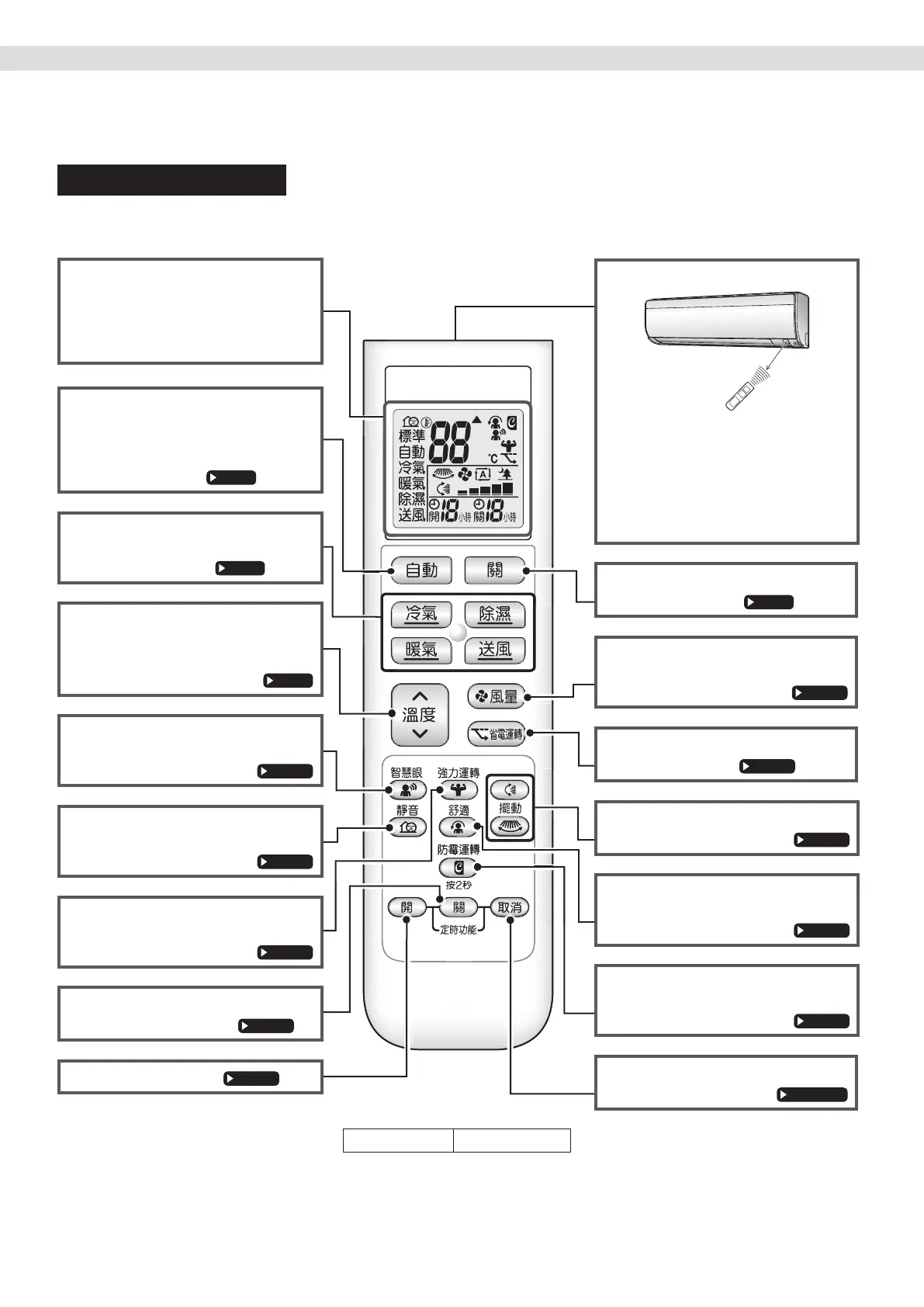
Remote Controller
Signal transmitter
7m
•
Tousetheremotecontroller,aimthe
transmitterattheindoorunit.Ifthereis
anythingblockingthesignalsbetween
theunitandtheremotecontroller,such
asacurtain,theunitmaynotoperate.
• Themaximumtransmissiondistance
isabout7m.
OFF button
• Stopstheoperation.
FAN setting button
• Selectstheairowratesetting.
ECONO button
• ECONOOperation.
SWING button
•
Adjuststheairowdirection
.
COMFORT button
•
COMFORTAIRFLOWoperation
.
MOLD PROOF button
•
Moldproofoperation
.
TIMER CANCEL button
• Cancelsthetimersetting.
Display (LCD)
• Displaysthecurrentsettings.
(Inthisillustration,eachsectionis
shownwithitsdisplaysonforthe
purposeofexplanation.)
AUTO buttons
• Automaticallyselectsanappropriate
operationmode(COOLorHEAT)
basedontheindoortemperatureand
startstheoperation.
Direct operation buttons
• StartstheCOOL,DRY,HEATor
FANONLYoperation.
TEMPERATURE
adjustment button
• Changesthetemperaturesetting.
SENSOR button
•
INTELLIGENTEYEoperation.
QUIET button
• OUTDOORUNITQUIEToperation.
POWERFUL button
• POWERFULoperation.
OFF TIMER button
(NIGHT SET mode)
ON TIMER button
Modelname ARC480A65
Read Before Operation Read Before Operation
01_EN_3P492259-18L.indd 7 12/13/2019 2:08:15 PM



 To Next Page