20
TIMER Operation
■ To use ON TIMER
operation
• Check that the clock is correct. If not, set
the clock to the present time. (page 10.)
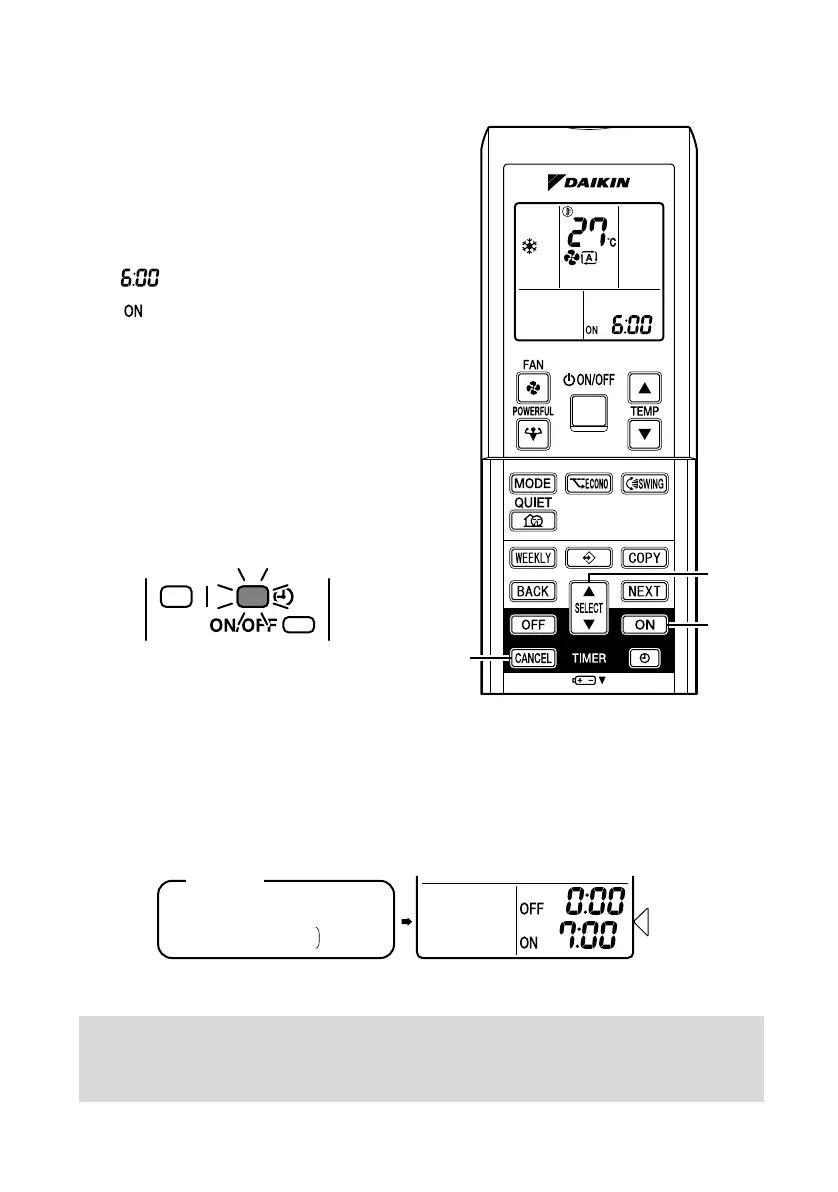
1. Press “ON TIMER button”.
is displayed.
blinks.
2. Press “SELECT button” until
the time setting reaches the
point you like.
•
Every pressing of either button
increases or decreases the time setting
by 10 minutes. Holding down either
button changes the setting rapidly.
3. Press “ON TIMER button”
again.
• The TIMER lamp lights up.
■ To cancel ON TIMER
operation
4. Press “CANCEL button”.
• The TIMER lamp goes off.
■ To combine ON TIMER and OFF TIMER
• A sample setting for combining the two timers is shown below.
ATTENTION
■ In the following cases, set the timer again.
• After a breaker has turned OFF.
• After a power failure.
• After replacing batteries in the remote controller.
(Example)
Present time: 11:00 p.m.
(The unit operating)
OFF TIMER at 0:00 a.m.
ON TIMER at 7:00 a.m.
Combined
Display
3PEN477071-1A.book Page 20 Thursday, March 30, 2017 1:28 PM




 To Next Page