21
WEEKLY TIMER Operation
Up to 4 timer settings can be saved for each day of the week. It is convenient if the WEEKLY TIMER is
set according to the family’s life style.
■ Using in these cases of WEEKLY TIMER
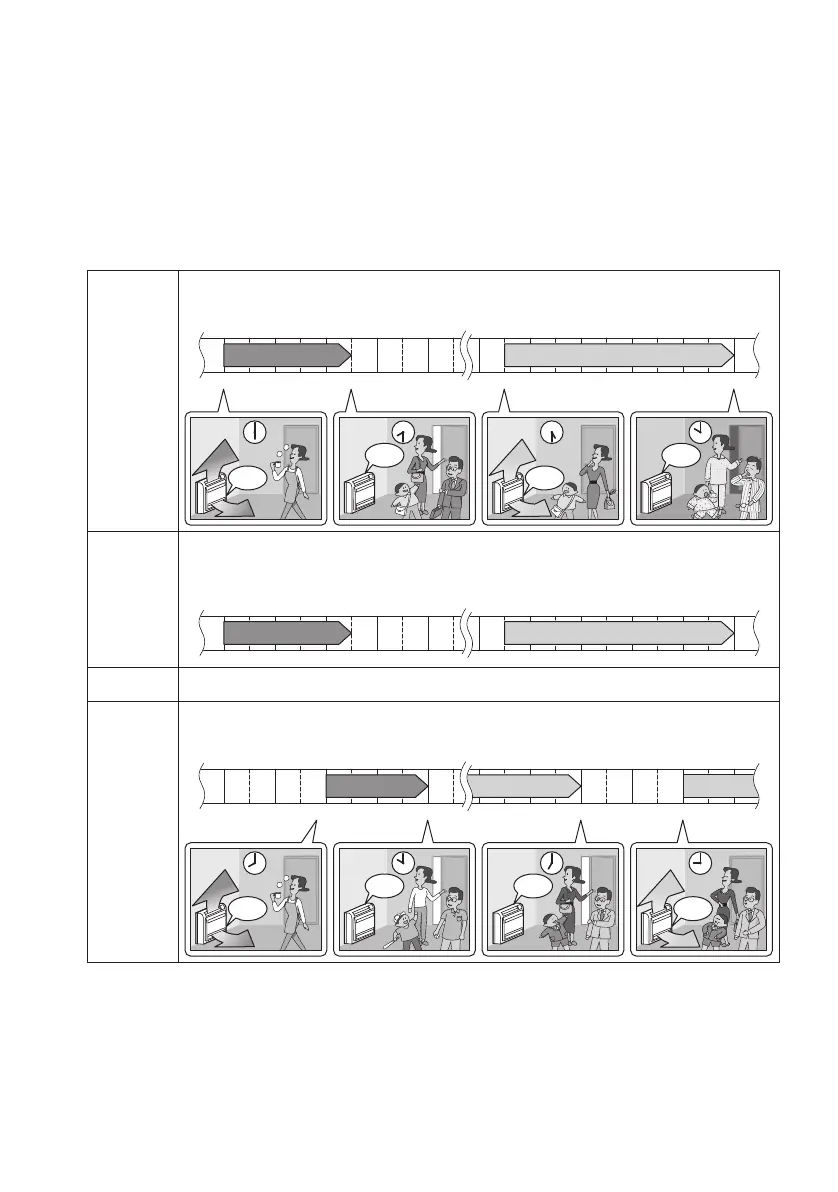
An example of WEEKLY TIMER settings is shown below.
6:00 8:30 17:30 22:00
25°C 27°C
6:00 8:30 17:30 22:00
25°C 27°C
8:00 10:00 19:00 21:00
27°C 27°C25°C
Example:
The same timer settings are made for the week from Monday through
Friday while different timer settings are made for the weekend.
• Up to 4 reservations per day and 28 reservations per week can be set in the WEEKLY TIMER.
The effective use of the copy mode ensures ease of making reservations.
• The use of ON-ON-ON-ON settings, for example, makes it possible to schedule operating mode
and set temperature changes. Furthermore, by using OFF-OFF-OFF-OFF settings, only the
turn-OFF time of each day can be set. This will turn OFF the air conditioner automatically if the
user forgets to turn it OFF.
Make timer settings up to programs 1-4. (see page 22.)
[Monday]
No timer settings
[Saturday]
Make timer settings up to programs 1-4. (see page 22.)
[Sunday]
Use the copy mode to make settings for Tuesday to Friday, because
these settings are the same as those for Monday. (see page 24.)
[Tuesday]
to
[Friday]
Program 1 Program 2 Program 3 Program 4
ON OFF ON OFF
Program 1 Program 2 Program 3 Program 4
ON OFF ON OFF
ON OFF OFF ON
Program 1 Program 2 Program 3 Program 4
OFF
OFF OFF
OFF
27°C
27°C
ON
25°C
25°C
ON
ON
25°C
25°C
ON
27°C
27°C
3PEN477071-1A.book Page 21 Thursday, March 30, 2017 1:28 PM




 To Next Page