If the width is longer than the left end of the printable area +
n1+256*n2, the width is set to the width of the whole printable area
minus the left end of the printable area. The printable area is
expanded to right to hold the last symbol.
40. (1) GS k m [ d ] k NUL
(2) GS k m n [ d ] k
Print a bar code
[Code] (1) [1Dh] + [6Bh] + m + Di + [00h]
(2) [1Dh] + [6Bh] + m + n + Di
[Range] (1) {0 <= m <= 6}
(2) {65 <= m <= 73}
[Outline] Prints a bar code.
The beginning of line is considered as the next printing start
position.
Depending on the value of m, the following bar code can be
selected.
d id the bar code data to be printed and k indicates the number of
characters to be printed.
n indicates number of characters when 65 <= m <= 73.
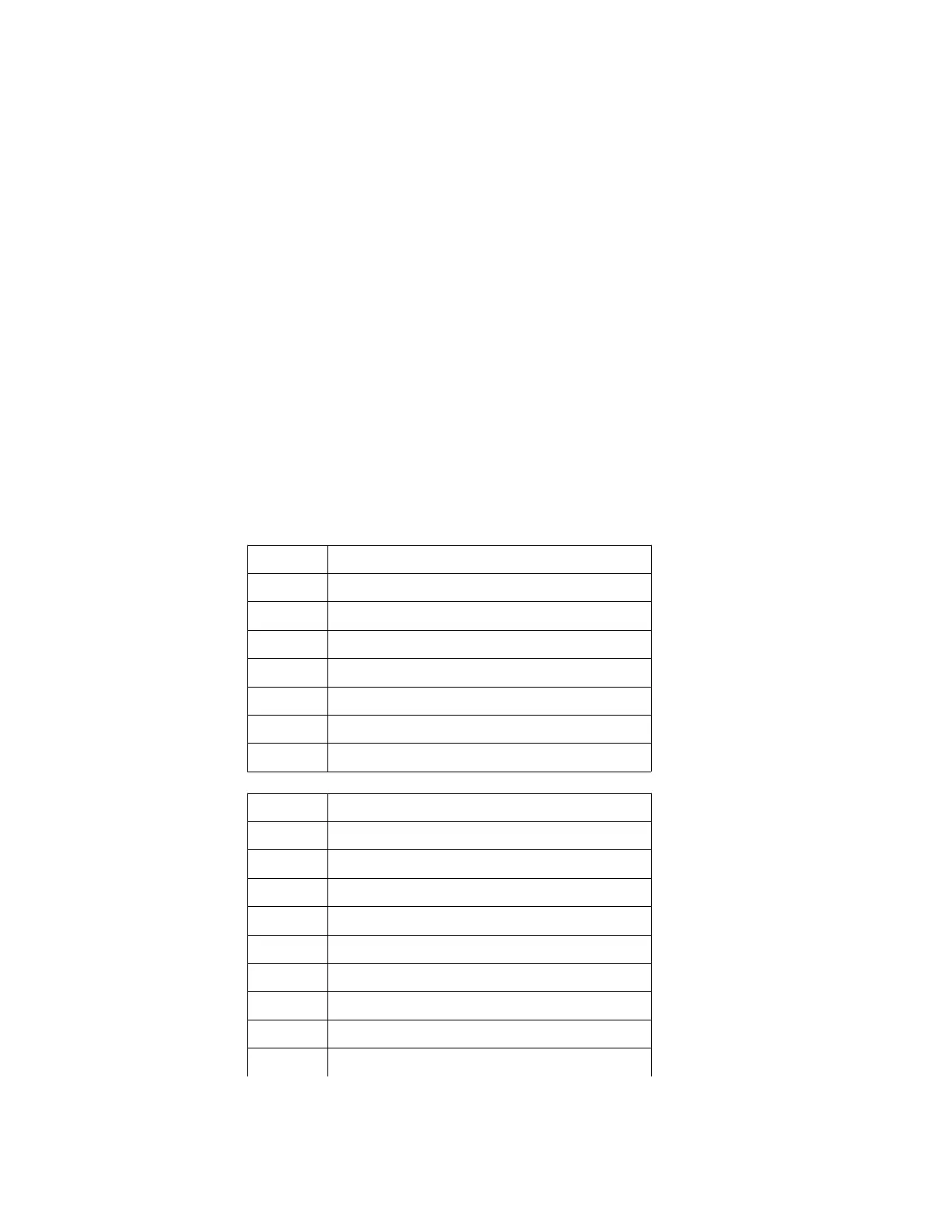
m determines bar code type:
m (1) Barcode Type
0 UPC-A
1 UPC-E
2 EAN 13 (JAN 13)
3 EAN 8 (JAN 8)
4 CODE 39
5 2OF5 INTERLEAVED
6 CODEBAR
m (2) Barcode Type
65 UPC-A
66 UPC-E
67 EAN 13 (JAN 13)
68 EAN 8 (JAN 8)
69 CODE 39
70 2OF5 INTERLEAVED
71 CODEBAR
72 CODE 93
73 CODE 128 (AUTO)


 To Next Page