GB
144
4. Parameter-setting
4.1 Setting the parameters of a receiver recognised by a control panel
IMPORTANT
• Before setting the receiver’s parameters, recognition programming must first be performed (see 3.1 Programming a receiver to be
recognised by the control panel).
• All parameter-setting must be performed using TwinLoad
®
software available in the Daitem installers section at www.daitem.co.uk.
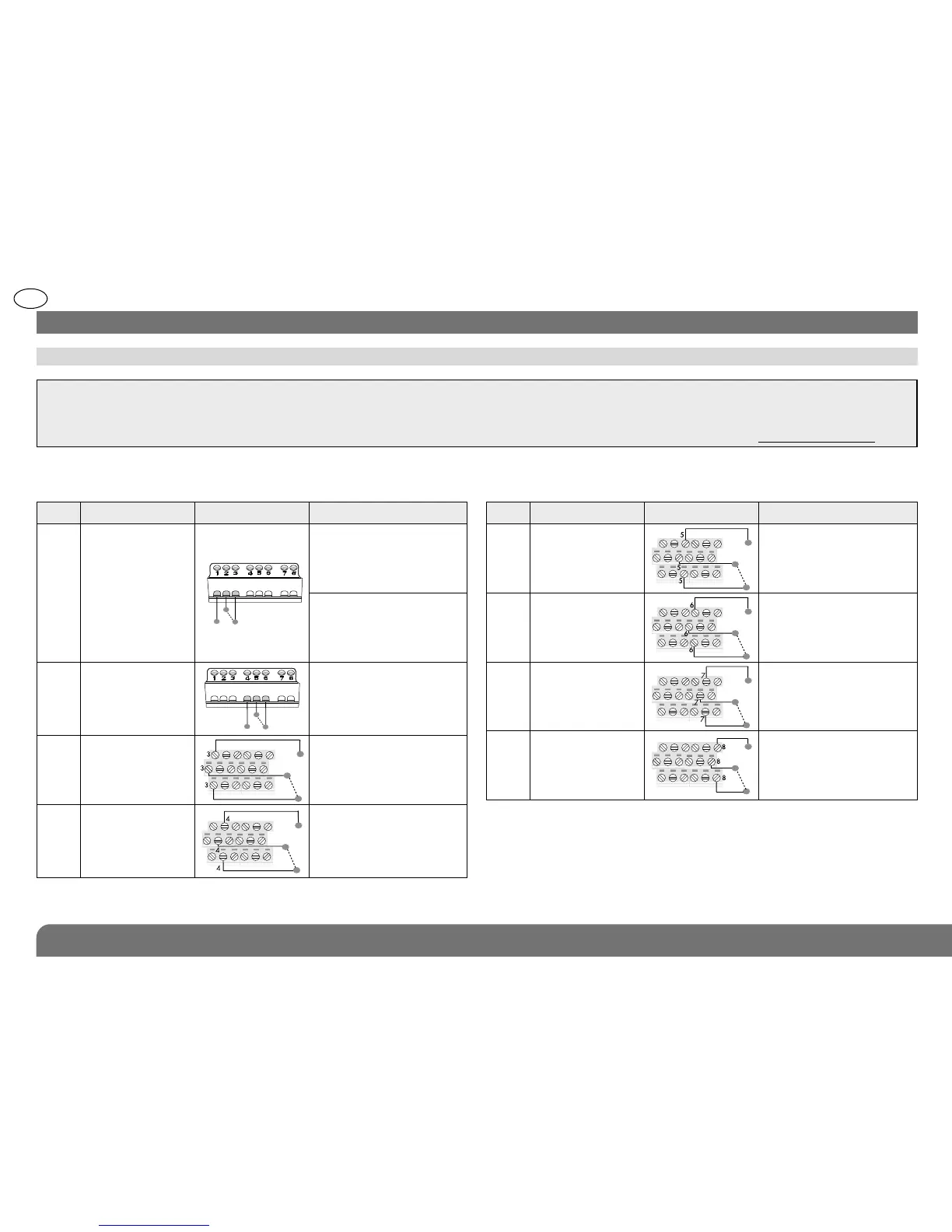
Output Description
Contact in rest position
Operation
1
Disarming (NC)
and Total Arming
(NO):
On/Off mode
NO
C
NC
NC-C contact closes
when Disarming signal
received from control
panel
NO-C contact closes
when Arming signal
received from control
panel
2
Light control:
On/Off mode
NO
C
NC
NO-C contact closes when
Light On channel received
and NC-C contact closes
when Light Off channel
received.
3
Anti-tamper:
NO/NC 1.3 s
pulse mode (1)
NO
C
NC
NO-C contact closes
when anti-tamper
signal received
from control panel
4
Single or
confirmed
intrusion:
NO/NC 1.3 s
pulse mode
NO
C
NC
NO-C contact closes
when single or confirmed
intrusion signal received
from control panel
Output Description
Contact in rest position
Operation
5
Fire alarm:
NO/NC 1.3 s
pulse mode
NO
C
NC
NO-C contact closes
when Fire signal
received from control
panel
6
Technical
alarms:
NO/NC 1.3 s
pulse mode
NO
C
NC
NO-C contact closes
when Technical alarm
signal received from
control panel
7
Individual
protection:
NO/NC 1.3 s
pulse mode
NO
C
NC
NO-C contact closes
when alert or silent alarm
signal received from
control panel
8
Power fault:
NO/NC 1.3 s
pulse mode (2)
NO
C
NC
NO-C contact closes
when power fault signal
received from control
panel
(1) Activation of system device anti-tamper protection against opening
and/or removal of receiver box or break in receiver anti-tamper loop.
(2) • Power fault in system device or control panel: NO/NC 1.3 s pulse mode.
• Power faul of receiver external power supply: NO-C contact closes.
When the receiver has been programmed for recognition by a control panel, the outputs are factory programmed to operate as
follows:


 To Next Page