ENGLISH
56
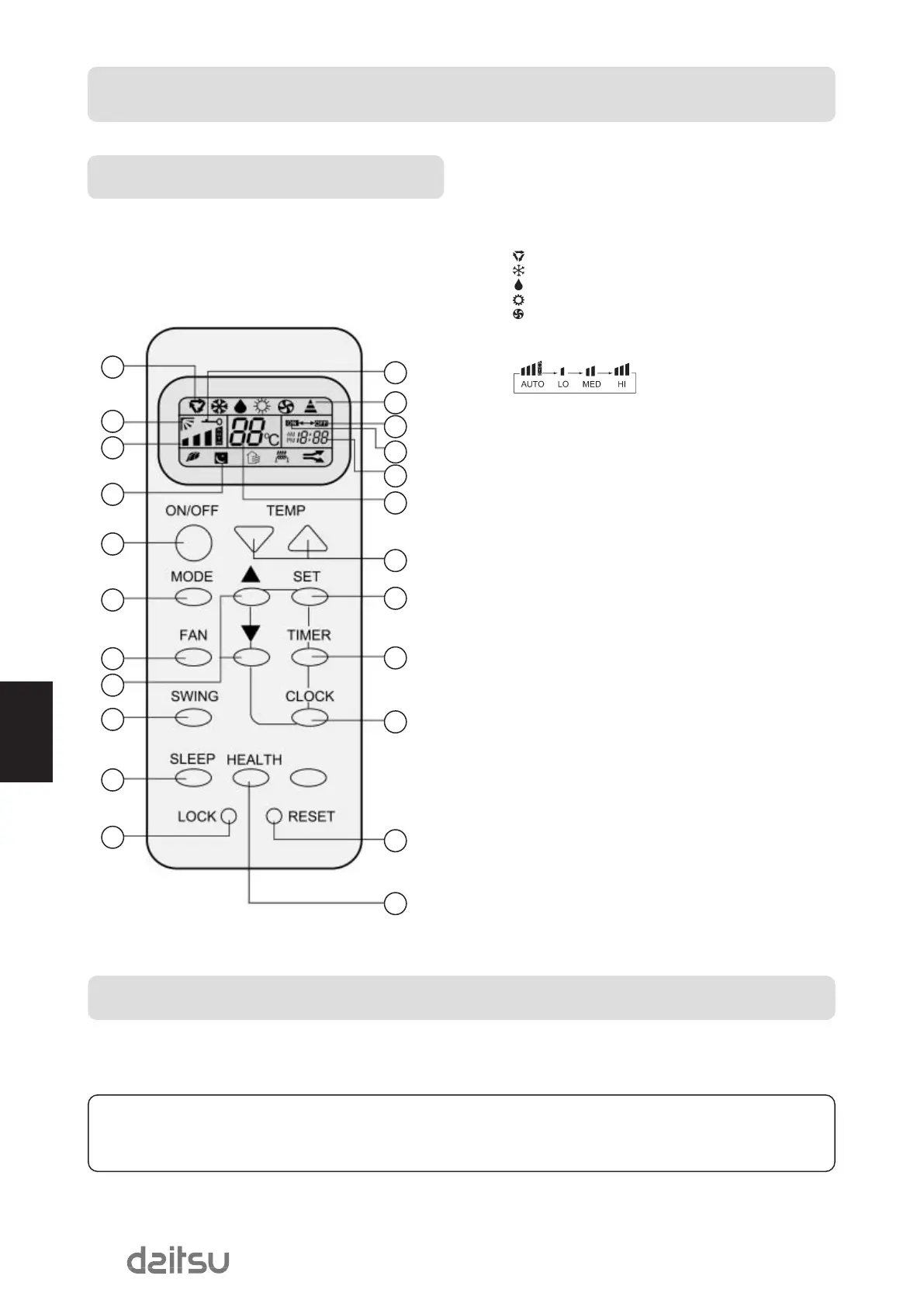
1- Mode display.
AUTO
COOL
DRY
HEAT
FAN
2- SWING display.
3- FAN SPEED display.
4- SLEEP display.
5- LOCK display.
6- SIGNAL SENDING.
7- TIMER OFF display.
8- TIMER ON display.
9- CLOCK display.
10- TEMP display.
11- POWER ON/OFF.
Used for unit start and stop.
12- MODE.
Used to select AUTO run, COOL, DRY, HEAT and FAN
operation.
13- FAN.
Used to select fan speed LO, MED, HI, AUTO.
14- HOUR.
Used to set clock and timer setting.
15- SWING.
Used to set auto fan direction.
16- SLEEP.
Used to select sleep mode.
17- LOCK.
Used to lock buttons and LCD display.
18- TEMP.
Used to select your desired temp.
19- SET.
Used to confirm timer and clock settings.
20- TIMER.
Used to select TIMER ON, TIMER OFF, TIMER ON-OFF.
21- CLOCK.
Used to set correct time.
22- RESET.
Used to reset the controller back to normal condition.
23- HEALTH.
Used to set healthy operation.
1
5
6
7
8
9
10
18
19
20
21
22
23
2
3
4
11
12
13
14
15
16
17
Hints
After replacing with new batteries, remote controller will conduct self-check, displaying all information on LCD. Then, it will
become normal.
Brief introduction to health operation
The anion generator in the air conditioner can generate a lot of anion to effectively balance the quantity of position and anion in the
air and also to kill bacteria and speed up the dust sediment in the room and finally clean the air in the room.
Note: Cooling only unit do not have functions and displays related with heating.
Operation Buttons and display of the remote controller
If the unit which you purchased has healthy function, Remote controller should like the following figur
PARTS AND FUNCTIONS
MUsECO410DaEng 16/11/07 13:52 Página 56


 To Next Page