Ajout de l’appar
eil
Il y a 3 méthodes en ma
tière d’ajout de l’appareil.
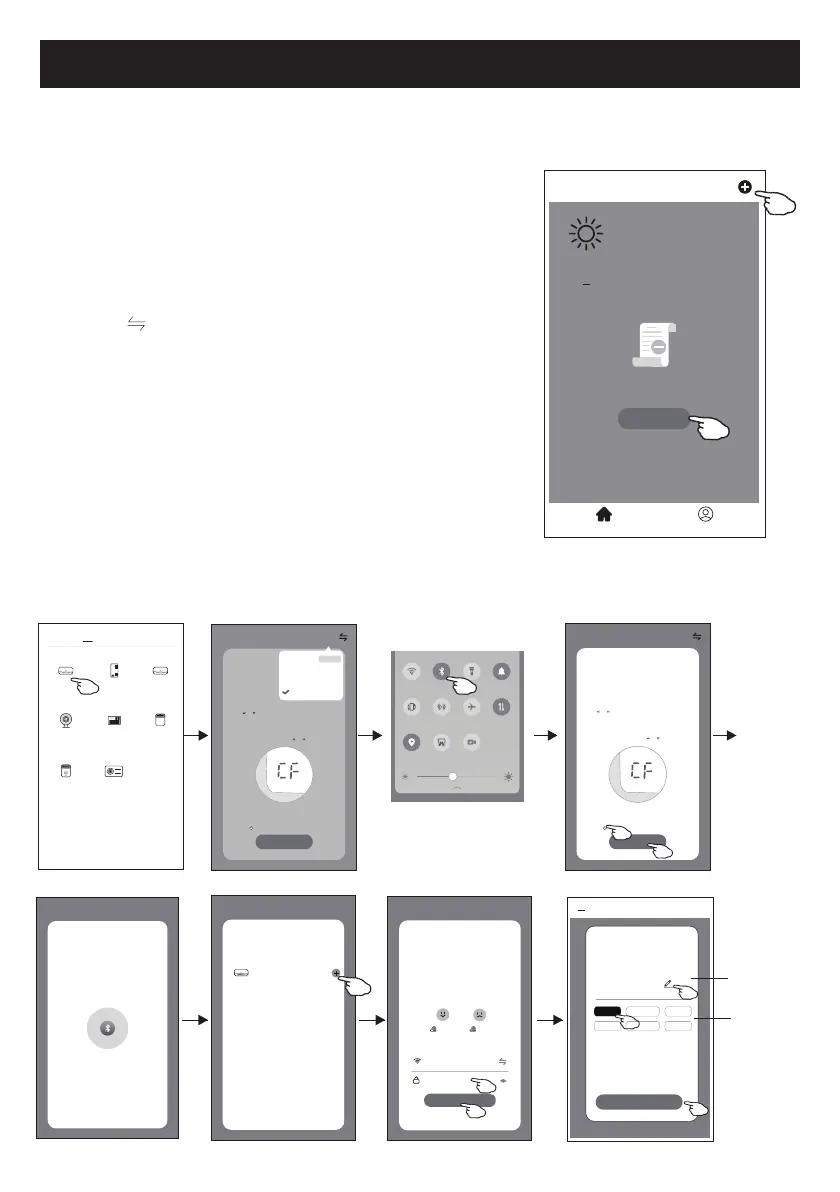
3-Mode de Bluetooth
1. Démarre
z l'unité intérieure, ce qui n’est pas nécessaire pour le
climatiseur
2. Cliquez sur « + » dans le coin su
périeur droit de l'écran «
Home
(Accueil) » ou cliquez sur « Add device (Ajout de l’
appareil)
»
dans la pièce sans appareil.
3. Appuye
z sur le logo «
Air condit
ioner (Climatiseur) (BT+Wi-Fi)
».
4. Assure
z-vous que la fonction Blue tooth de votre smartphone
est disponible.
5. Cliquez dans le c
oin supérieur droit et choisissez
« Bluet
ooth
», puis suive
z les instruction sur l'écran pour
réinitialiser le module Wi-Fi, puis c
ochez «
Confirm the blue
tooth is r
eset (Confirmer la réinitialisation de bluetooth)
» et
cliquez sur « Nex
t (Suivant)
».
6. Sélectionnez l
'un des appareils trouvés et cliquez sur «
+ »
7. Saisissez le mot de passe de Wi-Fi qui es
t pareil avec celui de
votr
e smartphone, puis cliquez sur «
Nex
t (Suivant)
».
8. Vous pouv
ez voir le pourcentage du processus de connexion, et
en même temp
s
« PP », « SA », « AP » s'af
fichent tour à tour sur l'écran intérieur.
« PP » signifie « Recher
che du routeur en cours
»
« SA » signifie « connect
é au routeur
»
« AP » signifie « connect
é au serveur
»
<
Welcome Home
Set your home locaon for more
informaon
All Devices Living Room
Master
...
Add Device
Home Me
Work office
<
No devices
Select 2.4 Ghz
Wi-Fi Network and
enter password
Next
Cancel
If your Wi-Fi is 5GHz, please set it to
bo 2.4GHz.Common router seng
method
2.4GHz 5GHz
*******
Password
Help
Select Device to Add
Next
Cancel
Air condioner
WLAN
Bluetooth
Flashlight
Sound
Auto-rotate
Huawei Share
Airplane
mode
Mobile data
Locaon
Screenshot
Screen
Recorder
<
Add Manually
Auto Scan
Dehumidifier
Air Condioner
(BT+Wi-Fi)
Fresh Air
Purifier
Split Air
Conditioner
Window Type
Air Condioner
Portable Air
Conditioner
Security
Camera
Swimming
Pool H/P
AP Mode
Reset the devLFHILUVW
Method1:When there is a DISPLAY key on the
remote control, press the DISPLAY key 6 times
in the me of 8 seconds; when there is no
DISPLAY key on the remote control, press the
ECO key 6 mes in the me of 8 seconds unl
the device beeps twice and the LCD screen
show CF .
Next
Cancel
Confirm the device is reset.
Reseng Devices
<
Method2:Press the General key 9 mes in the
me of 8 seconds unl the device beeps twice
and the LCD screen show CF .
CF Mode
AP Mode
Bluetooth
Default
CF Mode
Reset the device first.
Method1:When there is a DISPLAY key on the
remote control, press the DISPLAY key 6 mes
in the me of 8 seconds; when there is no
DISPLAY key on the remote control, press the
ECO key 6 mes in the me of 8 seconds unl
the device beeps twice and the LCD screen
show CF .
Next
Cancel
Confirm the device is reset.
Reseng Devices
<
Method2:Press the General key 9 mes in the
me of 8 seconds unl the device beeps twice
and the LCD screen show CF .
Help
Bluetooth Search
The search process may take up to
two minutes. Please do not perform
any operaons during this me.
Next
Cancel
Scanning nearby devices...
Add Device
<
Device added
successfully
Sample1
Living Ro...
Dining R...
Master Be... Second B...
Kitchen Study Ro...
Done
Renomme
z
l'appareil
Sélectionnez
la salle de
localisation



 To Next Page