EasyManua.ls Logo

Daitsu DS-9KTP - Account Management

Daitsu DS-9KTP
184 pages
Print Icon
To Next Page IconTo Next Page
To Previous Page IconTo Previous Page
Loading...
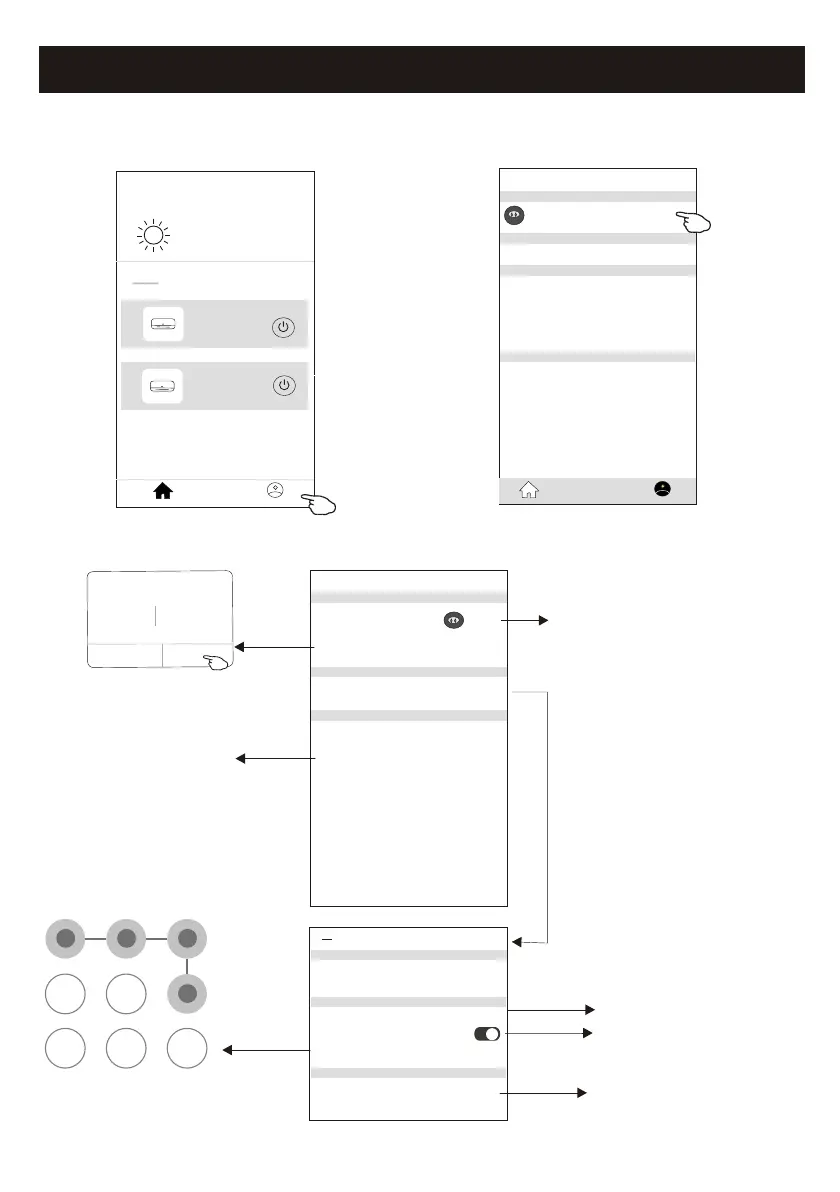
Account management
29
<<
my home
+
>
Set your home location, get more
information
Welcome home
V
All Devices
Living Room
room
Master Bed
...
Home
Me
Sample1
Sample2
Turned off
Already On
Profile
Nick name >
Account******
Message Center >
Help Center >
More Services >
Settings >
Home Management >
Home
Me
Account Profile setting
Profile
Profile Picture >
Account Security >
Time Zone Universal >
Nickname ******** >
Select a picture for the
account from local album
Edit name
Cancel Save
Account one
Select the time zone
Change the nick
name of your account
Account Security
Phone Number ********
Change Login Password >
Deactivate Account >
Location China
<
Pattern Unlock
Change Pattern Password >
Change the password
like reset password on page7
Please carefully to
deactivate the account
for all data will be deleted.
Set a pattern password
for launching the APP
Tap the switch to enable
or disable the Pattern password

Related product manuals