Air conditioner control
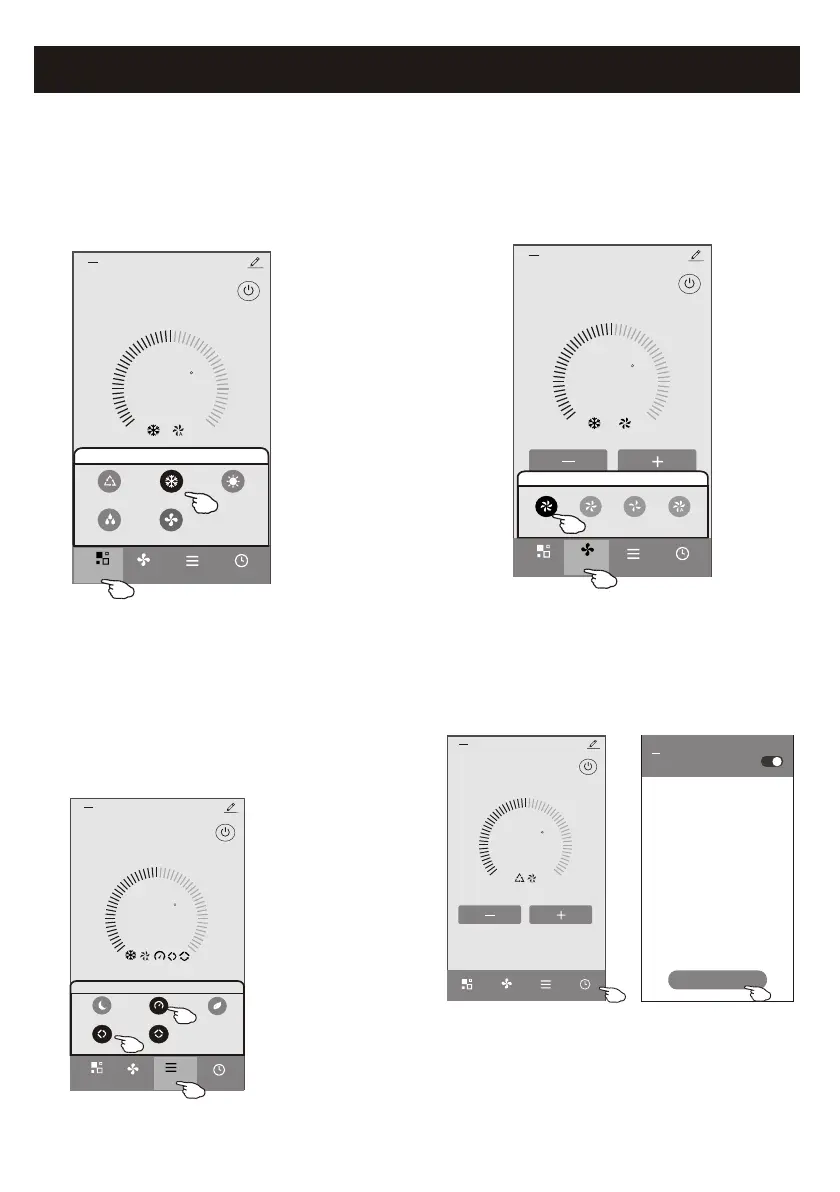
Control form1-Mode setting
1. Tap Mode to pop up the Mode screen.
2. Select one of the mode Feel/Cool/Heat/Dry/Fan.
3. Tap anywhere around the setting temperature to
cancel the Mode setting.
23
C
Set Temperature
Timer
Function
Fan
Sample2
<
Mode
FanDry
Feel
Cool Heat
Mode
Control form1-Select fan speed
23
C
Set Temperature
Timer
Function
Sample2
<
Mode
Fan
Fan
Med Low Auto
High
1. Tap Fan to pop up the Fan screen.
2. Select one of the fan speed High/med/Low/Auto.
3. Tap anywhere around the setting temperature to
cancel the selection.
14
Control form1-Function setting
1. Tap Function to pop up the Function screen.
2. Select one of the functions Sleep/Turbo/ECO.
3. Select UP-DOWN/LEFT-RIGHT for auto swing
with direction of UP-DOWN/LEFT-RIGHT.
4. Tap anywhere around the setting temperature
to cancel the Function setting.
23
C
Set Temperature
Timer
Fan
Sample2
<
Mode
Function
UP-DOWN
LEFT-RIGHT
Turbo
Sleep
ECO
Function
Control form1-Timer adding
1. Tap Timer to pop up the Add Timer screen.
2. Tap Add Timer.
23
C
Set Temperature
Timer
Function
Fan
Mode
Sample2
<
WLAN
<<
Add Timer
Add timer



 To Next Page