Air conditioner control
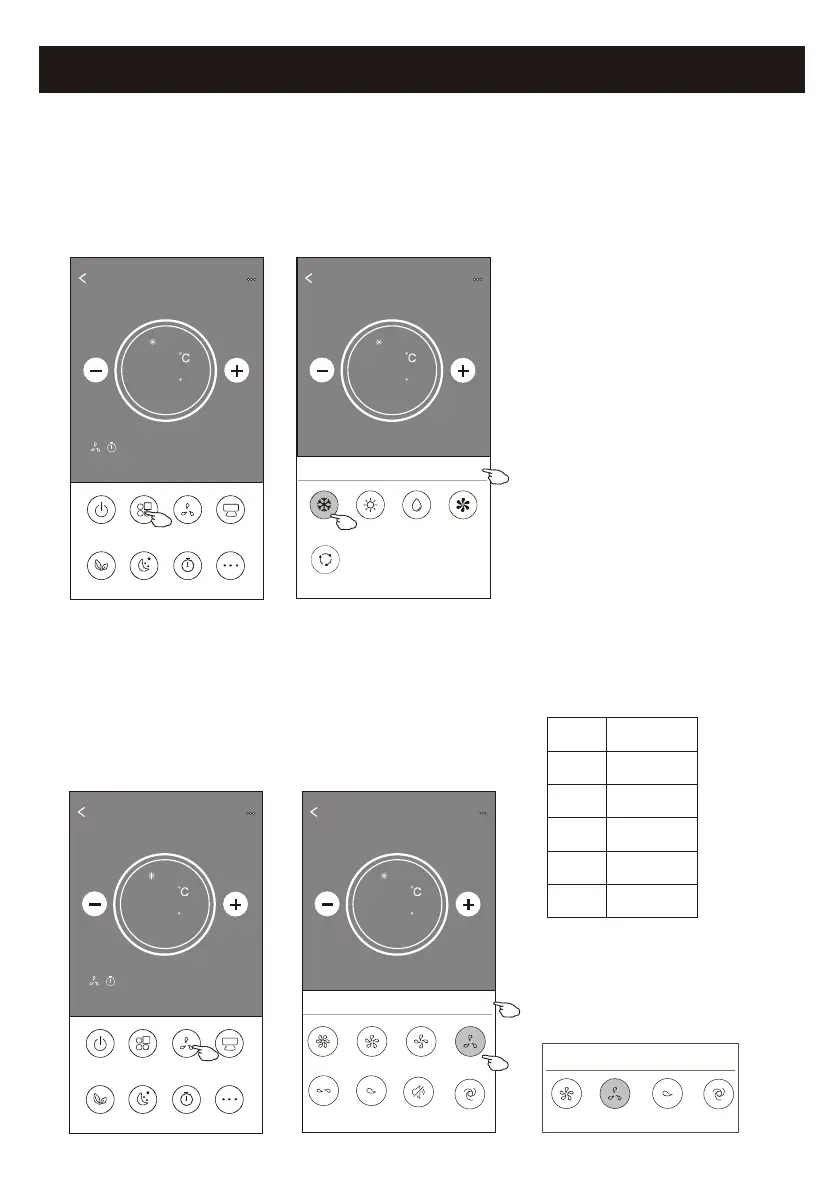
1. Tap the Mode button.
2. There are 5 modes on the Mode screen, tap one button to
set the Air conditioner working mode.
3. Tap the X button to back the main control screen.
4. The mode and background will change on the screen.
ON/OFF
Fan Speed
Precision
Air Flow
More
Eco Sleep
Mode
Timer
Sample1
25
Cool
0
Back
Sample1
25
Cool
0
Cool
Dry
Fan
Heat
Auto
Mode
X
Note: please read the details of each mode
in the user manual to control more comfortable.
ON/OFF
Fan Speed
Precision
Air Flow
More
Eco Sleep
Mode
Timer
Sample1
25
Cool
0
1. Tap the Fan speed button.
2. Choose your desired fan speed and tap it.
3. Tap the X button to back the main control screen.
4. The selected fan speed indicator will appear on the screen.
Back
Sample1
25
Cool
0
Turbo
Mid-High
Mid
high
Fan Speed
X
Mid-Low
Mute
Auto
Low
Mode Fan Speed
Cool
Fan
Dry
Heat
Auto
All speeds
All speeds
All speeds
All speeds
17
Note: Fan Speed screen may appear slightly different ,
depending on the air conditioner model.
Example as below:
Mid
high
Fan Speed
X
Auto
Low
Note:
Fan Speed can't be adjusted on Dry mode .
Control form2-Mode setting
Control form2-Fan speed selection



 To Next Page