Air conditioner control
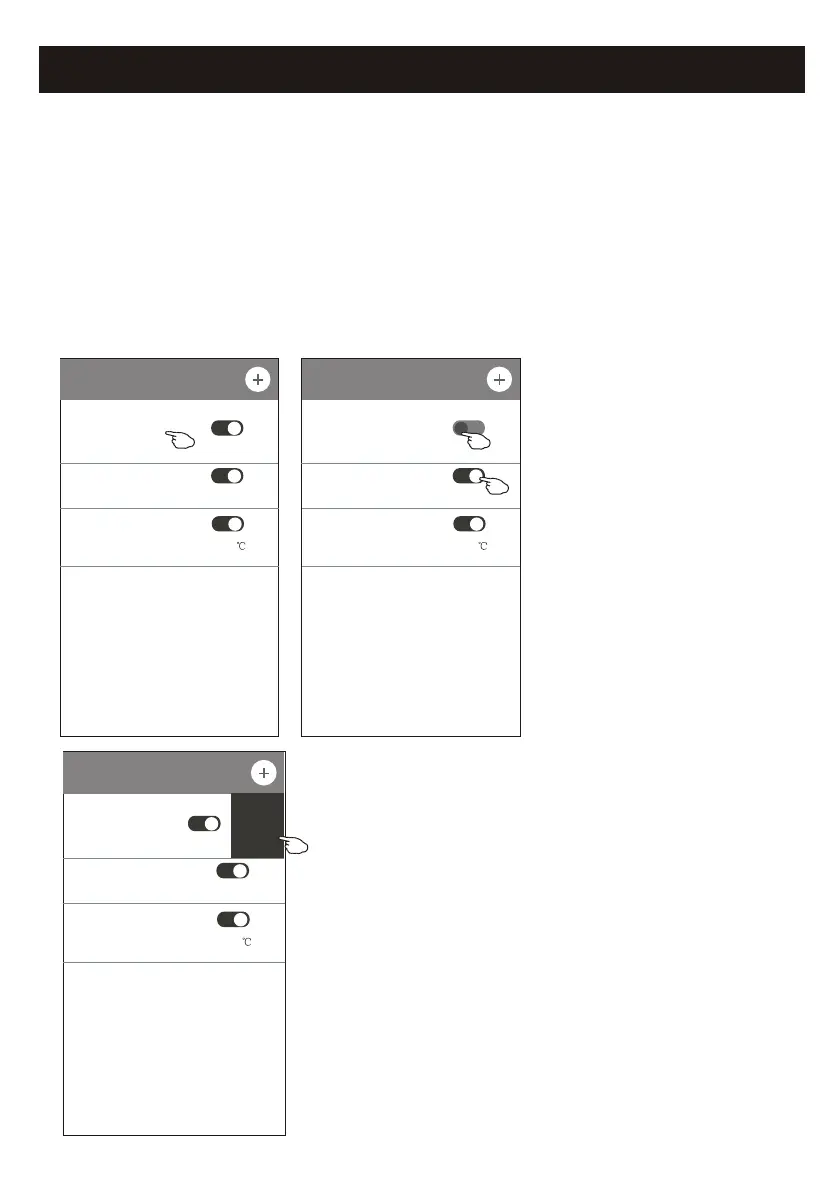
1.Change the Timer setting:
Tap anywhere of the timer list bar except the switch bar to get into the Timer
setting screen, change the setting and then tap save.
2.Enable or Disable the Timer:
Tap the left of the switch to disable the Timer.
Tap the right of the switch to enable the Timer.
3.Delete the Timer:
Slide the list bar of the Timer from right to left until Delete button appear,
then tap delete.
< Timer
16:19
ON,Cool,Mid,Up-Down Swing 25 ,M...
21:29
OFF, Weekday
04:30
OFF
23
< Timer
16:19
ON,Cool,Mid,Up-Down Swing 25 ,M...
21:29
OFF, Weekday
04:30
OFF
Slid left to disable the Timer.
Slid right to enable the Timer.
< Timer
16:19
ON,Cool,Mid,Up-Down Swing 25 ,M...
29
kday
04:30
OFF
Delete
Control form2-Timer management



 To Next Page