28
Control de aire acondicionado
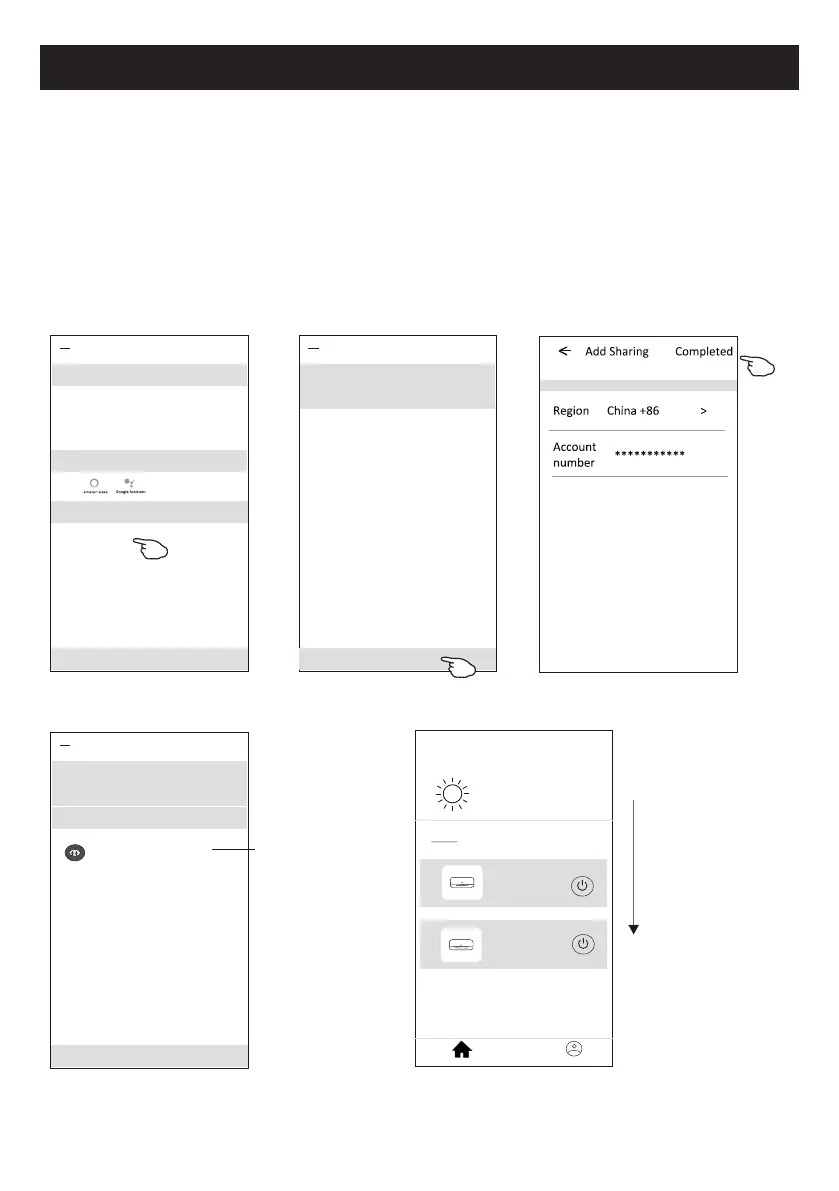
1. Pulse "Device Sharing" y aparece la pantalla para compartir dispositivos.
2. Pulse "Add Sharing".
3. Seleccione la región e introduzca la cuenta que desea compartir
.
4. Pulse "Completed", la cuenta aparecerá en su lista de compartición.
5. Los miembros de uso compartido recibidos deben mantener presionada la pantalla Home y
deslizar hacia abajo para actualizar la lista de dispositivos, y el dispositivo aparecerá en la
misma lista.
Mantenga
presionada la barra
por unos 3s y luego
puede eliminar
la cuenta de uso
compartido.
Mantenga pulsado y
deslice hacia abajo
para actualizar la
lista de dispositivos
Detalles de dispositivo y gestión
¿Cómo compartir el dispositivo con otras cuentas?
<
Details of device
Adding sharing
It is recommended to set permanent resident as family
member to control the device Family Settings
Sharing List
Alias name1
************
my home
+
>
Set your home location, get more
information
Welcome home
V
All Devices
Living Room
room
Master Bed
...
Home
Me
Sample1
Sample2
Turned off
Already On
<
Details of device
Information
Remove Device
Supported Third-part Control
Others
Modify Device Name *** >
Device Location Dining Room >
Check Device Network Check Now >
Device Sharing >
Create Group >
Device Info >
Feedback >
Check for Firmware Update >
<
Details of device
Adding sharing
It is recommended to set permanent resident as family
member to control the device Family Settings



 To Next Page