13
MAN# 650665:A
OIL PSI Engine oil temperature setup menu
• Only valid when optional SEN-1039 pressure sender is purchased from Dakota Digital.
• When “>OIL PSI” is displayed, press and hold the switch until “RELEASE” is displayed, and release.
• The options are “ON”, “OFF”, and “BACK”.
• To enable oil PSI, move focus to “>ON”, press and hold the switch until “RELEASE” is displayed, and release.
• The selections will be “LOW WARNING”, “TEST” and “BACK”.
• Press and release the switch to change the selection, press and hold the switch to select it.
Low warning Low oil pressure warning setup
• When “>LOW warning” is displayed, press and hold the switch until “RELEASE” is displayed, and release.
• The low pressure options will range from 0 to 30 PSI.
• Press and release the switch to change the change the low oil pressure warning point.
• To exit, press and hold the switch until “RELEASE” is displayed, and release.
TEST Voltage test
• When “>TEST” is displayed, press and hold the switch until “RELEASE” is displayed, and release.
• The display will give a voltage return from the sender with 0.5 volts at zero PSI.
• 0.0 volts means the sensor is not connected.
• To exit, press and hold the switch until “RELEASE” is displayed, and release.
• Exit setup.
VOLT Low voltage warning setup
• When “>VOLT” is displayed, press and hold the switch until “RELEASE” is displayed, and release.
• The low voltage warning points will range from 9.0 to 12.1 volts.
• Press and release the switch to change the low voltage warning point.
• Press and hold the switch until “RELEASE” is displayed, and release.
• Exit setup.
DISPLAYS Message display option menu
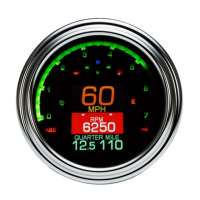
Refer to graphic on page 7 for indicator and message locations.
• When “>DISPLAYS” is displayed, press and hold the switch until “RELEASE” is displayed, and release.
• The display will show “MESSAGE TOP”, “MESSAGE BTM”, “MBMs”, or “BACK”.
• Press and release the switch to change the selection, press and hold the switch until “RELEASE” is displayed, and release.
MESSAGE TOP Top message screen information
• When “>MESSAGE TOP” is displayed, press and hold the switch until “RELEASE” is displayed, and release.
• The selectable options are “PERFORM HIDE”, “PERFORM SHOW”, and “BACK”.
• Push and release the switch to select the option, press and hold the switch until “RELEASE” is displayed, and release.
• PERFORM HIDE: does not allow any performance option displays to be show while riding.
• PERFORM SHOW: turns on the following options, which can toggled through while riding.
o HIGH Speed (MPH – km/h), 0-60 time, ¼ mile speed with ¼ mile time, and HIGH RPM.
• Press and release the switch to change the change the option.
• Press and hold the switch until “RELEASE” is displayed, and release.
• Exit setup.
BTM MESSAGE Bottom message screen information
• When “>MESSAGE BTM” is displayed, press and hold the switch until “RELEASE” is displayed, and release.
• The selectable options are “PERFORM HIDE”, “PERFORM SHOW”, and “BACK”.
• Push and release the switch to select the option, press and hold the switch until “RELEASE” is displayed, and release.
• PERFORM HIDE: does not allow any performance option displays to be show while riding.
• PERFORM SHOW: turns on the following options, which can be toggled through while riding.
o HIGH Speed (MPH – km/h), 0-60 time, ¼ mile speed with ¼ mile time, and HIGH RPM.
• Press and release the switch to change the change the option.
• Press and hold the switch until “RELEASE” is displayed, and release.
• Exit setup.
MBMS Display which MBMs are connected and adjust warnings
If a pressure or boost sensor is not connected or failed, the display will show “FAIL”, “TOO LOW”.
If no MBM is attached but the display shows a blank value, click through the displays to remove it.
• When “>MBMs” is displayed, press and hold the switch until “RELEASE” is displayed, and release.
• The screen display what MBM modules are attached and more than one input if it exists.
• The screen will show “NONE” if there are no MBMs present.
• Press and release the switch to move through the MBMs attached.
• Press and hold the switch until “RELEASE” is displayed on the MBM setting to modify.
o See the separate MBM manual for additional details.
• Exit Setup.


 To Next Page
 Loading...