4 MAN# 650666:A
Programming, clock set
FUNCTION SWITCH
The factory trip reset switch on the side of the dash panel or back of the gauge cup is used as the main function switch.
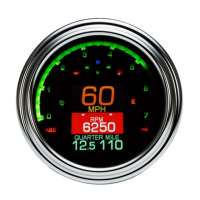
During normal operation the function switch allows access to information including mileage, RPM, and performance
information which is located within two message locations on the gauge. The message locations have arrows indicating
which message location is currently selected, or in focus. Press and release the function switch to change the displayed
information.
If you would like to change focus to another location, press and hold the function switch; you’ll see a status bar labeled
“MOVE FOCUS” filling. Once the status bar is filled, “RELEASE TO MOVE” will be displayed below; if the data in the
selected location can be reset, such as a tripmeter, the bar will be emptying with “HOLD TO CLEAR” displayed above.
Release the switch before the bar empties and the next line of information will be in focus, illustrated by arrows on each
side. Focus alternates top and bottom.
To clear or reset information such as Trip A, Trip B or performance readings, press and hold the function switch until you
see the status bar filling. Continue to hold the switch as the bar empties and then displays “HOLD TO CLEAR”. Hold until
you see “RELEASE” displayed above the status bar. The information will now be reset.
If the function switch is pressed while the key is in the off position, the clock and odometer will be displayed.
SETTING THE CLOCK
The clock uses a 12 hour format and can be set by holding the function switch while the focus arrow is next to the clock. If
the clock is not shown, tap the function switch until it appears; keep in mind you may need to move to another message
location.
Hold the switch until “RELEASE” is displayed; the hours will begin flashing. Tap switch to change the hours, hold the
switch to move to the minute set and the minutes will begin flashing. Tap the switch to change the minutes; hold the
switch to save and exit the clock set mode.
FACTORY RESET
In the event you would like to start over with your settings, preferences and display locations, there is a reset option which
will revert all settings back to the out-of-the-box configuration. This includes message locations, color selections and
speedometer calibration but DOES NOT include the odometer.


 To Next Page