6 MAN# 650666:A
Setup
PRESS AND HOLD FUNCTION SWITCH WHILE TURNING IGNITION ON. Release the switch.
For speed calibration: HOLD THE FUNCTION SWITCH WHILE STARTING THE BIKE
Press and release the switch to move through the different setup menus.
Press and hold the switch to enter a setup menu.
Press and hold to save an option, also.
Current selections within a sub menu are denoted with an asterisk (*).
Exiting Setup
At the end of every setup section, steps must be taken to properly exit the setup and return to normal operation.
When a section in this manual says “Exit setup”, please refer to these steps.
• Press and release the function switch until you see “>BACK”.
• Press and hold the switch until you see “RELEASE”, and release the switch.
• Press and release the function switch until you see “>EXIT MENU”.
• Press and hold the function switch until you see “RELEASE”, then release the switch.
BLUETOOTH Bluetooth menu
• This is diagnostic section when using the app for your smartphone or tablet.
• The app can aid in setup and also read real time data on your smartphone or tablet.
• When “>BLUETOOTH” is displayed, hold until “RELEASE” is displayed, and release the switch.
o Under the word SETUP the Bluetooth ID will be shown.
o For Android users, this is the ID that you pair to, in Settings/Bluetooth, prior to opening the app.
• The Bluetooth menu options are: “STATUS CHECK”, “OFF”, “SETUP ONLY”, “ALWAYS ON”, “RESET”, “BACK, and “EXIT”.
• STATUS CHECK: Shows the unit is either “WAITING” for connection or “CONNECTED” with the app.
• OFF: turns off the Bluetooth.
• SETUP ONLY: Bluetooth is only active in setup.
• ALWAYS ON: default mode, works for setup and for real time readings on your smartphone or tablet.
• RESET: resets the Bluetooth options to default, useful if pairing is a problem.
LIGHTING Lighting menu for color changes
• When “>LIGHTING” is displayed, press and hold the switch until “RELEASE” is displayed, and release the switch.
• The color menu options are “COLOR THEMES”, “SET ALL COLOR”, ”DISPLAY COLOR”, ”LABEL COLOR”, “MESSAGE COLOR”,
“BAR COLOR”, “WARNING COLOR”, “DIMMING” , “SUNLIGHT”, “RESET” or “BACK”.
• Since the color options are so expansive the selection process is the same in all sections.
o Press and release the switch to change the selection.
o Hold the function switch to enter the selected setup menu, until “RELEASE”, and release the switch.
o The display will show the available options. Press and release the switch to move through the available options.
▪ An asterisk* will appear next to the option indicating it’s set as the current setting.
o Press and hold to select an option, until “RELEASE” is displayed.
o Exit setup.
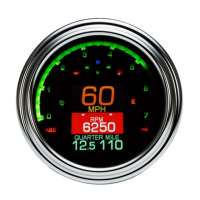
• COLOR THEMES: offers preset colors for the LCD color, label colors, message colors, tach bar, and tach warning.
• SET ALL COLOR: can set the entire gauge to one of 31 color choices.
• DISPLAY COLOR: independently sets the speed color to one of 31 color choices.
• LABEL COLOR: independently sets the MPH or km/h label color to one of 31 color choices.
• MESSAGE COLOR: independently sets the message area, (below the speed readout), color to one of 31 color choices.
• BAR COLOR: independently sets the color of the tach bar, up to the warning point, to one of 31 color choices.
• WARNING COLOR: independently sets warning point (high RPM) color to one of 31 color choices.
• DIMMMING: offers two options, AUTOMATIC night dimming, or “OFF”.
• SUNLIGHT: special feature to enhance viewing of the TFT LCD in bright daylight with a high contrast display.
This works independently from the night dimming
If enabled, this will temporarily override the color choices made, to offer a visible display during the day.
The color will revert back when the sunlight is less intense, (light overcast days can trigger this mode).
o NORMAL: in daylight the background will stay black as the speed and messages will turn white.
o INVERT: in daylight the background will turn white as the speed and messages will turn black.
o OFF: your color choices will not change.
• RESET: This will reset all color choices and options back to original factory colors.


 To Next Page
 Loading...