Dashboard
7
3 Dashboard
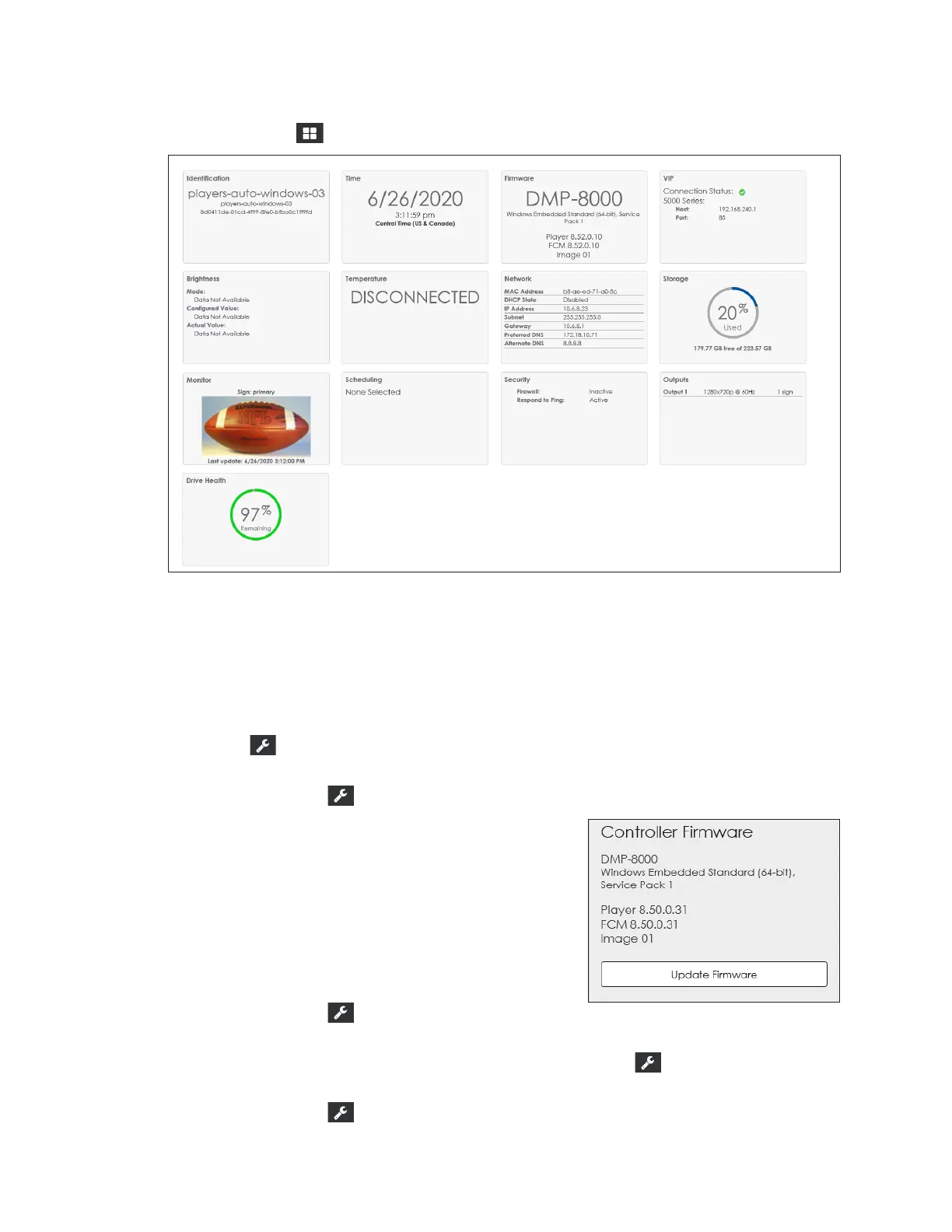
Click Dashboard to show the system status tiles. Refer to Figure 6.
Figure 6: Dashboard Status Tiles
Dashboard Tiles
Every dashboard status tile is interactive; click any tile to open an operational window or
command.
• Identication: This tile provides the player's descriptive data including the name,
description, and player ID number. Click this tile to open Identication under the
Cong menu.
• Time: This tile shows the current date, time, and time zone. Click this tile to open Time
under the Cong menu.
• Firmware: This tile shows the current version of the
player rmware. Click this tile to open a window to
trigger a rmware update. Browse to the correct
le and click Update Firmware to update the
player rmware. Refer to Figure 7.
• VIP: This tile shows information about any
system-congured video image processor (VIP).
If there is no associated VIP, the message No VIP
Congured is shown. Click this tile to open VIP
under the Cong menu.
• Brightness: This tile is present if there is an
associated VIP. Click this tile to open VIP under the Cong menu.
• Temperature: This tile is present if there is an associated VIP. Click this tile to open VIP
under the Cong menu.
Figure 7: Firmware Update Prompt



 To Next Page