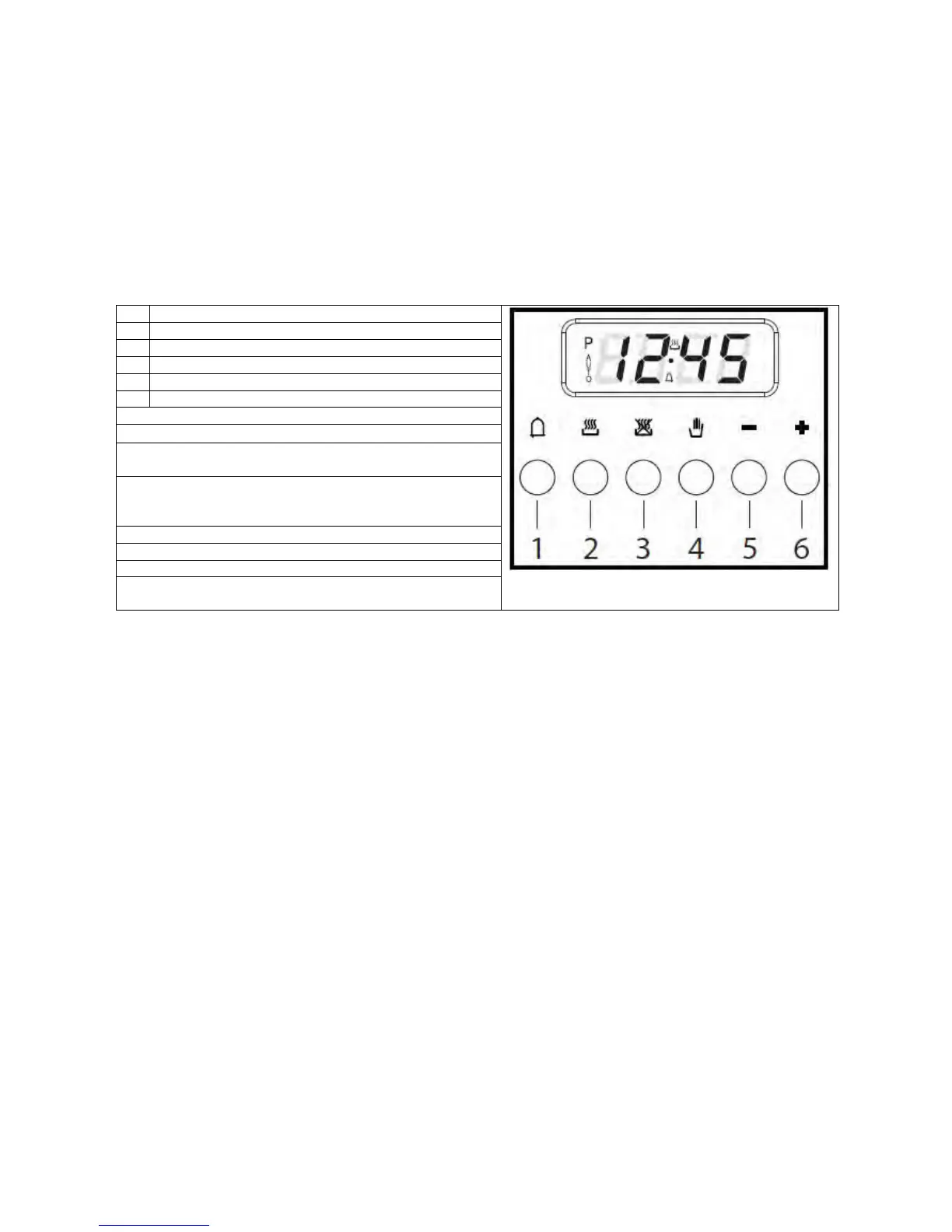
Description of buttons
1 Time
2 Cooking Time
3 End of cooking time
4 Manual position
5 意Scroll forward through all programme numbers
6 Scroll back through all programme numbers
Description of illuminated symbols
« AUTO » - (flashing) - Programmer in automatic position,
but not programmed
« AUTO » - (on steady) - Programmer in automatic
position, with program inserted.
“2” (symbol) - Automatic cooking functioning
“1” (symbol) - Timer in use
“2” and « AUTO » (both flashing) - Programme error
No symbol lit except the clock numbers: programmer set
manually.
Digital clock
Indicates hours (0-24) and minutes. Immediately after connection (as well as after a power outage), three
intermittent numerals are shown on the display.
To set the correct time, press “2” + “3” buttons simultaneously and at the same time one of the buttons “+” or “-“
until you have the correct time.
The speed with which the numerals change on the display increases substantially a few seconds after pressing
the “+” e “-“ buttons.
Manual cooking - (without programmer)
To use the oven without the help of the programmer, you will need to cancel the
flashing «AUTO» message. To do so, just press the “4” button.
If the «AUTO» message is steady, showing that the oven has been programmed, you will need to cancel the
programme by pressing “4” so that the display shows zero.
Automatic cooking - (start and end of cooking time)
1) Programme the length of cooking time with “2”
2) Programme the end of cooking time with “3”
3) Select the desired temperature and function using the thermostat commands and by pressing the switch, the
«AUTO» symbol on the display will indicate that the oven has been programmed.
Practical example:
You want to cook for 45 minutes, ending at 14.00.
- By pressing “2”, you set 0.45 on the display.
- By pressing “3”, you set 2.00 pm on the display.
After these operations the current time and the «AUTO» symbol will reappear on the display,
to indicate that the programming has been understood and memorised.
At 1.15 p.m. (2.00 p.m. less 45 minutes), the oven will start automatically, and during cooking the “2” and
«AUTO» symbols will be shown.
At 2.00 p.m. cooking will stop automatically. A buzzer will sound, which you can stop by pressing “1”.
Electronic programmer
(DO64FS, DO67MS, DO67MW, DO69MS)
The electronic programmer includes the following functions:
24-hour clock with illuminated display
Timer (up to 23 hours 59 minutes)
Programme to automatically start and stop cooking
Programme for semi-automatic cooking (possibility of
programming only start and end time)
8


 To Next Page
 Loading...