OPERATING INSTRUCTIONS
18
REMOTE CONTROL
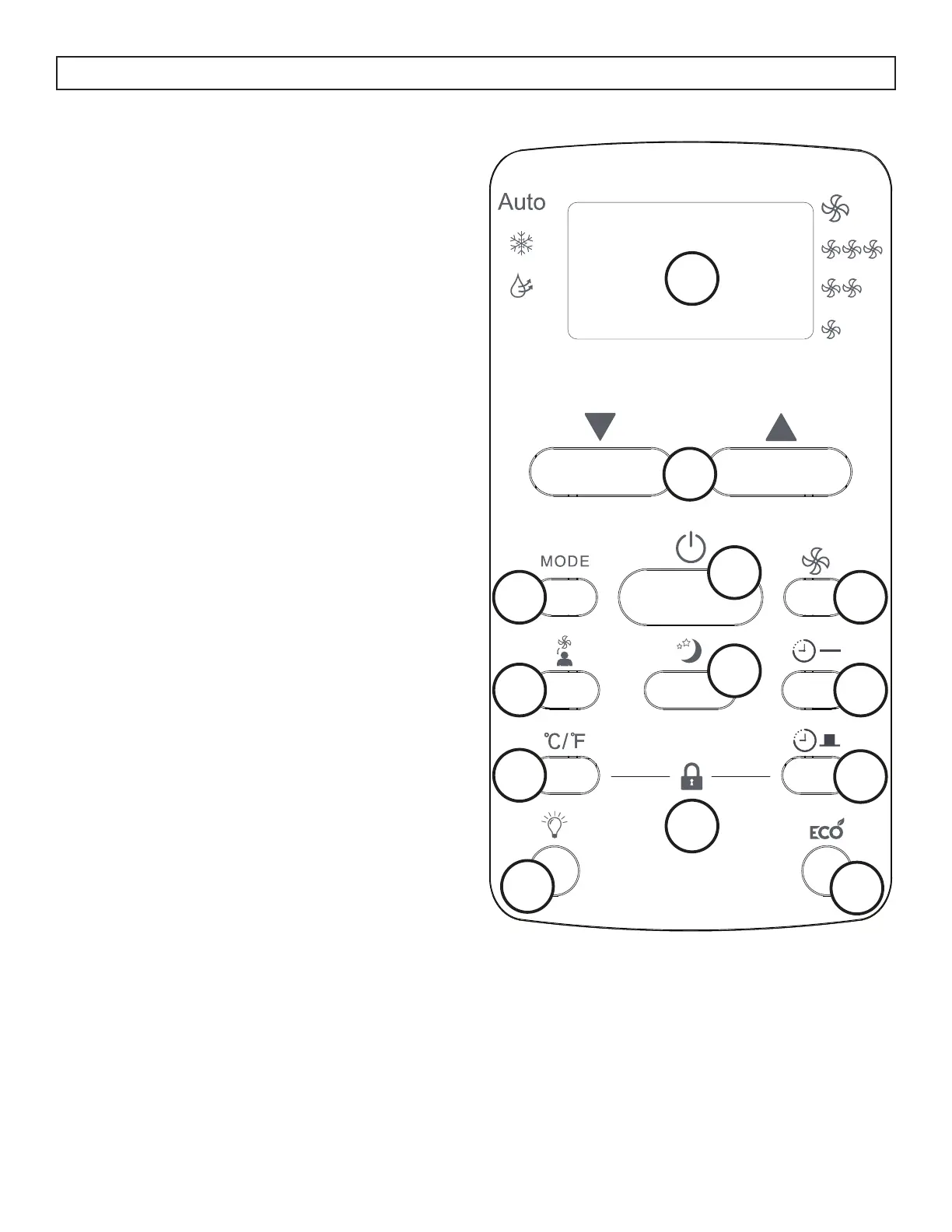
1. Display Panel: Displays the set temperature and
the timer settings. To change the temperature
scale being displayed, press the °C/°F button.
2. Up and Down Arrows: Used to adjust the set
temperature in 1° increments and the timer
function in 30 minute increments up to 10 hours
and then in 1 hour increments up to 24 hours.
3. Mode Button: Used to choose the operating
mode.
4. Follow Me Button: Used to set the follow me
function.
5. °C/°F button: Use to change the temperature
scale.
6. LED Button: Press to turn the LED back light on
or off.
7. Power Button: Used to turn the appliance on or
off.
8. Sleep Button: Used to set the sleep function.
9. Fan Button: Used to set the fan speed. The fan
can be set to low, medium, high and auto.
10. Timer On Button: Used to set the auto on timer.
11. Timer Off Button: Used to set the auto off timer.
12. Energy Saver Button: Used to set the energy
saver function.
13. Lock Button: Press the °C/°F button and the
timer button at the same time to lock the remote
control and prevent the settings from being
inadvertently changed.
TEMP
1
2
3
4
5
6
7
8
9
10
11
12
13




 To Next Page