E-
10
Removing Excess Humidity
If the atmosphere in your room is very humid or damp, you can remove
excess humidity without lowering the room temperature too much.
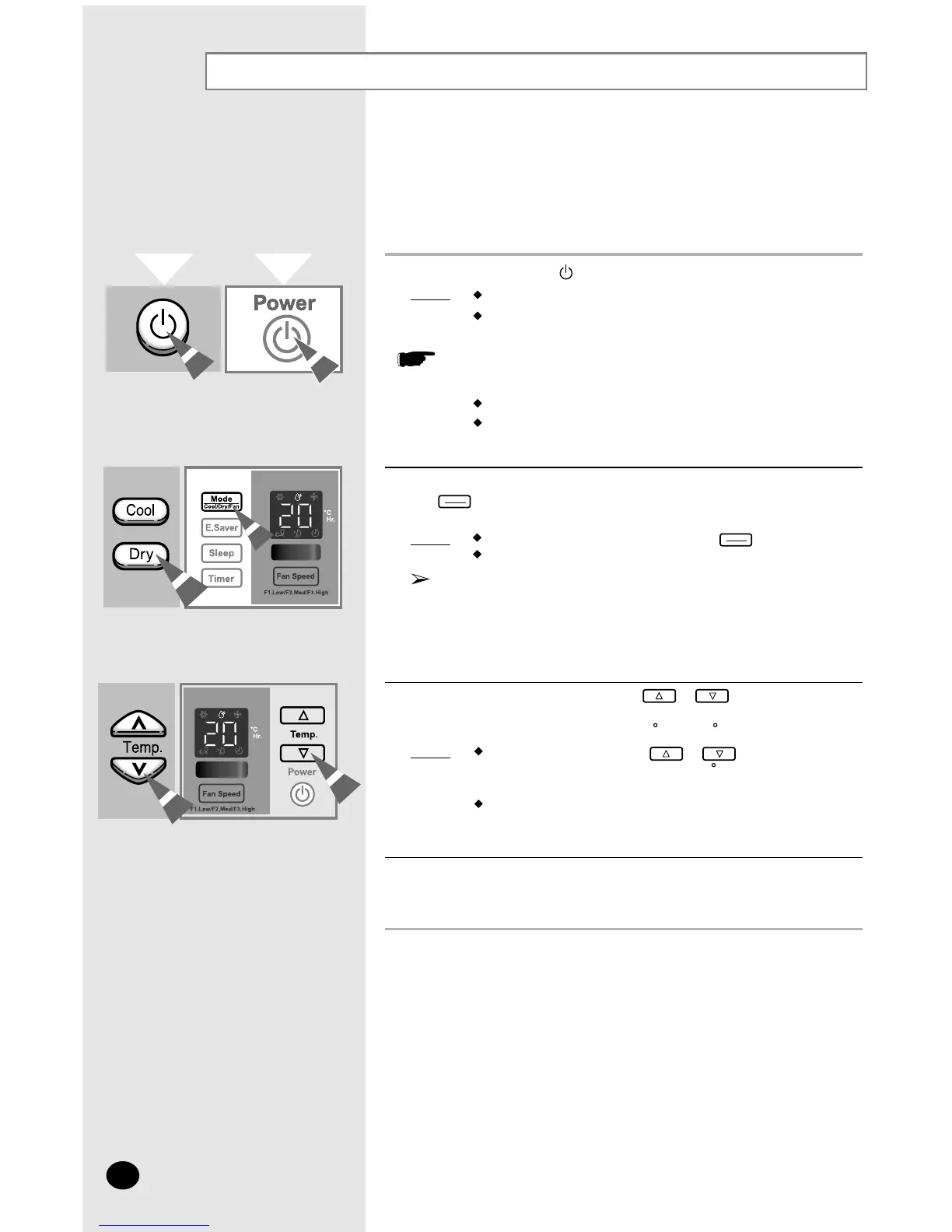
1 If necessary, press the (On/Off) button.
Result: The air conditioner starts up in the Cool mode.
The unit beeps.
The air conditioner is fitted with a protection mechanism to pre-
vent the unit from being damaged when it is started immediately
after being:
Plugged in
Stopped
It will start up normally after three minutes.
2 If the
temperature
is not displayed at the top of the control panel, press
the button on the control panel one or more times until it
appears.
Result
:
The unit beeps each time you press the button.
The air conditioner runs in Dry mode.
You can change modes at any time.
3 To adjust the temperature, press the
or
buttons one or
more times until the required temperature is displayed.
Possible temperatures are between
18 C and 30 C
inclusive.
Result: Each time you press the
or
buttons:
- The temperature is adjusted by 1 C
- The unit beeps
The air conditioner starts removing the excess humidity;
the quantity of air is adjusted automatically.
4 To control the direction of the air flow, refer to page 11.




 To Next Page