This document is an instruction manual for the DANEI AUDIO TE-012 Automatic Belt-Drive Turntable, a suitcase-style turntable.
Function Description
The DANEI AUDIO TE-012 is a versatile suitcase-style turntable designed for playing vinyl records and offering various modern connectivity and playback options. Its primary function is to play 33, 45, and 78 RPM vinyl records. Beyond vinyl playback, it supports Bluetooth connectivity for streaming audio wirelessly from external devices, USB/TF card playback for MP3 files, and recording vinyl audio to USB or TF cards in MP3 format. It also features an FM radio tuner. The device includes built-in speakers and offers external audio output options via RCA jacks and a 3.5mm headphone jack. The suitcase design makes it portable and easy to store.
Important Technical Specifications
- Product Name: 'Retro Musique' Suitcase Style Bluetooth Turntable
- Speaker Driver: 5W * 2
- Dimensions (each speaker): L13.8" x D10.2" x H4.9" (L350 x D260 x H125mm)
- Power: DC5V === 1A
- Inputs: 1 x 3.5 mm stereo mini-jack, 1 x Bluetooth, 1 x USB card, 1 x TF card
- Power Output: 5Watts
- Frequency Range: FM: 87.5-108 MHz
- Speeds: 33; 45; 78 rpm
- Auto stop: Auto Stop ON or OFF
- RCA out: Yes
- Recording: USB/TF card recording (Only support FAT32 or FAT format)
- AC/DC Adapter: Input: AC 100-240V~, 50/60 Hz; Output: DC 5V, 1A
Usage Features
The turntable offers a range of user-friendly features:
Record Playback:
- Supports three playback speeds: 33, 45, and 78 RPM, accommodating various vinyl record types.
- Includes a 45 RPM adaptor for playing records with larger center holes.
- Features an auto-stop function that can be turned ON or OFF, allowing the turntable to stop spinning automatically at the end of a record or continue spinning.
- A tone arm lift lever facilitates gentle placement and removal of the stylus on the record.
- Plastic protective cover for the stylus is provided to prevent damage during transport or when not in use.
Bluetooth Function:
- Allows wireless streaming of audio from Bluetooth-enabled devices.
- Easy pairing process, indicated by display messages like "Lod" (searching) and "bt" (connected).
- Control playback (play/pause, next/previous track) directly from the turntable.
USB/TF Function (MP3 Playback and Recording):
- Supports playback of MP3 files from USB drives or TF cards.
- Enables recording of vinyl audio directly to a USB drive or TF card in MP3 format.
- Recording is supported only for FAT32 or FAT formatted storage devices.
- Playback controls include play/pause, next/previous track, and fast-forward/backward.
- The display shows "DEL" during recording, and a beep sound indicates when recording starts and stops.
FM Radio:
- Built-in FM tuner with a frequency range of 87.5-108 MHz.
- Allows scanning for and storing FM radio stations.
- The display shows the frequency during FM mode.
Auxiliary Input/Output:
- LINE OUT jacks (RCA): For connecting the turntable to an external amplifier or powered speakers, allowing for a more robust audio experience.
- DC In jack: For connecting the AC/DC power adapter.
- Headphone jack (3.5mm): For private listening.
- AUX IN jack (3.5mm): For connecting external audio devices (like MP3 players, cell phones, iPods) to play through the turntable's speakers.
General Operation:
- The unit is powered by an AC/DC adapter.
- Volume control is available via a knob.
- A "Mode" button allows switching between different functions (Bluetooth, USB/TF, FM, Phono).
- LED display provides visual feedback on the current mode and track information.
Maintenance Features
The manual provides clear instructions for maintaining the turntable and its components to ensure longevity and optimal performance.
General Care:
- Cleaning: The unit should be kept clean and dry. Avoid using chemical solvents for cleaning. A soft anti-static cloth is recommended for cleaning the record surface.
- Dust Removal: Keep records and the unit free from dust. Dust can be removed from records by gently wiping the surface in a circular motion with a soft anti-static cloth.
- Storage: Store records upright on their edges to prevent warping. Do not expose records to direct sunlight or high humidity and temperature. Avoid storing the turntable in a closed trunk or areas with unstable temperature and low humidity.
- Ventilation: Do not block any ventilation openings to prevent overheating.
- Power Cord: Protect the power cord from being pulled or stretched.
- Moving the Unit: When changing the unit's location, pack it carefully and securely. If the unit is to be packed and moved a great distance, it is advisable to tighten the turntable transport locking screw.
Stylus Maintenance:
- Stylus Replacement: The stylus should be replaced approximately every 50 hours under normal use.
- Removing an old stylus:
- Set a screwdriver at the tip of the stylus and push down in direction "A".
- Pull the stylus out toward direction "B".
- Installing a new stylus:
- Hold the tip of the stylus and insert the other edge by pressing toward direction "C".
- Push the stylus up toward direction "D" until it locks at the tip.
- Caution:
- Do not remove or bend the stylus.
- To avoid injury, do not touch the needle.
- Turn off the unit's power before you replace the stylus.
- Keep out of the reach of children.
- Handle with care, as a bent or broken stylus may damage the record and cause the turntable stylus to malfunction.
- Do not expose the stylus to extreme heat.
- Contact a qualified repair company if you experience difficulty in changing the stylus.
Troubleshooting Guide:
The manual includes a troubleshooting guide to help users resolve common issues related to general operation, phonograph playback, Bluetooth connectivity, USB/TF functions, and FM radio. This section provides possible causes and remedies for various problems, such as volume not adjusting, buzzing sounds, pairing issues, and recording errors.

 Need help?
 General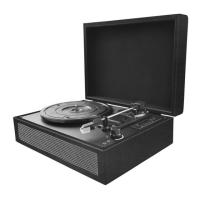

 To Next Page