AK-PC 551 User Guide RS8GY302 © Danfoss 2015-06 7
Wizard
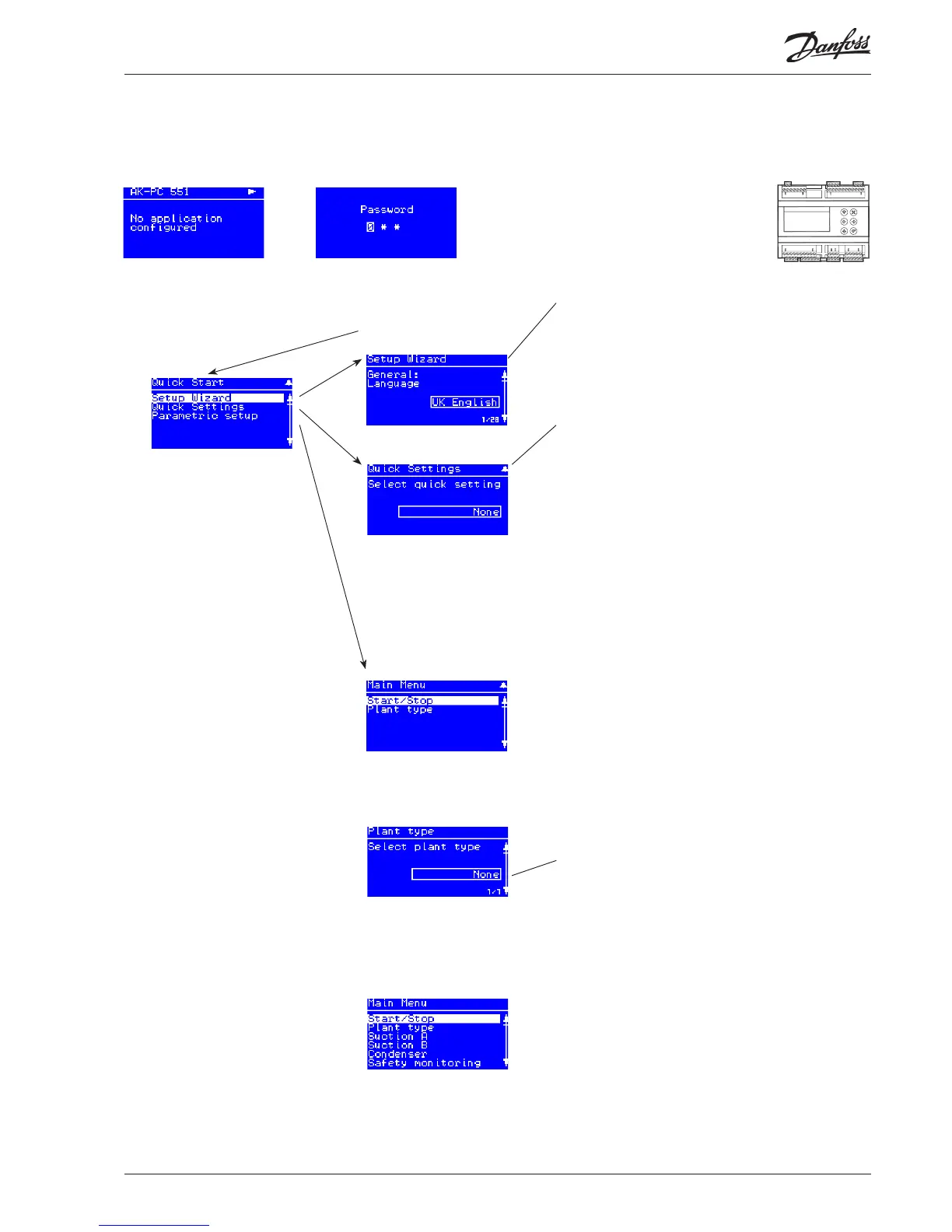
Here you will be led through a series of settings, after
which the controller will be ready for start.
Image 1 of 28 is displayed here.
Quick
Select from the dierent combinations of compressors
and fans here.
Also see the overview on pages 18 and 19.
3CDA + 2CB + FS
2CDA + 2CB + 3F
3CSA + 2CB + FS
2CSA + 2CB + 3F
4CA + 3CB + FS
3CA + 2CB + FS
2CA + 2CB + 3F
4CDA + FS
3CDA + FS
3CDA + 3F
2CDA + 2F
4CSA + FS
4CA + FS
4CA + 4F
3CSA + FS
3CA + FS
3CA + 3F
None
The following options are available here:
2 Comp + 1 Cond = suction group A + B and condenser
Comp. + Cond. = suction group A and condenser
Condenser = condenser only
Compressor = suction group A only
None
Main Menu
The rst setting is the
Plant type
When the Plant type has
been selected, it will al-
low several settings to be
made.
For example:
Continue to the next
menus.
All settings are explained
on the pages that follow.
Start screen upon delivery
Set-up overview
There are three ways in which the controller can be set up. Select the one that is easiest for you: either “Wizard”, “Quick settings” or a
review of “all parameters”.
The default password upon
delivery is 300. Use the arrow
keys to set the password. End
by pressing “Enter”
Hold “Enter” down
for 2 seconds to come to
password entry
Select a set-up method. End
by pressing “Enter”
Operating principles
1. Select position using arrow keys
2. Select using “Enter”
3. Use the “X” to return
Example:
3CDA + 2CB + FS =
3 Compressors,
one Digital,
suction group A
+
2 Compressors,
suction group B
+
one fan,
Speed controlled




 To Next Page