D4-9 / D4-9X Four-Post Lifts 20 P/N 5900251 — Rev. A1— August 2021
Creating Chalk Line Guides
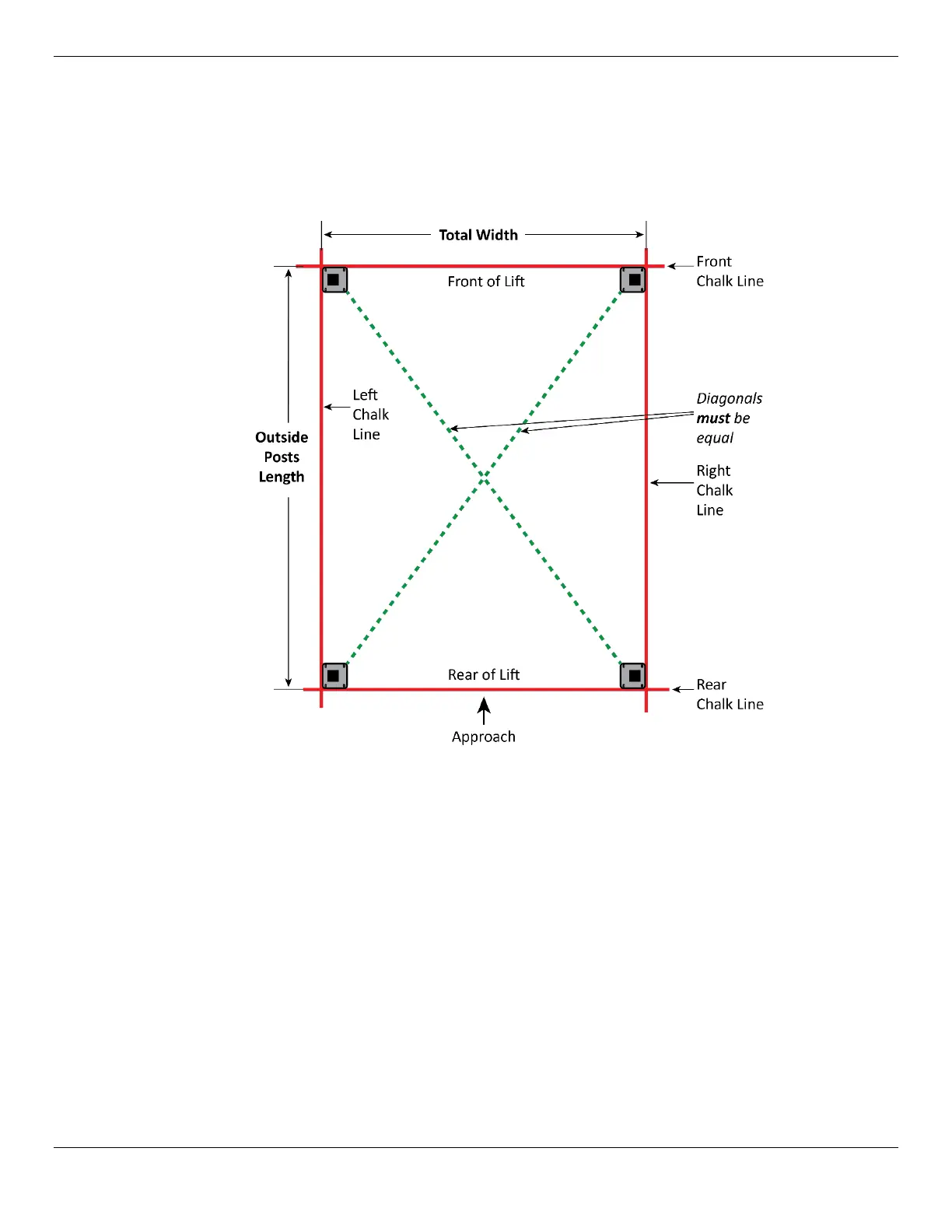
Create the Chalk Line Guides so that the outside edges of all four Post bases fit into the four corners
when it is time to put the Posts into place.
Note: Do
not
use the
Total
Length value; this includes the Ramps, which are not taken into
consideration for creating Chalk Line Guides.
To create Chalk Line Guides:
1. Write down the Total Width and Outside Posts Length values for your model, which you can
find in Specifications.
2. Create the Front Chalk Line where you want the Front of the Lift (The Front of the Lift is the end
opposite the Approach Ramps).
Make the Front Chalk Line
longer
than the Total Width setting for your Lift model, but make
notations that indicate the length of the Total Width setting.
3. Create the Left and Right Chalk Lines at 90° angles to the Front Chalk Line and parallel to each
other; the Left and Right Chalk Lines
must
be parallel to each other.
4. Create the Rear Chalk Line parallel to the Front Chalk Line; the Front and Rear Chalk Lines
must
also be parallel to each other.
5. With all four Chalk Lines created and before moving the Posts into position, measure
diagonally
to make sure the two diagonal measurements are the same.
6. When you move the Posts into position, put the outside edges of the Bases inside the four corners
created by the Chalk Line Guides.


 To Next Page