DB-70 Automatic Wheel Balancer 33 P/N 5900261 — Rev. A1 — January 2021
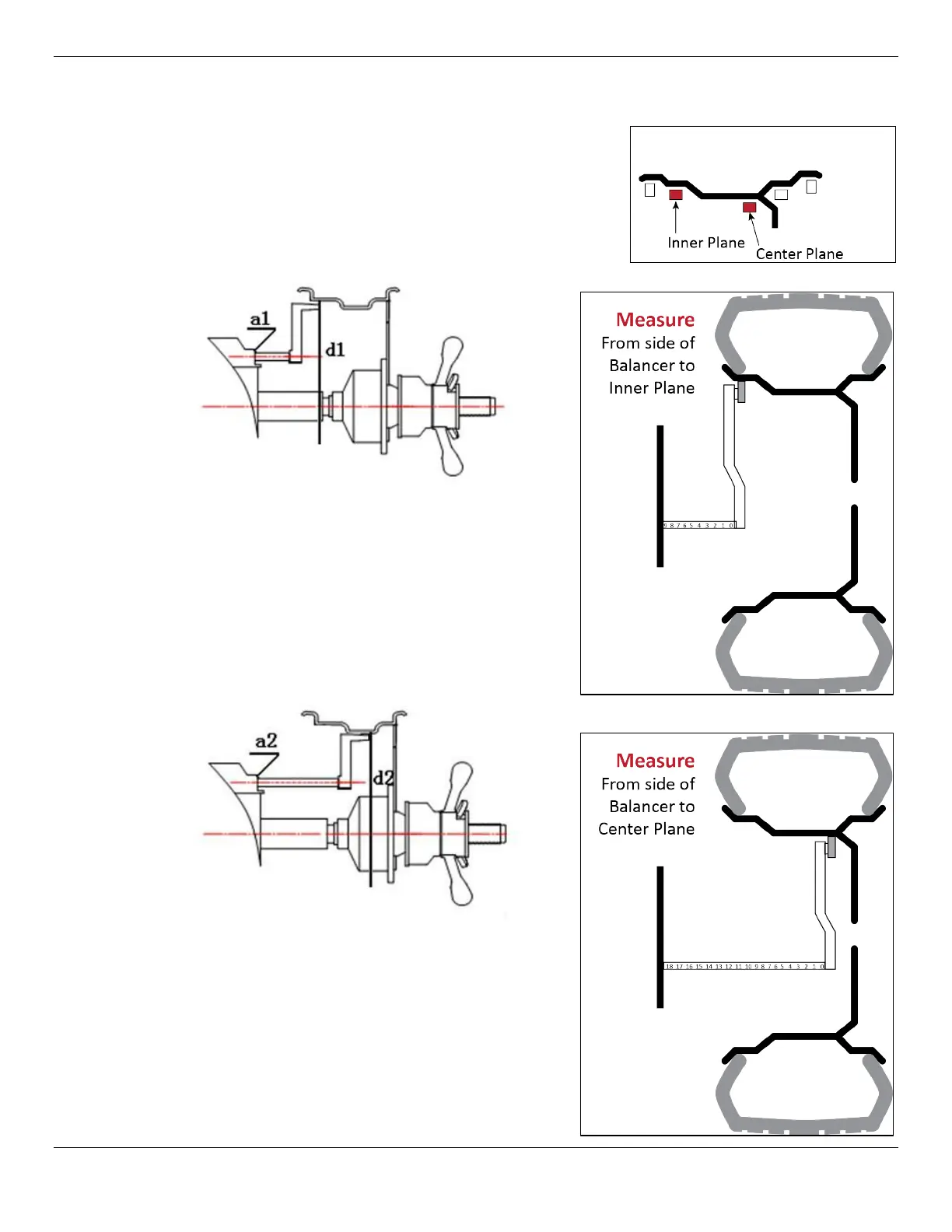
To balance a Wheel using ALU1 Mode:
a. On the Control Panel, press the F button until the
ALU 1 Indication is lit.
Note: ALU 1 requires measuring the Inner plane
distance and Wheel diameter
a1
d1
, as well
as the Center Plane distance and diameter
a2
d2
b. Input the inner plane wheel parameters. Slide
the inner distance arm to touch the Wheel’s
inner plane and hold it there until the Balancer
beeps. This automatically determines the
distance from the side of the Balancer to the
wheel and the wheel diameter (a1 and d1),
then places the parameters into the
Balancer’s memory. You may also enter the
values manually using the A and D keys.
c. Input the center plane parameters. Slide the
inner distance arm to the center plane and
hold it there until the Balancer beeps. This
automatically determines the distance from
the side of the Balancer to the center plane
and the wheel diameter (a2 and d2), then
places the parameters into the Balancer’s
memory. You may also enter the values
manually using the A and D keys.


 To Next Page