14
Manual del Usuario / action 500 series / User’s Manual
AMPLIFIER
Description
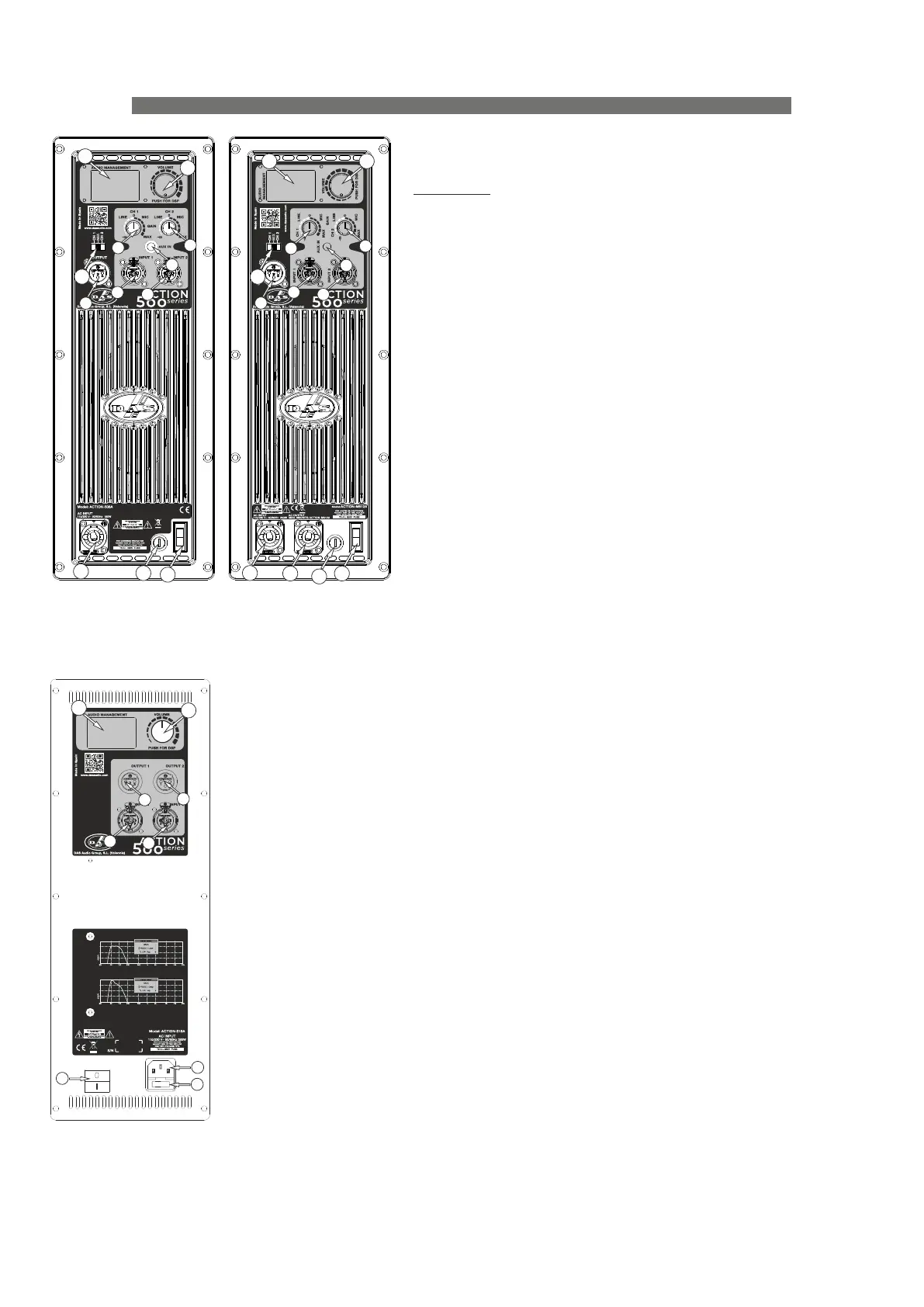
1) MASTER VOLUMEN AND DSP CONTROL:
Use the encoder to select the desired output volume
and push/hold it to access to the different DSP and cabinet
settings.
2) MAIN SCREEN:
In the main screen all selected parameters and settings
are shown. Besides this, there are two input level indicators
on the left , one output level indicator on the right and the
center area is reserved to display messages as Input Clip or
Limit.
3) INPUT CONNECTORS:
1/4” Jack+XLR combined socket-type input signal
connectors. This is a balanced connector just like the LOOP
THRU connector with the following pin assignments:
1 or S =GND (ground).
2 or T =(+) Non inverted input.
3 or R =(-) Inverted input.
4) OUTPUT CONNECTORS:
XLR-type output signal connector for connecting several
units together and sending them all the same signal. Except
in ACTION-S18A, the user can select the output signal with a
switch.
5) INPUT GAIN CONTROL:
For channels 1, 2 and AUX IN, gain control, line and
microphone.
6) OUTPUT MIX SELECTOR:
It allows the user to select which input channel signal to be sent to other cabinets. In
ACTION-508A, ACTION-M512A, ACTION-512A, ACTION-515A and ACTION-525A: User can
select Ch1, Ch2 or both (Mix). In ACTION-S118A and ACTION-S218A: User can select the
same input signal or filtered signal (HPF) with a cut-off frequency of 100 Hz.
7) AUX IN:
3.5 mm audio jack input for connecting external audio media devices, such as MP3
players. The input source is controlled with Gain control 1.
8) AC INPUT :
Standard IEC-60320 (only ACTION-S18A) or PowerCon NAC3FCA mains connector
(inserted, rotated and locked for ON). Only use this equipment with an appropriate
mains cord.
9) AC OUTPUT (only ACTION-M512A, ACTION-S118A and ACTION-S218A) :
PowerCon NAC3FCB connector for AC loop thru to other units (see unit’s label). Only
use this equipment with an appropriate mains cord.
10) POWER :
Mains power ON/OFF switch.
11) FUSE :
Fuse holder. Only use the recommended fuse type and size.
12) LIMIT (only ACTION-S118A and ACTION-S218A) :
Red LED indicates amplifier saturation. Amplifier limiter indicator lights.
13) SIGNAL (only ACTION-S118A and ACTION-S218A) :
Green LED indicates signal presence.
14) ON (only ACTION-S118A and ACTION-S218A) :
Green LED indicates that the unit is ON.
15) LOW-PASS CROSSOVER (only ACTION-S118A and ACTION-S218A) :
Button for adjusting the upper cut-off frequency for the subwoofer unit (see label). We
recommend a cut-off frequency of 80 Hz.
16) POLARITY (only ACTION-S118A and ACTION-S218A) :
Switch for inverting the phase of the unit. The LED indicates the inverted phase.
17) PRESET DEEP/LOUD (only ACTION-S118A and ACTION-S218A) :
Button for switching between two types of frequency response, DEEP or LOUD.
18) LOGO OFF / ON (only ACTION-S118A and ACTION-S218A) :
Press the button to illuminate the logo.
19) Fan (only ACTION-S118A and ACTION-S218A).
1
1
1
2
2
2
3
3
3
3
3
3
4
4
4
4
11
10
8
8
8
9
11
11
10
10
5
5
5
5
6
6
7
7
Amplifier :
ACTION-508A
ACTION-512A
ACTION-515A
ACTION-525A
Amplifier :
ACTION-M512A
Amplifier :
ACTION-S18A


 To Next Page