FUNCTIONS APPLICATION
Bluetooth
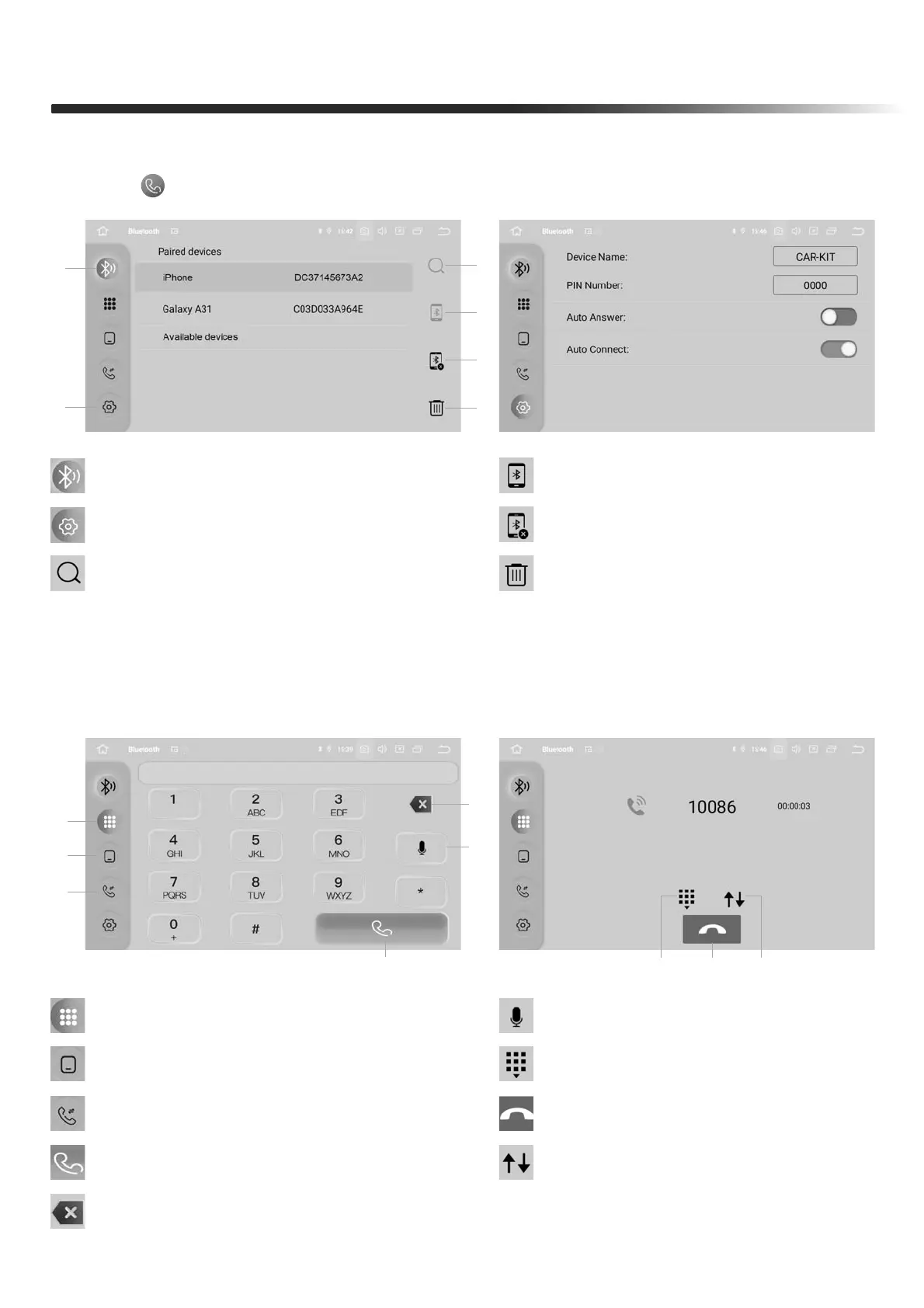
Touch " " in main menu to enter Bluetooth interface
Phone
This unit allows hands free calling, using your phone's Bluetooth con-
nection to the unit, you'll be able to dial, answer, access phone book
1. Keyboard: Dial
7. Keyboard: Open the dial pad
9. Dial Out: Dial Out history
6. Voice: Voice assistant
8. Hang up:
Touch it to hang up the call
1
1
62
3
4
5
2
3
4
5
78
9
1. Bluetooth interface
3. History: Calls record
2. Phone Book: Phone Contacts
2. Bluetooth Settings
4. Dial: Touch it to make a call
5. Delete:
Touch it to delete numbers one by one, long press to delete all inputted numbers
3. Search Bluetooth device
4. Connect Bluetooth
5. Disconnect Bluetooth
6. Delete Bluetooth
6


 To Next Page