FUNCTIONS APPLICATION
$PSOLHU
7RXFKLQPDLQPHQXWRHQWHU$PSOLHULQWHUIDFH
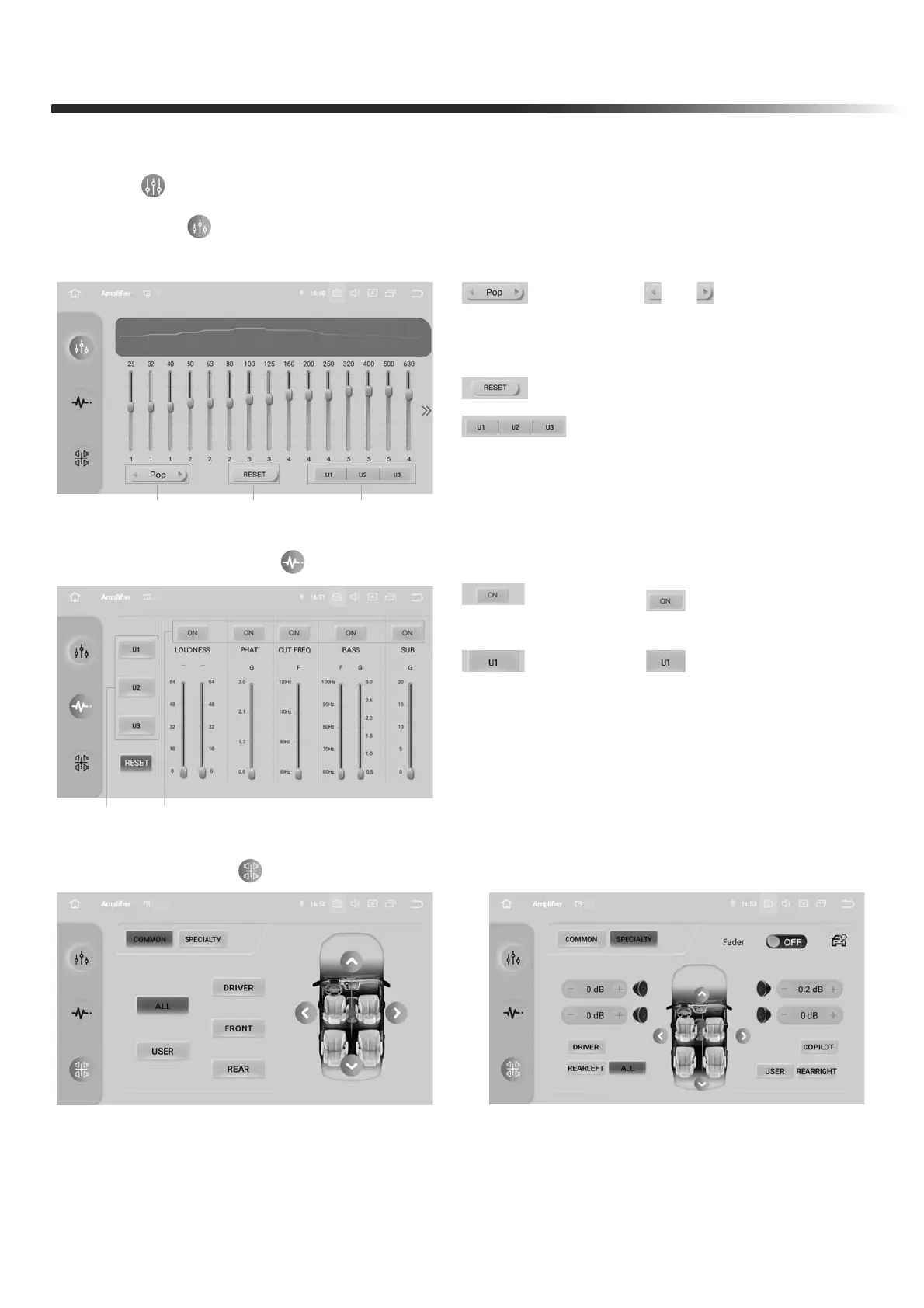
1. EQ: Touch “ ” to enter the EQ interface, and click the desired sound effect to adjust
more detailed effects
2. DSP Setting: Touch “ ” to enter the DSP interface
3. Fad-Bal: Touch “ ” to enter the Fad-Bal interface
1. Press“ & ” icon set Sound
Effect like Rock,POP,Jazz,Clissic,Flat,
Voice,Custom
2. Reset Button
3. Press to Set Custom Effect
1
45
2 3
4. Press “ ” to turn on the value
setting
5. Press “ ” icon to save
the Custom setting
COMMON: four modes: Driver, Front,
Rear, and All passengers
SPECIAITY: YHPRGHV'ULYHU&RSLORW
Rearleft, Rearright, and All passengers


 To Next Page