Shodex RI-101 4 Using the control module
4.5 DataApex UNI Setup
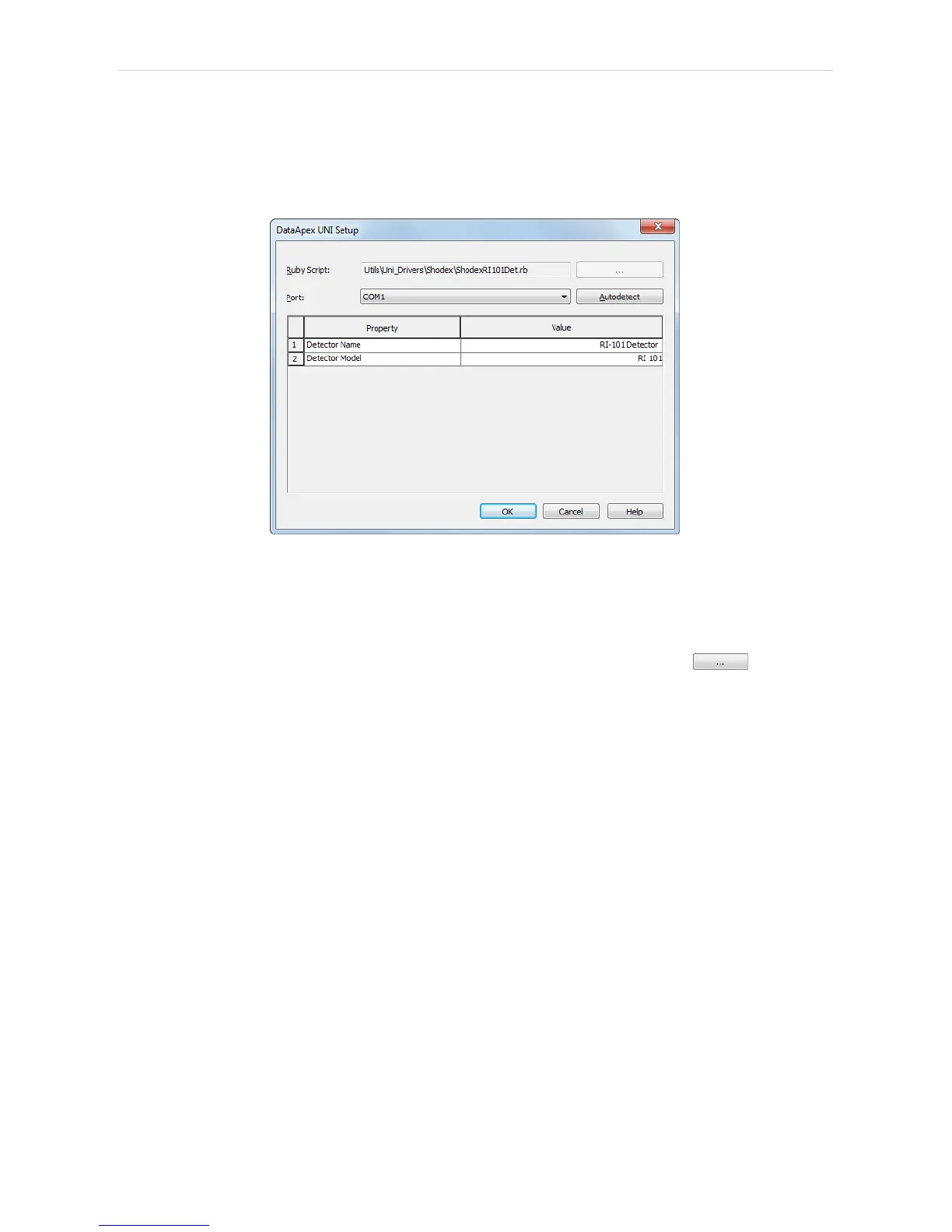
The appearance of the DataApex UNI Setup dialog depends on the
presence of the selected Ruby Script - if the script is not present, only the
Ruby Script field is visible.
Fig 9: DataApex UNI Setup
Ruby Script
Displays the selected Ruby Script. The correct SHODEXRI101DET.RB
script for the Shodex RI-101 detector can be found in the UTILS/UNI_
DRIVERS/SHODEX subdirectory (accessible through the button) of
the Clarity installation folder (C:\CLARITY\BIN by default).
Port
Defines the communication port used, possible values dependent on the
type of communication of the device and/or available ports in the PC.
AutoDetect
It is used for verifying the device communication over the serial port
selected above.
Detector Name
Allows you to set the custom name of the detector. This name (entered
into the Value column) will be used throughout the Clarity station.
Detector Model
Allows you to set the type of the detector. The selection influences several
settings further in Method Setup - Acquisition dialog.
- 12 -


 To Next Page