Shodex RI-101 3 Installation Procedure
l Select the correct item and press the Add (③ on Fig 3 on pg 4.) button.
Each device with already created UNI profile should have its own item
named accordingly in the Available Control Modules dialog.
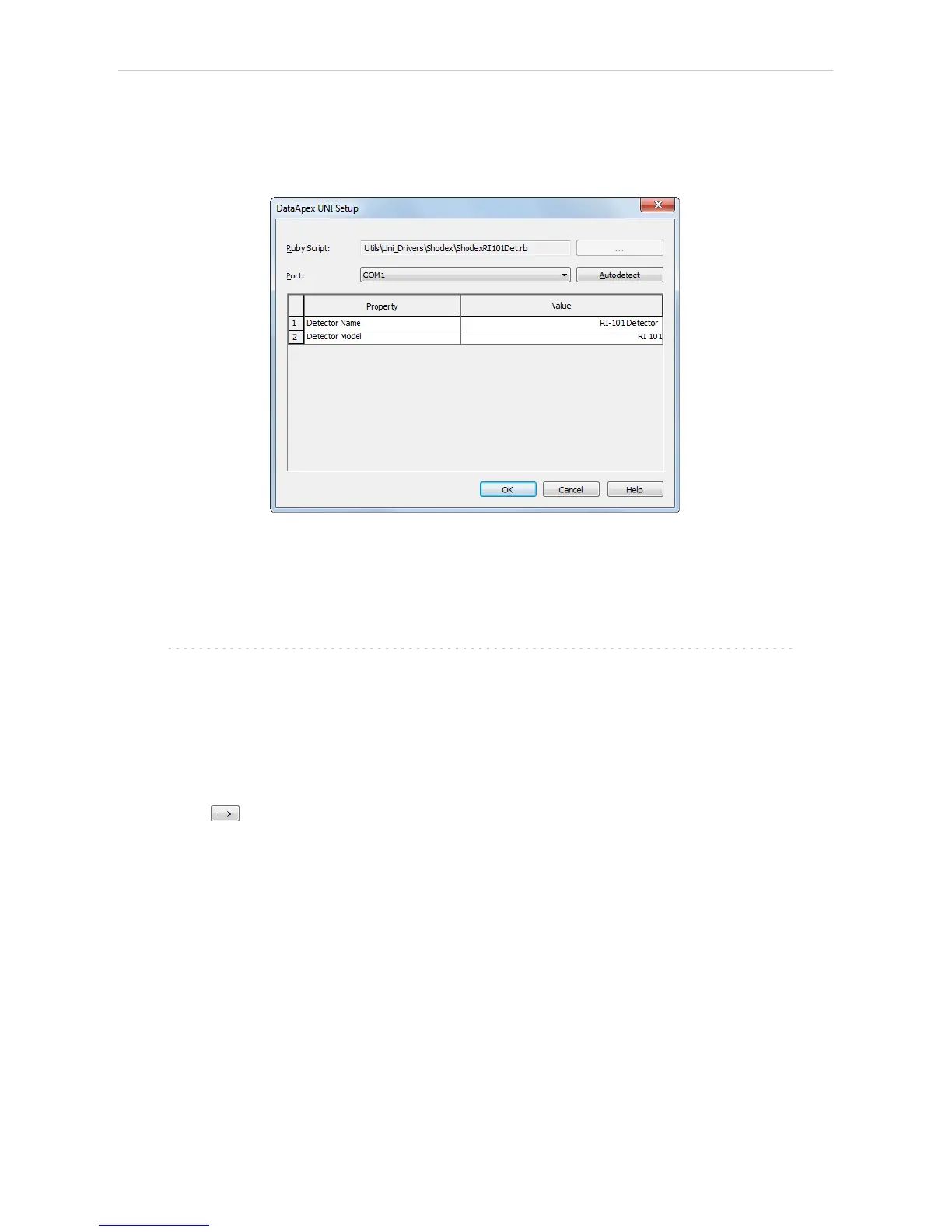
l The DataApex UNI Setup dialog will appear.
Fig 4: DataApex UNI Setup
l Set the correct communication Port and click on the AutoDetect button to
establish communication with the device.
l You may fill in the custom Device Name.
Note: The DataApex UNI Setup dialog is described in detail in the chapter
"DataApex UNI Setup" on pg 12.
l The Shodex RI-101 item ④ will appear in the Setup Control Modules list
of the System Configuration dialog.
l Drag the appropriate item from the Setup Control Modules list on the left
side to the desired Instrument tab ⑤ on the right side ⑥ , or click on the
button ⑦ .
- 5 -


 To Next Page