DKG-317 User Manual V-01.19
(01.10.2009)
- 7 -
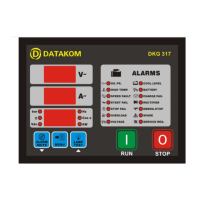
3.2 Digital Displays
The unit has 3 seven segment displays. They show:
-Measured parameters,
-Service counters,
-Statistical counters,
-Program parameters.
The navigation between different screens in a group is made with the MENU button. Holding the
MENU button pressed for 1 second makes the display to switch to the next group.
VOLTAGE DISPLAY: This display shows:
-Phase U voltage if the genset is running
By pressing the MENU key, below values may be displayed:
-(U-V-W) generator phase to neutral voltages
-(UV-VW-WU) generator phase to phase voltages
If the service counters group is displayed, then this display will show the counter name.
In programming mode it displays (PGM).
CURRENT DISPLAY: This display will show the current values measured using the current transformers.
Using the programming menu, current transformers within the range of 10/5A to 9000/5A may be
programmed.
In programming mode it displays the program number.
MULTIFUNCTION DISPLAY: By pressing the MENU key below values may read:
-generator frequency (Hz)
-generator cosΦ
-generator active power (KW)
-oil pressure (bar)
-coolant temperature (ºC)
-battery voltage (V-DC),
In programming mode it displays the program value.


 To Next Page