EasyManua.ls Logo

Datakom DKG-116 - User Manual

Datakom DKG-116
4 pages
Print Icon
To Next Page IconTo Next Page
Loading...
DKG-116 User Manual V-02 (
11.08.2010)
Tel: +90-216-466 84 60
http://www.datakom.com.tr
Fax: +90-216 364 65 65
datakom@datakom.com.tr
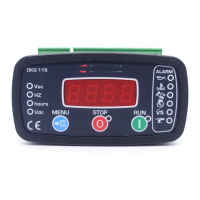
DKG-116 MANUAL AND REMOTE START UNIT
DESCRIPTION
The DKG-116 is a low cost
gasoline/diesel genset control unit
designed to start and stop a genset both
manually and remotely.
The manual control is made using RUN
and STOP pushbuttons on the front
panel. The remote control is made via
REMOTE START input signal.
When RUN button is pressed or a Remote
Start signal arrives, the engine will be
cranked up to 3 times. When it runs, the
crank relay will be immediately deactivated
and after Holdoff timer delay, fault
checking will be enabled. When the engine
is running, if a fault condition is detected
then the engine is shutdown immediately
and the unit indicates the source of the
failure through related alarm led.
If STOP button is pressed or the Remote
Start signal disappears, the genset will
continue to run during cooldown period. At
the end of the period the engine will stop.
The MENU button selects display
parameter scroll and allows program
mode entry and lamp test functions.
The total engine run hours is kept in a
tamper-proof non-erasable memory which
is not affected by power failures.
MEASUREMENTS
Generator Volts: L1-N, L2-N, L3-N
Generator Volts: L1-L2, L2-L3, L3-L1
Generator Frequency
Battery Voltage
OPTIONS
Auxiliary output (negative pulling).
FEATURES
Both Manual and remote control
Generator protection
Built in alarms and warnings
Remote Start operation available
True RMS measurements
Tamper-proof engine hours display
Field adjustable parameters
High current Fuel and Crank outputs
Protected semiconductor auxiliary
output
Digital inputs: 4
Survives cranking dropouts
Sealed front panel
Standard panel dimensions: 96x48mm
Plug-in connection system
Question and Answer IconNeed help?

Do you have a question about the Datakom DKG-116 and is the answer not in the manual?

Summary

Description of DKG-116 Unit

Manual and Remote Operation

Explains manual control using RUN/STOP buttons and remote control via REMOTE START input signal.

Engine Start and Shutdown Logic

Details engine cranking, running behavior, and shutdown sequence upon fault detection.

Menu Button Functions

Describes menu button use for parameter scrolling, program mode entry, and lamp test.

Engine Run Hours Memory

Notes that total engine run hours are stored in tamper-proof memory.

Measured Parameters

Generator Voltage and Frequency

Lists generator voltage (L1-N, L1-L2) and frequency measurements.

Battery Voltage Measurement

Indicates battery voltage is a measured parameter.

Available Options

Auxiliary Output

Details the auxiliary output feature, which is negative pulling.

Key Features of DKG-116

Control Modes and Protection

Highlights manual/remote control, generator protection, and built-in alarms.

Measurement and Display Features

Includes True RMS measurements, tamper-proof hours display, and field adjustable parameters.

Inputs and Outputs

Details digital inputs (4), high current outputs, and auxiliary output.

Durability and Design

Mentions surviving cranking dropouts, sealed front panel, and plug-in connection.

Safety Precautions for Installation and Use

Electrical Connection Safety

Emphasizes using correct circuit breakers, fuses, and disconnecting power before work.

Operational Safety Guidelines

Advises against touching terminals when running and using only dry cloths for cleaning.

Servicing and Mounting Precautions

States electrical equipment should be serviced by competent personnel and unit is for front panel mounting.

Unit Programming

Programming Input Connections

Requires High Temperature and Emergency Stop inputs to be connected to Battery negative.

Programmable Parameters Overview

Lists 8 programmable parameters including voltage limits, frequency, oil input, and phases.

Entering and Navigating Program Mode

Describes entering program mode via long-pressing MENU and navigating parameters.

Diesel Engine Option Selection

JP1 Terminal Solder for Diesel Control

Instructs to solder a wire to JP1 terminals for diesel engine control.

Programming Parameter Adjustment

Adjusting Low AC Voltage Limit

Details how to set the Low AC Voltage limit (U-Lo) using MENU, RUN, and STOP buttons.

Adjusting High AC Voltage Limit

Details how to set the High AC Voltage limit (U-HI) after saving the Low AC Voltage limit.

Setting Nominal Frequency and Oil Input

Describes setting Nominal Frequency (Fr9) and Oil Input type (OIL).

Configuring Fuel Output and Relay-3

Details setting Fuel output type (FUEL) and Relay-3 function (rLY3).

Setting Choke Timer and Number of Phases

Describes setting the Choke timer (CHOL) and Number of Phases (3-1P).

Exiting Program Mode

Explains how to exit program mode by pressing MENU for 3 seconds.

Connection Diagram and Specifications

DKG-116 Wiring Diagram

Illustrates the terminal connections for Battery, Starter Motor, Generator, and control signals.

Technical Specifications

Provides detailed electrical, environmental, and physical specifications of the unit.

Panel Cutout Dimensions

Shows the required dimensions for mounting the unit into a panel.

Packaging Information

Details the quantity per package and package dimensions/weight.

Summary

Description of DKG-116 Unit

Manual and Remote Operation

Explains manual control using RUN/STOP buttons and remote control via REMOTE START input signal.

Engine Start and Shutdown Logic

Details engine cranking, running behavior, and shutdown sequence upon fault detection.

Menu Button Functions

Describes menu button use for parameter scrolling, program mode entry, and lamp test.

Engine Run Hours Memory

Notes that total engine run hours are stored in tamper-proof memory.

Measured Parameters

Generator Voltage and Frequency

Lists generator voltage (L1-N, L1-L2) and frequency measurements.

Battery Voltage Measurement

Indicates battery voltage is a measured parameter.

Available Options

Auxiliary Output

Details the auxiliary output feature, which is negative pulling.

Key Features of DKG-116

Control Modes and Protection

Highlights manual/remote control, generator protection, and built-in alarms.

Measurement and Display Features

Includes True RMS measurements, tamper-proof hours display, and field adjustable parameters.

Inputs and Outputs

Details digital inputs (4), high current outputs, and auxiliary output.

Durability and Design

Mentions surviving cranking dropouts, sealed front panel, and plug-in connection.

Safety Precautions for Installation and Use

Electrical Connection Safety

Emphasizes using correct circuit breakers, fuses, and disconnecting power before work.

Operational Safety Guidelines

Advises against touching terminals when running and using only dry cloths for cleaning.

Servicing and Mounting Precautions

States electrical equipment should be serviced by competent personnel and unit is for front panel mounting.

Unit Programming

Programming Input Connections

Requires High Temperature and Emergency Stop inputs to be connected to Battery negative.

Programmable Parameters Overview

Lists 8 programmable parameters including voltage limits, frequency, oil input, and phases.

Entering and Navigating Program Mode

Describes entering program mode via long-pressing MENU and navigating parameters.

Diesel Engine Option Selection

JP1 Terminal Solder for Diesel Control

Instructs to solder a wire to JP1 terminals for diesel engine control.

Programming Parameter Adjustment

Adjusting Low AC Voltage Limit

Details how to set the Low AC Voltage limit (U-Lo) using MENU, RUN, and STOP buttons.

Adjusting High AC Voltage Limit

Details how to set the High AC Voltage limit (U-HI) after saving the Low AC Voltage limit.

Setting Nominal Frequency and Oil Input

Describes setting Nominal Frequency (Fr9) and Oil Input type (OIL).

Configuring Fuel Output and Relay-3

Details setting Fuel output type (FUEL) and Relay-3 function (rLY3).

Setting Choke Timer and Number of Phases

Describes setting the Choke timer (CHOL) and Number of Phases (3-1P).

Exiting Program Mode

Explains how to exit program mode by pressing MENU for 3 seconds.

Connection Diagram and Specifications

DKG-116 Wiring Diagram

Illustrates the terminal connections for Battery, Starter Motor, Generator, and control signals.

Technical Specifications

Provides detailed electrical, environmental, and physical specifications of the unit.

Panel Cutout Dimensions

Shows the required dimensions for mounting the unit into a panel.

Packaging Information

Details the quantity per package and package dimensions/weight.

Datakom DKG-116 Specifications

General IconGeneral
BrandDatakom
ModelDKG-116
CategoryRemote Starter
LanguageEnglish

Related product manuals