Datasheen D902AW User Manual
Page 16 Total 19 Pages
4 OTHER CONFIGURATION
4.1 LAN CONFIGURATION
Configuration of Modem’s IP address and password
4.1.1 CONFIGURATION OF MODEM’S IP ADDRESS
As a network device, ADSL Modem has its own IP address and MAC address. The factory sets the
MODEM, at a default IP address of 192.168.1.1 and subnet mask of 255.255.255.0. The user can configure
these addresses through the “LAN” on “Configuration” like this:
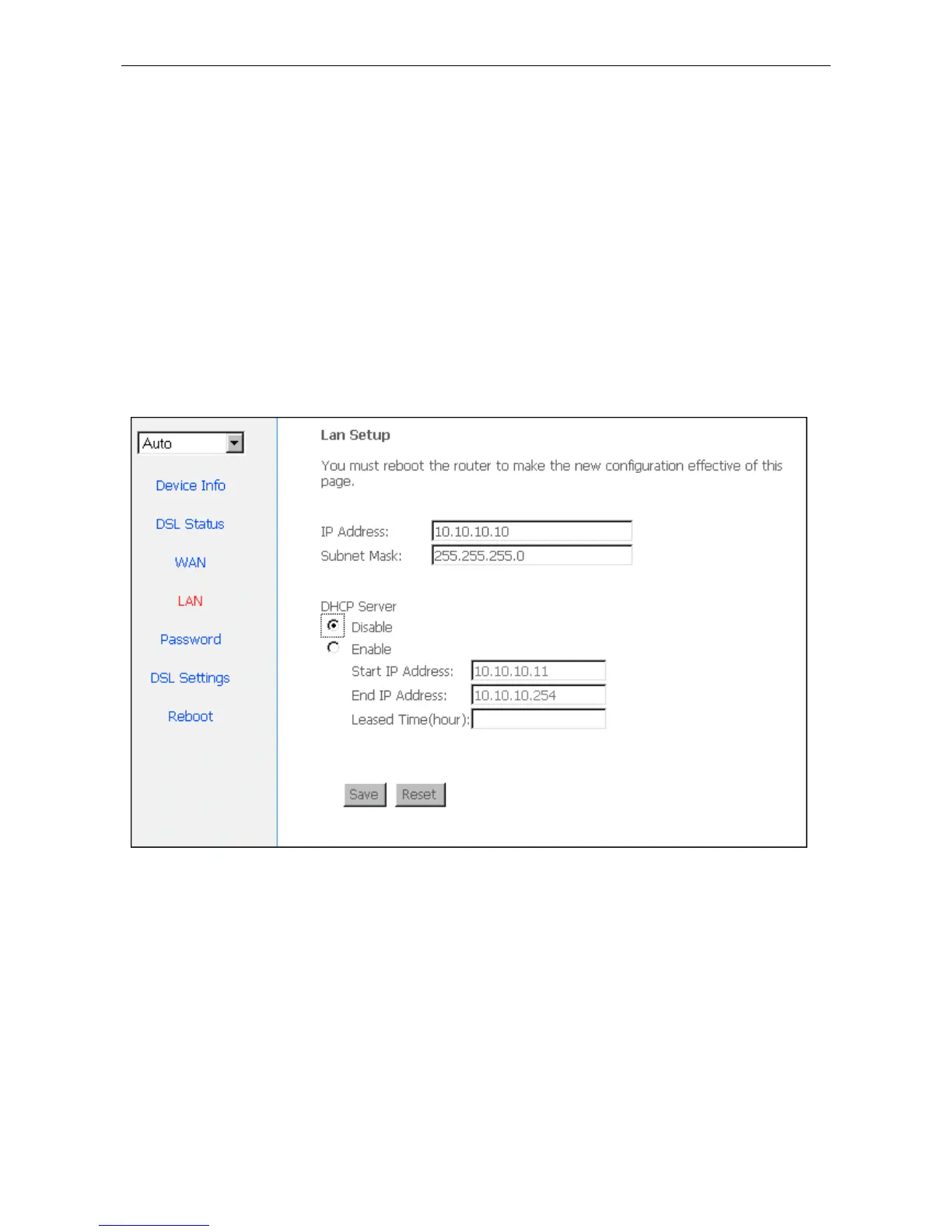
For example, change IP address to “10.10.10.10”. Click ”LAN”, input “IP address”: 10.10.10.10, then
“subnet mask”: 255.0.0.0, the result is as Figure4.1, press “save”.
Figure 4.1
Note
:
If you change IP address, it will take effect after you reboot the modem. You must use the new IP
address to login.
4.1.2 DHCP CONFIGURATION
• click“LAN ”
• click“DHCP server”;
• Define the “Start IP address” and the “End IP address” of DHCP server (for example, from
10.10.10.11 to 10.10.10.254).
• Input the value of lease (Measured by the second, 0 indicates permanently valid).


 To Next Page