Datasheen D902AW User Manual
Page 7 Total 19 Pages
Note
:
When you save the settings, the web page will be refreshed slowly, please wait it finished.
After you save the settings, it will take effect until next reboot.
Some settings only take effect after rebooting the router.
3.4 WAN CONFIGURATION
If the configuration is bridge encapsulation, there is no need to configure any more parameters. Only need
to use the third party dial-up software to connect the Internet.
Totally, this router supports:PPPoA、PPPoE、MER、IPoA、Bridging. For detail configuration information,
please check the following configuration guide.
3.4.1 CONFIGURATION GUIDE
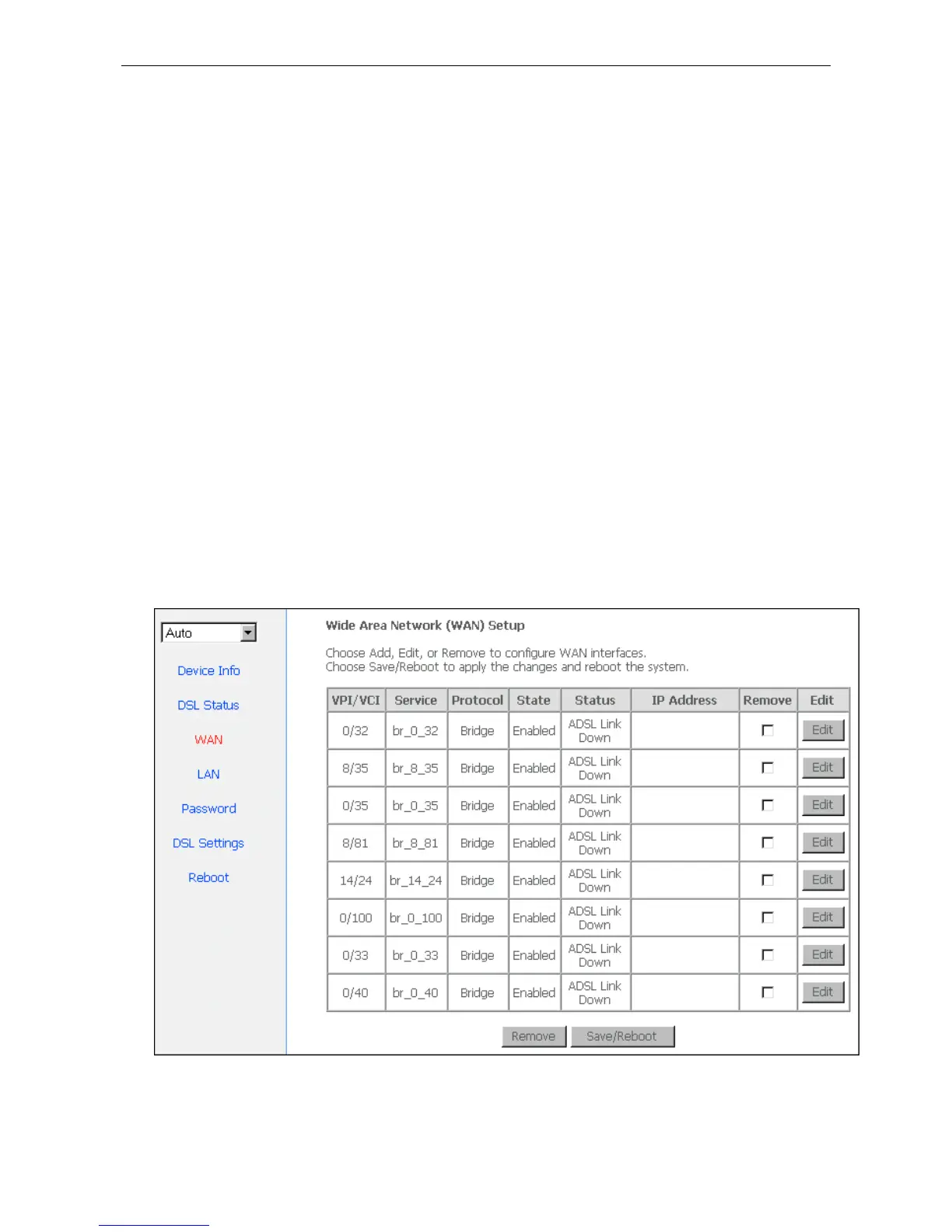
Click “WAN” on the left page, enter into “WAN” configuration page.
Note: At most we can have eight connections. If you need to add a new connection, please delete or modify
an existing connection.
Figure 3.2
Click on the next connection which you want modify. Press “Edit” button, enter the configure guide, as
Figure 3.3


 To Next Page