EasyManua.ls Logo

Datatool system 3 - User Manual

Datatool system 3
12 pages
Print Icon
To Next Page IconTo Next Page
Loading...
USER GUIDE
SYSTEM 3
SYSTEM 21
02005084
06/2003
even if you read nothing else - READ THESE 2 POINTS!
KEEP WITH YOUR MOTORCYCLE IN PLASTIC BAG PROVIDED
Set your own individual
PIN OVERRIDE
This will let you disarm the system if
you lose the remote transmitter.
See pages 6 to 8
All references to System 3 apply to
System 21 unless otherwise stated
ALWAYS CARRY A SPARE
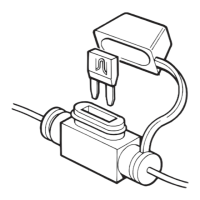
IN-LINE FUSE
Make sure your installer advises you of
the location of the in-line fuse. If the
fuse fails, your motorcycle will be
immobilised until it is replaced.
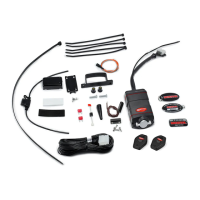
MAIN SYSTEM COMPONENTS
Two Remote Transmitters
Installed Control Unit
Customising Wires
Installed Protective Trigger Switch
Installed In-Line Fuse and Spare Fuse
Installed LED Alarm Indicator
Warning Labels
WARNING
UNAUTHORISED ALTERATIONS OR
ADDITIONS MAY INVALIDATE THE
WARRANTY AND CERTIFICATE OF
INSTALLATION

Questions and Answers

Summary

User Guide for Datatool System 3 and System 21

Main System Components

Lists the key hardware components included with the Datatool alarm system.

Warning: Unauthorized Alterations

Alerts users that modifications can void the warranty and installation certificate.

Essential Safety and Setup Advice

Crucial advice on carrying a spare fuse and setting a PIN override for system access.

Initial Operation - Standard Mode

To Disarm the System

Explains the procedure to disarm the Datatool system using the remote transmitter.

To Arm the System

Describes how to arm the system manually or automatically after switching off ignition.

Full Alarm Reaction

Details the duration and behavior of the alarm when triggered.

Operation Overview

Monitored Elements and Reactions

Outlines the four motorcycle circuits monitored and potential alarm triggers.

Movement;Nudge Detection

Explains how movement/nudge detection works and when to disarm it.

Operation - Service;Valet Mode

Engage Service Mode

Describes how to activate Service Mode for maintenance or battery removal.

Protective Trigger Switch

Explains the function of the trigger switch and its deactivation in Service Mode.

Hazard Warning Lights Function

Entering Hazard Warning Lights Mode

Details how to activate hazard warning lights and their limitations due to battery.

Switching Off Hazard Warning Lights

Provides instructions for turning off hazard lights while keeping the system armed or disarmed.

Sleep Mode

System Sleep Mode Activation

Explains that the system enters sleep mode to conserve power when battery is low.

Exiting Sleep Mode

Describes the procedure to bring the system out of sleep mode by holding the transmitter button.

Rider Options

Siren Tone Selector

Outlines the steps to select one of eight individual siren tones for the alarm.

Arming Without Movement;Nudge Function

Explains how to program the system to arm with movement/nudge function disarmed (Ferry Mode).

Arming;Disarming in Silent Mode

Details how to program the system to arm and disarm in silent mode.

PIN Override: Initial PIN Entry

PIN Entry Procedure

Guides users through the process of setting their first four-digit PIN for override.

Confirming the Entered PIN

Explains how to confirm the newly set PIN to ensure accuracy.

PIN Override: Change PIN

Entering Existing PIN

Describes how to enter the current PIN to initiate a change.

Setting a New PIN

Details the steps to set a new four-digit PIN for the system.

Confirming the New PIN

Explains how to confirm the new PIN to complete the change process.

Disarming Using PIN Override

PIN Override Procedure

Explains how to use the PIN to disarm the system after an alarm reaction.

Entering the PIN Example

Illustrates the PIN entry sequence with a specific example (5426).

System Reaction Diagnostics

Reaction Indication

Explains how to identify the cause of an alarm trigger by listening to beeps.

Alarm Reaction Diagnostics Table

Provides a table correlating beep counts with specific alarm trigger reasons.

Troubleshooting

System Doesnt Disarm or Arm Manually

Lists checks for when the system fails to arm or disarm using the transmitter.

Starter Motor Fails to Function (System 3 only)

Provides troubleshooting steps for the starter motor issue specific to System 3.

False Alarms

Identifies common causes of false alarms and suggests adjustments.

Maintenance and Support

Transmitter Maintenance and Replacement

Covers care for the transmitter, including battery replacement and lost transmitters.

Control Unit Care

Advises on cleaning and protecting the main control unit from damage.

Motorcycle Battery and Charging

Recommends battery care, intelligent chargers, and precautions for charging.

General Security and Warranty

Offers security advice and mentions warranty terms provided by the installer.

Datatool system 3 Specifications

General IconGeneral
Water ResistanceYes
ImmobiliserYes
Battery BackupYes
Voltage MonitoringYes
Installation RequiredYes
TypeAlarm

Related product manuals